Participating Frequently
July 8, 2014
Question

Why do certain apps were not showing up in creative cloud desktop manager
  • July 8, 2014
  • 1 reply
  • 460 views

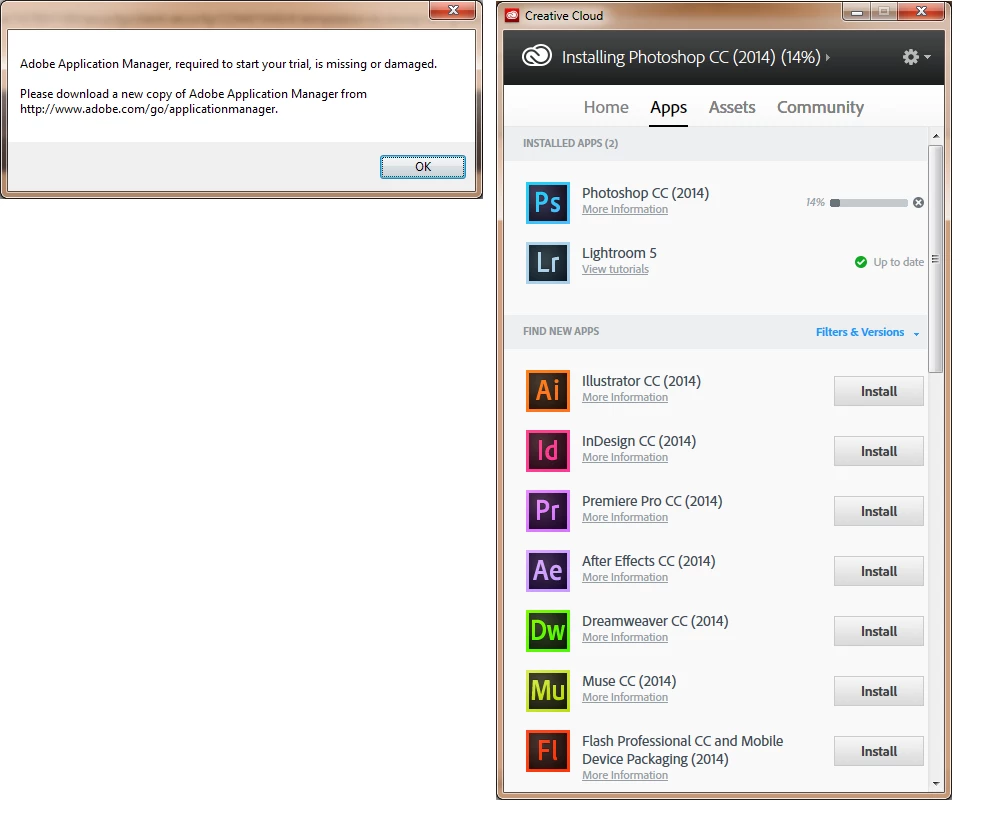
I'm not so sure on why this error message shows up every time I logged in to my computer. Here’s my scenario…

Every time I try to open the Creative Cloud desktop manager and it will not launch as if it’s not working. So I saved a copy of their installer so that I can reinstall it every time I login. Yes EVERY TIME. Once the CC desktop manager shows up, the only app that shows up is LR. But as I check my Control Panel, Photoshop CC, Dreamweaver and Acrobat was installed. However, as I try to launch those three programs, that error above shows up. So my daily routine is to install a software and use it. Then tomorrow, same routine again. I’m doing this process for a month now and I’m getting tired of it as time goes by. Is there a possible solution for this? I’ve tried to uninstall and reinstall it again but having the same loop over and over again. Thanks for the help! I’m using Windows by the way.

This topic has been closed for replies.

1 reply

Jeffrey_A_Wright
Legend
July 8, 2014

Moving this discussion to the Creative Cloud Download & Install forum.

MarlonMalabuyoc it appears your installation of Creative Cloud Desktop is damaged.  Please see Error "Failed to Install" Creative Cloud Desktop application - http://helpx.adobe.com/creative-cloud/kb/failed-install-creative-cloud-desktop.html for steps on how to reinstall.

Participating Frequently
July 8, 2014

Thanks Jeff! Let me try that one.

As of the moment, everything is working. I'll monitor the programs installed and hopefully, this will fix the issue.

Participating Frequently
July 9, 2014

It seems that the problem is still there. The usual routine of mine.

First I opened the Creative Cloud desktop launcher and nothing's happening. It's not opening as if it's not installed. So I tried to run the installer again and it pops out and it only shows that Lightroom is the only one installed. As you can see on the photo above, it shows that Dreamweaver, Acrobat, and Photoshop were installed but it's now showing up in my Apps list. I tried to open Photoshop and it requires me to log in to my Adobe account before I can continue using it. Before, I can use it even if I'm not connected to the Internet. But now, there's this sign in page and I need to be logged in to my Adobe account before I can use Photoshop. Is there a possible solution to this?