



Averdahl
Community Expert
Community Expert
November 19, 2021
Question

Why do the CC app alert me for updates when there is nothing to update?

  • November 19, 2021
  • 1 reply
  • 203 views

Yes, why does the CC app alerts me to update an CC app or CC apps though they are already updated?


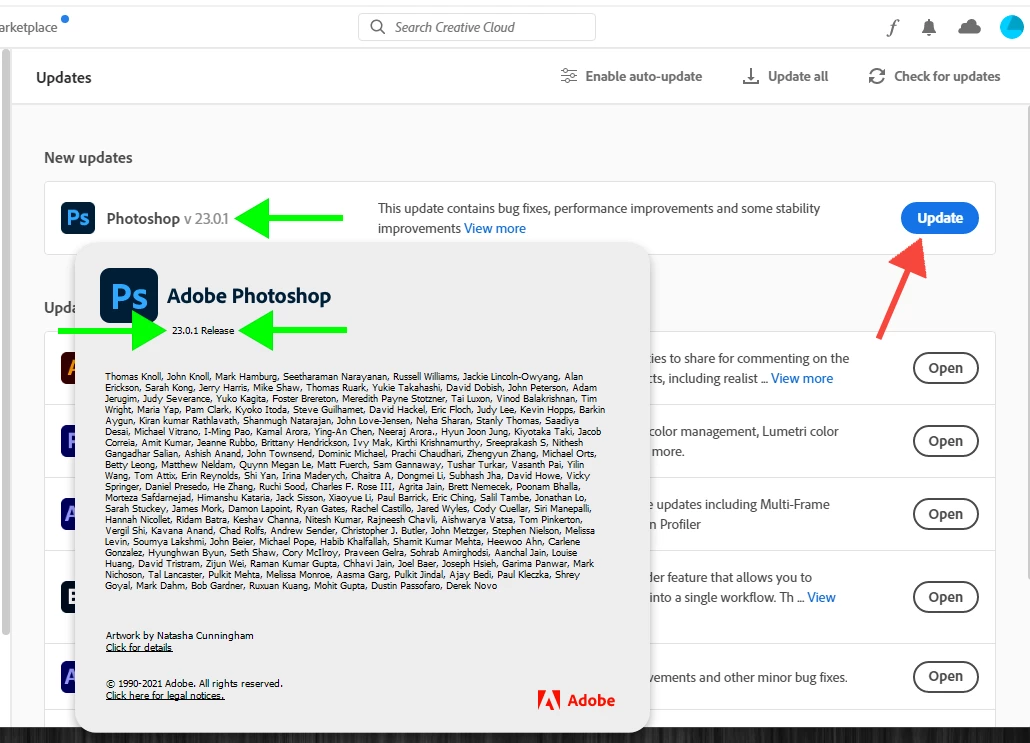
I see this from time to time and today i was alerted that i needed to update my Photoshop 23.0.1 to Photoshop 23.0.1 which makes no sense. Sometimes it want to update all installed apps. Sometimes it sticks until i restart the computer and sometimes it goes awaya fter a couple of minutes.


I see this on several computers, so there is nothing wrong with the computers. I have seen it on fresh installs of Windows 10 and now in Windows 11.


Today it sticks, meaning that the CC app still urges me to update Photoshop 23.0.1 to 23.0.1.


Why? How to solve?


This topic has been closed for replies.

1 reply

Jeffrey_A_Wright
Community Manager
Community Manager
November 19, 2021

Averdahl, there have been a few updates released for Photoshop CC.  I am unsure if all of those updates resulted in a new version number. However, I know I have applied updates to Photoshop CC and several other Adobe applications in the last week on multiple computers.


You can use the process listed in https://helpx.adobe.com/creative-cloud/help/update-app.html to turn off automatic updates.  It won't prevent new updates from being detected, but only mandatory updates to the Creative Cloud desktop app will be automatically applied.

Averdahl
Community Expert
AverdahlCommunity ExpertAuthor
Community Expert
November 19, 2021
quote

Averdahl, there have been a few updates released for Photoshop CC.


By @Jeffrey_A_Wright


For Photoshop CC2022 there has been one (1) update and not a few updates, at least for Windows users. 🙂


Photoshop 23.0.1 were released on nov 12 2021. I have never seen any Adobe product get a new update with the same number as the previous update, hence the question why the CC app alerts me to upgrade to a version i already have installed. There is only one (1) 23.0.1 version for Windows.


Update list and dates here: New and enhanced features | Latest release of Photoshop (adobe.com)


quote

You can use the process listed in https://helpx.adobe.com/creative-cloud/help/update-app.html to turn off automatic updates.  It won't prevent new updates from being detected, but only mandatory updates to the Creative Cloud desktop app will be automatically applied.


By @Jeffrey_A_Wright


I have this option set to Off already since it when enabled updates apps silently in the BG and do not alert the user like in this case. The issue is that it alerts for versions already installed when this option disabled.