



Participant
October 30, 2018
Question

Why is CCXProcess Devouring Bandwidth?

  • October 30, 2018
  • 6 replies
  • 10934 views

I'm running an up to date version of Adobe Creative Cloud on my Mid 2015 Macbook Pro (10.13.6 High Sierra). Every morning I turn on my computer to work, CCXProcess shows up in my Activity Monitor downloading a lot of data. Anything else that requires the internet grinds to a complete halt, as if it is trying to take up all of my available bandwidth. Websites won't load, I can't load emails, I can't download anything. If I quit CCXProcess then everything suddenly starts working again, but within less than a minute CCXProcess will start straight back up and continue to devour my bandwidth.

It always arrives at a point where CCXProcess seems satisfied with the amount of data it has consumed and finally allows me to work. This can be anywhere from 70 MB to over 200 MB according to the Activity Monitor, and can take anywhere from 15 to 30 minutes, sometimes more. If it happened once in a while I wouldn't be bothered, but it happens every single time I turn on my computer. I assumed this data was linked to the "Apps, Learn, Assets, Behance" tabs of the Creative Cloud app, but even if I quit Creative Cloud, CCXProcess will continue downloading whatever data that it deems so important.

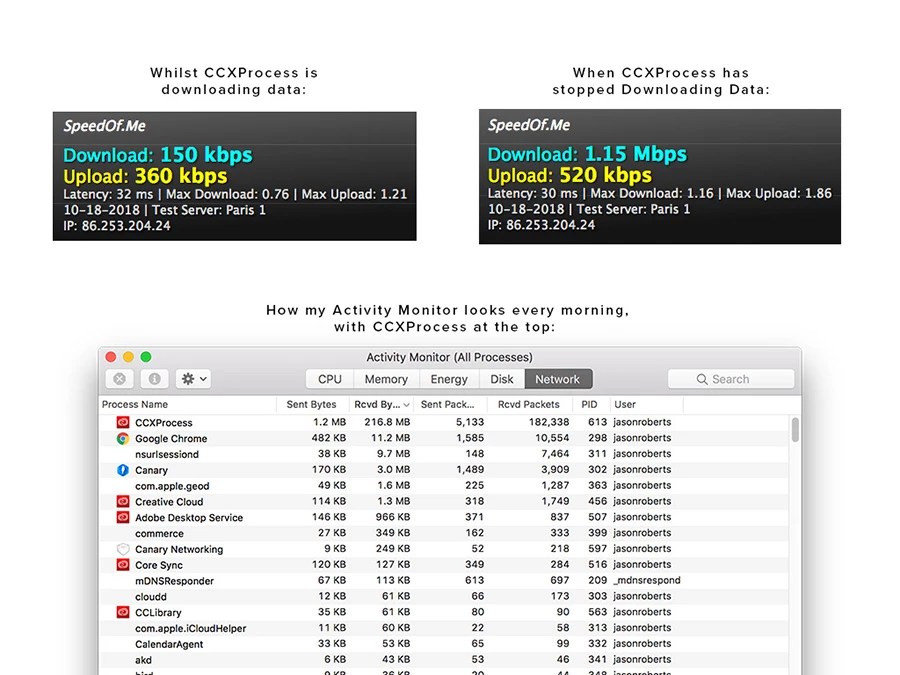
I'm aware that this might not be an issue for most, as my internet speeds could be described as "rural", with a max download of 1.2 Mbps. I've attached an image below showing my speeds when CCXProcess is doing its thing and after it has eventually stopped, along with how it shows up in my Activity Monitor.

Does anyone know why CCXProcess does this? Does anyone else even have the same issue? I've seen complaints of people wanting to uninstall CCXProcess because they don't know what it is, and some saying it's taking up a huge chunk of their CPU, but I've not found others with this particular problem.
This topic has been closed for replies.

6 replies

Participating Frequently
December 10, 2020

Same issues here, stupid CCX program - serves no purpose apart from making my entire mac grind to a halt as it eats more and more processor time. Yes I too noticed it sends lots of data.....??? Express VPN and Little Snitch show it sending/trying to send data to Adobe servers. Poor programming clearly at fault here or official Adobe Malware.

Participant
December 11, 2020

Well, it seems that problem re-appears with some updates of CCXProcess. Please Adobe developpers, could you work on this trouble and inform users ?

gregseth
Known Participant
April 27, 2020

You can get rid of it. I did and the only consequence I noticed is my firewall not lighting up like a christmas tree 😉

To do so you can either use the Adobe Creative Cloud Cleaner Tool (as mentioned here) or this little script I wrote:


#!/usr/bin/env bash

if [[ $(whoami) != 'root' ]]
then
    echo 'Must be superuser'
    exit 1
fi 

pkill -KILL CXXProcess
pkill -KILL Adobe_CCXProcess.node

CCX_FOLDER="/Applications/Utilities/Adobe Creative Cloud Experience/CCXProcess"
rm -rf "$CCX_FOLDER"/*
chown root "$CCX_FOLDER"
chmod 400 "$CCX_FOLDER"


With both methods you'll have to run them again at each Creativ Cloud app update.

Participant
April 27, 2020

Thanks all,

It seems that CCXProcess was disabled (killed ?) by a recent update (don't know when, don't know how). I don't see it now and i've no more GB taken on my bandwith 🙂

Participant
May 12, 2020

Not really.. It's been coming up the last two days for me. With every startup it consumes almost 200-250MB which I don't understand where they go or what for. No updates are happening, nothing from the apps are running except for CC Desktop on my Mac's menubar. 


And for the OP, your quest is really well written. Couldn't help but comment on that 😄

Participant
November 27, 2019

Same problem here 😞 

Participant
February 17, 2020

Same trouble with my iMac Retina late 2015.

CCXProcess.app download more than 1 Go...

This is a very impacting process ! Grrrrrrrr !


BlindingCloud
Participating Frequently
April 27, 2020

Just turn it off, in Windows 10:

  1. On the Start menu, select Settings.
  2. Go to Apps, then go to Startup.
  3. Toggle CCXProcess to off.
  4. Enjoy life.
Participant
December 7, 2018

I've now rid myself of the stone age internet speeds, having a connection that ranges between 15 and 30 Mbps (that's 10x to 20x faster) yet CCXProcess is STILL using up all of my available bandwidth on startup. As usual, once it has consumed anywhere from 70 to way over 200 MB it finally stops, but even with 20x the internet speed I had before, this can still take some time as CCXProcess seems to be downloading this data at a slower-than-normal rate. And again, as usual, whilst this is happening I struggle to load emails, websites, or anything that requires an internet connection.

I've been keeping Creative Cloud up to date, in the hopes that one of the updates will fix it, but I've had no such luck. What the heck is CCXProcess doing? I'd even settle for knowing what CCXProcess is actually for!

Participant
November 21, 2018

I thought I'd finally found a solution, but it seems I just can't shake CCXProcess and it continues to ruin my productivity every morning, and whenever I have to restart my computer.

I thought that uninstalling and reinstalling the Creative Cloud app might be worth a shot, but on trying to uninstall I was greeted with a message telling me I couldn't do that because I still had other CC apps installed. Thankfully, it offered the option of repairing the Creative Cloud installation instead, so I went with that.

For a few days I was blessed with uninterrupted internet access, as CCXProcess was no longer hogging all of the available bandwidth on startup. Finally! But the joy was short-lived, as a couple of days ago CCXProcess returned with a vengeance, continuing on its campaign of bandwidth consumption every single time I start up my Mac.

I'm trying my best to hold off from angrily Tweeting @Adobe like a madman, and hoping that someone here with more insight than me could possibly shed some light on what CCXProcess is doing, and how to stop it. In the immortal words of Leeloo Dallas: Please help.

Abambo
Community Expert
Community Expert
November 21, 2018

As I can't answer the question to what the CCXProcess does, I have seen a recent update of this one.

ABAMBO | Hard- and Software Engineer | Photographer
Participant
November 14, 2018

This is still a daily headache for me. Being a self-employed designer I rely on my Adobe software, but CCXProcess is killing productivity every morning without fail. What's even more frustrating is that my wife is also a freelance designer, and CCXProcess is slowing down our entire home network meaning she too cannot contact clients, check emails or download/upload files. We can only continue once CCXProcess decides to release us from its grip, or I force it by quitting every Creative Cloud or Adobe process that's running, which clearly isn't a practical solution as I need to use my Adobe software to work!

Even stranger, is that my wife is running Creative Cloud, also on macOS, is on the same plan as me, yet CCXProcess is way down the list on her Activity Monitor, consuming almost no bandwidth.

I can't understand why on one Mac this is a major problem, yet on another that is in the same room, on the same network, running the same software, it's not.

What in digital hell is CCXProcess doing and how can I end its tyranny? Any ideas?