karienvdw
Known Participant
July 14, 2015
Answered

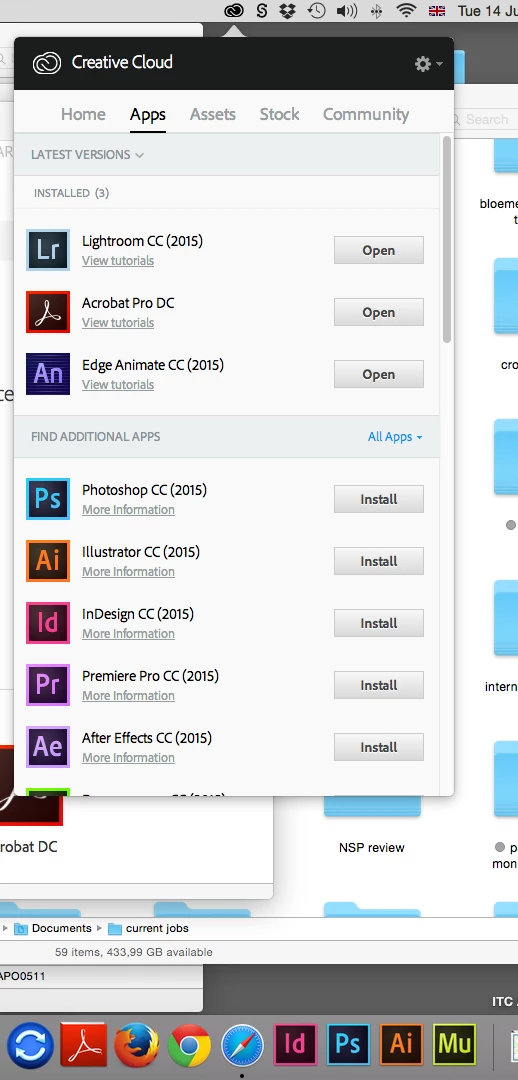
Why is Creative Cloud dashboard showing installed programmes as not installed?

  • July 14, 2015
  • 3 replies
  • 616 views

I have CC 2015 subscription, all the usual graphic design programmes installed, everything been working great for more than a year – and now out of the blue none of them are showing as installed in the CC dashboard. Why is this happening? How do I fix it??  Please do not tell me I have to uninstall and reinstall everything

This topic has been closed for replies.
Correct answer arij2010

Hi Karien,

Sometimes it's simply due to install language .for example ,if you install the soft in English and you change the language in CC desktop prefs to french ,it will show as not installed .

Verify that the language selected on CC desktop prefs is the same as the install language :

Creative Cloud desktop app preferences gear icon

Change install language

Regards ,

3 replies

Pattie-F
Legend
July 31, 2015
arij2010
arij2010Correct answer
Inspiring
July 14, 2015

Hi Karien,

Sometimes it's simply due to install language .for example ,if you install the soft in English and you change the language in CC desktop prefs to french ,it will show as not installed .

Verify that the language selected on CC desktop prefs is the same as the install language :

Creative Cloud desktop app preferences gear icon

Change install language

Regards ,

karienvdw
karienvdwAuthor
Known Participant
July 14, 2015

Thank you, that solved it!

Sheena Kaul
Legend
July 14, 2015

Hi Karien,

Please refer tot he help document below:

Apps panel doesn't show installed Creative Cloud apps

Regards,

Sheena

karienvdw
karienvdwAuthor
Known Participant
July 14, 2015

Did it and it doesn't work. Also did uninstall of CC (had tp do cleanup) and reinstall – to no avail. Is Adobe going to reimburse me for the hours spent on trying to fix their broken product? I just want to work!