
Haydar Sinanç
Participant
October 23, 2019
Question

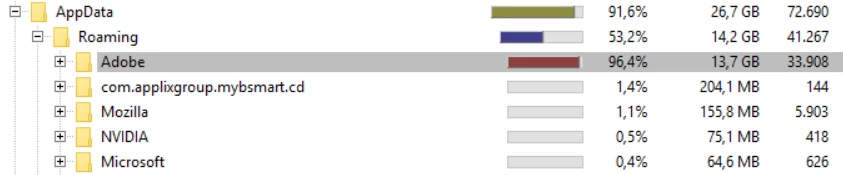
Why is my C drive full of scrap data from Adobe?

  • October 23, 2019
  • 3 replies
  • 189 views

Please do not fill my C drive with scrap data which will never be used, even though I install the apps on my D drive so that I don't get "scratch disks full" error in the middle of time sensitive work to manually delete the app cache.


    This topic has been closed for replies.

    3 replies

    Abambo
    Community Expert
    Community Expert
    October 23, 2019

    Adobe is using the Windows recommended path to store various data. You would need to relocate the users directory from C: to avoid programs filling-up C: .

    ABAMBO | Hard- and Software Engineer | Photographer
    Legend
    October 23, 2019

    It's up to you to move your scratch disk, Adobe don't try to guess what you want. If you aren't sure how to do this, please let us know which apps are doing this.

    October 23, 2019

    Hi

    Have you checked the media cache location of the various Adobe apps that you use, for example Adobe Bridge cache location defaults to the user appdata folder and can get quite large over time, same for apps like After Effects, Premiere Pro etc

    You can change the default location in preferences to another drive as I do, so I never have issues with cache filling up the C drive, all cache locations set to a separate SSD