Participant
February 21, 2016
Answered

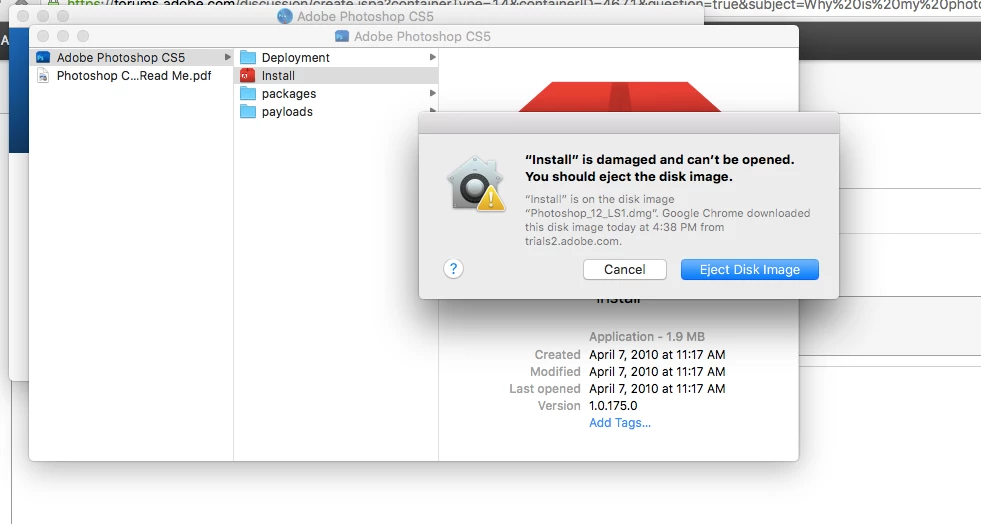
Why is my photoshop cs5 dmg downloading as a damaged file?
  • February 21, 2016
  • 2 replies
  • 499 views

    This topic has been closed for replies.
    Correct answer John T Smith

    IF Mac El Capitan read below

    CS6 and earlier programs have not been tested and will not be updated to run on Mac El Capitan

    -which means that you try to use CS6 and earlier at YOUR risk of having problems

    -you may get CS6 and earlier programs to install and run, or you may not (some do, some don't)

    -IF not, post details of any error messages and someone may be able to help (just not Adobe)

    That MAY be a false error message due to Mac El Capitan and OLD programs

    This information is a MUST DO to install old programs on Mac El Capitan

    -you may not get the same error message, but these are some links that MAY help with old programs

    -Java https://helpx.adobe.com/dreamweaver/kb/dreamweaver-java-se-6-runtime.html may help

    Install CS5 on Mac 10.11 https://forums.adobe.com/thread/2003455 may help (also for other than CS5)

    -also a TEMPORARY security change https://forums.adobe.com/thread/2039319

    -http://mac-how-to.wonderhowto.com/how-to/open-third-party-apps-from-unidentified-developers-mac-os-x-0158095/

    -and more on gatekeeper https://support.apple.com/en-au/HT202491

    2 replies

    kglad
    Community Expert
    Community Expert
    February 21, 2016

    try using another wired connection and/or another browser and/or a download manager or dl from prodesigntools.com.

    if you follow all 7 steps you can directly download a trial here:  http://prodesigntools.com/all-adobe-cs5-direct-download-links.html

    and activate with your serial number.

    if you have a problem starting the download, you didn't follow all 7 steps, or your browser does not accept cookies. 

    the most common problem is caused by failing to meticulously follow steps 1,2 and/or 3 (which adds a cookie to your system enabling you to download the correct version from adobe.com). 

    failure to obtain that cookie results in an error page being displayed after clicking a link on prodesigntools.com or initiates the download of an incorrect (eg, current) version.

    John T Smith
    Community Expert
    John T SmithCommunity ExpertCorrect answer
    Community Expert
    February 21, 2016

    IF Mac El Capitan read below

    CS6 and earlier programs have not been tested and will not be updated to run on Mac El Capitan

    -which means that you try to use CS6 and earlier at YOUR risk of having problems

    -you may get CS6 and earlier programs to install and run, or you may not (some do, some don't)

    -IF not, post details of any error messages and someone may be able to help (just not Adobe)

    That MAY be a false error message due to Mac El Capitan and OLD programs

    This information is a MUST DO to install old programs on Mac El Capitan

    -you may not get the same error message, but these are some links that MAY help with old programs

    -Java https://helpx.adobe.com/dreamweaver/kb/dreamweaver-java-se-6-runtime.html may help

    Install CS5 on Mac 10.11 https://forums.adobe.com/thread/2003455 may help (also for other than CS5)

    -also a TEMPORARY security change https://forums.adobe.com/thread/2039319

    -http://mac-how-to.wonderhowto.com/how-to/open-third-party-apps-from-unidentified-developers-mac-os-x-0158095/

    -and more on gatekeeper https://support.apple.com/en-au/HT202491