

Participant
December 20, 2019
Answered

Why my creative cloud shows offline

  • December 20, 2019
  • 9 replies
  • 39768 views

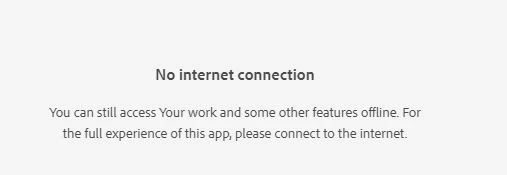
I have my office desktop connecting to the internet, but when I opened Creative Cloud, it says Offline, no internet connection. My coworker's CC is fine. 

See the following picture


This topic has been closed for replies.
Correct answer Jeffrey_A_Wright

Lucie154A, if you are trying to use a individual Creative Cloud membership, then the computer will need access to the servers and ports listed in https://helpx.adobe.com/enterprise/kb/network-endpoints.html.  One or more of the servers/ports are likely blocked on the work network.


If your work's I.T. department is unable to make the changes, then I would recommend you look into a Creative Cloud for Team or Enterprise membership.  Both memberships include the ability to install and utilize Creative Cloud applications on a restricted network.

9 replies

Participant
August 10, 2021

Same issue here. Totally frustrating. Chat tells me to delete single folders which didn't help the whole situation. So my only hope is to manually deinstall every single Adobe app & the Creative Cloud app and then try to install everything again? That's kind of a harsh offering for a SaaS based business which I pay a monthly price for.

Nancy OShea
Community Expert
Community Expert
August 10, 2021

@markuss8471790,

You resurrected an old discussion from 2019.  If you have a current question, please start a new topic with specific details about your issue.   Fellow product users will try to assist you.  Thank you.


This discussion is locked.


Nancy O'Shea— Product User & Community Expert
Participant
December 17, 2020

I chased this error for several months, coming to the conclusion that it wan't an Adobe error.

Well, it is sort of as Adobe rely on Microsoft Windows to report accurately that its online. And Windows hasn't been doing that.

So I did all kinds of fixes that broke other things.

In the end though, the laterst version of Windows 20H2, after its fully patched and updated from Windows updates, resolves it.

I also updated all drivers from Windows Updates (HP ,machines) and Bios.

BTW, 20H2 has had a second release (November) that I think specifically addresses the appears offline issue.

Participant
May 20, 2021

1. Press Windows + R keys.

2. Type regedit, click OK.

3. Go to HKEY_LOCAL_MACHINE\SYSTEM\CurrentControlSet\Services\NlaSvc\Parameters\Internet.

4. Make sure following values exist in right pane of Internet:


"ActiveDnsProbeContent"="8.8.4.4"

"ActiveDnsProbeContentV6"="2001:4860:4860::8844"

"ActiveDnsProbeHost"="dns.google"

"ActiveDnsProbeHostV6"="dns.google"

"ActiveWebProbeHostV6"="www.msftconnecttest.com"

"EnableActiveProbing"="1"


5. Restart your internet connection and/or reboot your computer if needed.

Participant
October 24, 2020

My Creative Cloud got back online when I activated and start Event Log service. Hope this helps.

Earth Oliver
Legend
November 13, 2020

oh wow, thank you! I was troubleshooting another issue yesterday and had disabled the Event Log. Today, my CC was showing offline and i couldn't figure out the issue. After doing 100 other things, your note here reminded me that i'd disabled the logging and now I'm back in business!

Nicky G.
Known Participant
April 29, 2021

hello I would also have the same problem with windows 10 - 1909.
What is the exact procedure to do in the "Event Log service" panel?
You say to solve with Event Log service but you don't explain the exact procedure to do. thank you

Participant
August 31, 2020

has this been solved? i have had the same problem for several months on my computer at work, so i have to use premier rush only at home. very inconvenient. i cannot do anything at work with creative cloud because it thinks its offline.

Jeffrey_A_Wright
Community Manager
Jeffrey_A_WrightCommunity ManagerCorrect answer
Community Manager
August 31, 2020

Lucie154A, if you are trying to use a individual Creative Cloud membership, then the computer will need access to the servers and ports listed in https://helpx.adobe.com/enterprise/kb/network-endpoints.html.  One or more of the servers/ports are likely blocked on the work network.


If your work's I.T. department is unable to make the changes, then I would recommend you look into a Creative Cloud for Team or Enterprise membership.  Both memberships include the ability to install and utilize Creative Cloud applications on a restricted network.

Participant
September 4, 2020

Thanks Jeff, hmm, it is not cooperative so then i will give up, because i am not going to pay even more extra money from my pocket for some enterprise membership.

Participant
August 5, 2020

Similar issue to original poster,  Attempting to install Illustrator, Creative Cloud installer keeps toggling online/offline like every second.  Installer never completes.  We can't install any apps at all. Very frustrating. 

Participant
July 28, 2020

I'm getting the same this morning... it's not even syncing.  Just says I have no connection as I sit here with my connection replying to this thread.

Participant
December 17, 2020

same.  very frustrating having to upload to dropbox when it should all be on the cloud.

Participant
December 22, 2019

I've the same issue. And yet, it seems to update quite fine without an internet connection when it wants to. Perhaps not having an internet connection doesn't mean the same thing to Adobe that it does for the rest of us.

Participant
April 11, 2020

Same problem for me , I' been using premier lately also I don't see how I would of figured half this stuff ten years ago with no book or videos on all the glitches and back Door erk in jerks when I finally learn all the quirks in this adobe stuff hopefully will pay off on countless sleep less nights up trying to figure out how to work this on our own sometimes tutorials are jacked but I must be thankful came along way #thxyoutube #trailerror

Mo Moolla
Legend
December 20, 2019

Uninstall Creative Cloud Desktop, download a new version and try again.


I have personally run into this issue myself several times and eacch time this did the trick


Mo

cheyrn
Inspiring
August 3, 2020

Is there a way to do that without uninstalling and reinstalling all of my adobe apps?

cheyrn
Inspiring
April 29, 2021

I'm pretty sure this thread was longer once. Anyway, what worked for me, on windows, is running creative cloud as administrator. There is probably a permissions issue that could be fixed, but that works for me. Some updates later, of the creative cloud app, this no longer happens to me.


Nancy OShea
Community Expert
Community Expert
December 20, 2019

It sounds like there's a conflict with the anti-virus / firewall settings and Creative Cloud.


Nancy O'Shea— Product User & Community Expert

