


jenniferm14187746
Participant
September 27, 2017
Answered

Will I lose my work if I uninstall Creative Cloud?

  • September 27, 2017
  • 3 replies
  • 30136 views

Hello Forum,

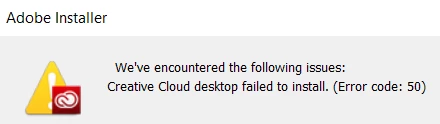
I would like to download some new fonts. I think I need to do this via Creative Cloud App. I had uninstalled Creative Cloud earlier via my system's regular uninstall process (although I realize now I shouldn't have). Problem is, I try to download Creative Cloud again and it seems I need to use the Creative Cloud Uninstaller before I can reinstall Creative Cloud desktop app. I am worried that this will delete my work / files that I have created using Illustrator and InDesign. Can someone reassure me that this is not the case. Also, what is the best way to obtain new (preferably free) fonts?

Appreciatively,

Jen
This topic has been closed for replies.
Correct answer kglad

you lose no files you created using cc when you uninstall cc.

for that error:

uninstall everything cc including preferences, https://helpx.adobe.com/creative-cloud/help/uninstall-remove-app.html

then uninstall the cc desktop app, https://helpx.adobe.com/creative-cloud/help/uninstall-creative-cloud-desktop-app.html

clean your computer of cc files per http://www.adobe.com/support/contact/cscleanertool.html

restart your computer (don't skip this)

reinstall the cc desktop app, https://creative.adobe.com/products/creative-cloud.

if you're unable to install the cc desktop app at this stage, use an administrator account (solution 3 here, https://helpx.adobe.com/creative-cloud/kb/creative-cloud-missing-damaged.html)

use the desktop app to install your cc programs/trials

3 replies

Participant
May 12, 2023

If I delete Adobe creative cloud will it just delete the work I did on the apps or more, also will the changes (when I install it) not do anything or completely change stuff?

kglad
Community Expert
Community Expert
May 12, 2023

@Ellie2985446120xr 


no, your work/creations/edited files will not be removed by uninstalling and cleaning all adobe apps from your computer.


uninstall every cc app including preferences per https://helpx.adobe.com/creative-cloud/help/uninstall-remove-app.html

then uninstall the cc desktop app, again using the correct uninstaller per https://helpx.adobe.com/creative-cloud/help/uninstall-creative-cloud-desktop-app.html#sa_src=web-messaging

clean your computer of cc files per http://www.adobe.com/support/contact/cscleanertool.html

Participating Frequently
September 30, 2017

Hi I recently lost all my 2k photos in one shot after I tried to switch to SD card option. I am really super anxious right now as those are my clients work. I did not register any subscriptions as my trial was over. Now when I open the app again, I have 0 photos. None! Someone please help me!

kglad
Community Expert
Community Expert
September 30, 2017

no photos are deleted by adobe programs, adobe options, adobe installers or adobe uninstallers.

ask someone with computer expertise that can inspect your computer to check for your files.

Participating Frequently
September 30, 2017

But then I have 0 imports. My phone shows me nothing at all

kglad
Community Expert
kgladCommunity ExpertCorrect answer
Community Expert
September 27, 2017

you lose no files you created using cc when you uninstall cc.

for that error:

uninstall everything cc including preferences, https://helpx.adobe.com/creative-cloud/help/uninstall-remove-app.html

then uninstall the cc desktop app, https://helpx.adobe.com/creative-cloud/help/uninstall-creative-cloud-desktop-app.html

clean your computer of cc files per http://www.adobe.com/support/contact/cscleanertool.html

restart your computer (don't skip this)

reinstall the cc desktop app, https://creative.adobe.com/products/creative-cloud.

if you're unable to install the cc desktop app at this stage, use an administrator account (solution 3 here, https://helpx.adobe.com/creative-cloud/kb/creative-cloud-missing-damaged.html)

use the desktop app to install your cc programs/trials

jenniferm14187746
Participant
September 29, 2017

Thanks so much for your help!

Creative Cloud is running once again!

Best,

Jennifer

kglad
Community Expert
Community Expert
September 30, 2017

you're welcome.
