Participant
November 29, 2022
Answered

Will installing Photoshop 2022 remove previous versions of Photoshop?

  • November 29, 2022
  • 3 replies
  • 3729 views

I have Photoshop 2019 and 2020. When I upgraded to PS 2020, the barrel rotation feature on the stylus stopped working. (yes, the Wacom driver is up to date.) After hours with Adobe support, they advised I stick with PS2019. I've been using PS2019 for the past few years and it's been fine. I just upgraded my mac OS to Monterey 12.6.1 and now PS2019 is acting a little jumpy. I realize I should probably upgrade to Photoshop 2022, but I am concerned the install will delete PS2019. I have read that Adobe no longer allows previous versions of PS to coexist, and new installs will overwrite previous versions. Is this true? Is there any way to keep an older version of PS with the new PS?  I can't risk losing the barrel rotation feature and I don't know if it has been restored in PS 2020. Thank you.

This topic has been closed for replies.
Correct answer John Waller
quote

I have read that Adobe no longer allows previous versions of PS to coexist, and new installs will overwrite previous versions. Is this true?


No, definitely not true. You can have as many previous versions installed as you wish.


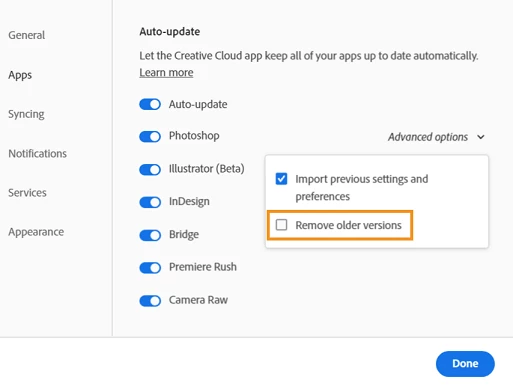
Prior to installing a new version, the trick is to first choose to not overwrite previous versions by UNchecking the "Remove older versions" box in the Preferences in the Cloud Desktop app. Then previous versions will not be touched.


3 replies

Participant
November 29, 2022

Hi janetm, I am having the same issue. Even though I have unchecked "remove older versions" I am also getting the message that other versions will be removed. I am hesitant to upgrade. Did you ever resolve the issue? Thanks.

John Waller
Community Expert
Community Expert
November 29, 2022
quote

Even though I have unchecked "remove older versions" I am also getting the message that other versions will be removed.


Sounds odd.

John Waller
Community Expert
John WallerCommunity ExpertCorrect answer
Community Expert
November 29, 2022
quote

I have read that Adobe no longer allows previous versions of PS to coexist, and new installs will overwrite previous versions. Is this true?


No, definitely not true. You can have as many previous versions installed as you wish.


Prior to installing a new version, the trick is to first choose to not overwrite previous versions by UNchecking the "Remove older versions" box in the Preferences in the Cloud Desktop app. Then previous versions will not be touched.


Abambo
Community Expert
Community Expert
November 30, 2022

I would also suggest in this case to disable Auto Update, so that you can decide on the updates you install and when. Checking the settings before each update would add additional confidence.

ABAMBO | Hard- and Software Engineer | Photographer
kglad
Community Expert
Community Expert
November 29, 2022

it's your option to keep previous versions, or not .


when starting the install, proceed carefully to choose the desired option.