
Participant
August 4, 2020
Answered

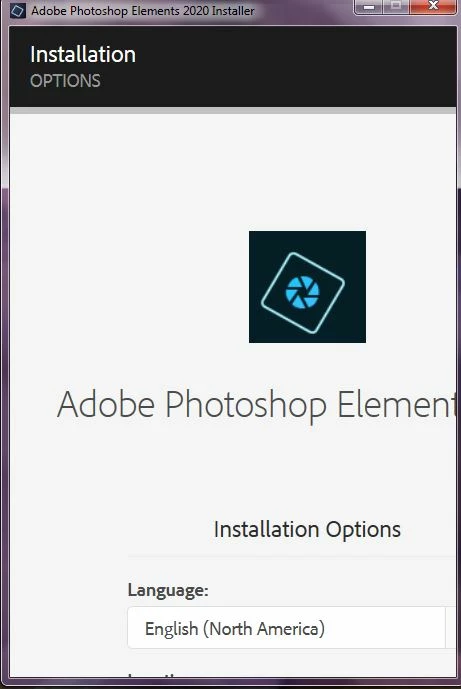
Will not let me install PS 2020. Won't let me go full screen on Windows 7. Please HELP!

  • August 4, 2020
  • 1 reply
  • 365 views

Hello All!
As stated above, it will not let me see the full page.
I have a screen shot.
It will not let me past the languages portion of the install.
I have tried everything!
Drag and drop, scroll buttons, you name it!
Unfortunatly, I do not have a touch screen.
It is a VERY old computer, concidering today's technology.
It is a Windows 7.
But hey, it still runs!
And I need it for school/ work.
I'm saving up for a newer one.
Hoping for the second stimus check... lol.

Anyways, here's the screeenshot.
Any help is greatly appreciated!
Thank you!


This topic has been closed for replies.
Correct answer Jeffrey_A_Wright

Rosewarrior, please use the steps listed in https://answers.microsoft.com/en-us/windows/forum/windows_7-desktop/i-need-to-change-the-dpi-settings-how-do-i-do-that/895a444c-1447-4ed0-b737-ebf7bb9a3012 to change the DPI settings in Windows 10.  You will want to choose an option that is smaller than the current settings.


Please also make sure that Photoshop Elements 2020 is capable of running on the computer. The minimum system requirements can be found at https://helpx.adobe.com/photoshop-elements/system-requirements.html.

1 reply

Jeffrey_A_Wright
Community Manager
Jeffrey_A_WrightCommunity ManagerCorrect answer
Community Manager
August 4, 2020

Rosewarrior, please use the steps listed in https://answers.microsoft.com/en-us/windows/forum/windows_7-desktop/i-need-to-change-the-dpi-settings-how-do-i-do-that/895a444c-1447-4ed0-b737-ebf7bb9a3012 to change the DPI settings in Windows 10.  You will want to choose an option that is smaller than the current settings.


Please also make sure that Photoshop Elements 2020 is capable of running on the computer. The minimum system requirements can be found at https://helpx.adobe.com/photoshop-elements/system-requirements.html.