Participant
November 4, 2017
Question

Win 10 Control Folder Access option causes CC updates to fail...

  • November 4, 2017
  • 2 replies
  • 2829 views

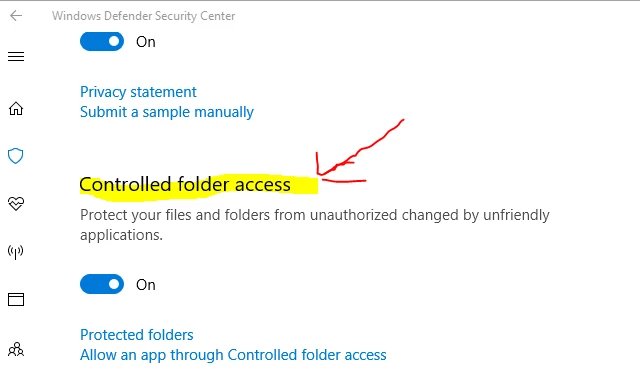
I'm sharing my recent experience where the update to Lightroom Classic CC 2018 was failing to install with an error code of 156 and mentioning that it couldn't delete existing LR shortcuts nor create new ones ("unable to create symlink").  It was resolved when I temporarily disabled the new Windows 10 Fall (2017) Creators Update that includes the new anti-ransomware option: Control folder access

So a heads up to the fine support folks at Adobe that this is something new that should be worked out with Microsoft so that Windows Defender considers your applications benign and will allow them to complete their updates.

I hope this proves helpful to folks.

This topic has been closed for replies.

2 replies

Participating Frequently
May 10, 2018

So, any update on this? Is this fixed in the recent update of the application?

Participating Frequently
November 19, 2017

Yes, this also stops the apps from saving files in controlled folders, which basically makes them unusable. Adding illustrator.exe as an allowed app didn't help, so any tips are appreciated.

December 15, 2017

Here is how to turn on Controlled folder access in windows 10 to combat Ransomware

Search windows defender in taskbar and open windows defender Security centre.

Now, click on Virus & Threat Protection.

No, Click on Virus & Threat Protection settings in next window.

Now, scroll down and toggle on Controlled folder access.

Click on Protected folders.

Now, click on add a protected folder button.

Now, browse and add the desired folder.

Source:- http://merabheja.com/how-to-turn-on-controlled-folder-access-in-windows-10-to-combat-ransomware/

Participant
December 16, 2017

Was this supposed to help, or some sort of robot answer? Please read and understand before replying.