marekk28325815
Inspiring
August 30, 2015
Answered

Windows 10 - creative cloud set-up has stopped working

  • August 30, 2015
  • 2 replies
  • 1471 views

I have two Win10 machines, when I tried installing creative cloud desktop on one of them, it fails... At the same time it works fine on the other.

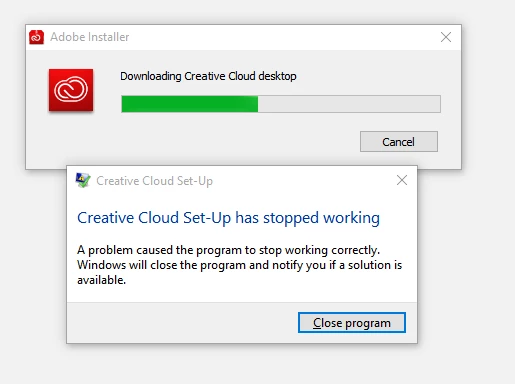
I downloaded the CreativeCloudSet-Up, start it, it starts downloading files and when the progress bar reaches 50%, it stops working:

is there a log I can browse to ind out what's wrong? Is it a common issue?

This topic has been closed for replies.
Correct answer marekk28325815

I got some time to follow up on my case with support.

Steps taken to get rid of the issue:

1. I was asked to download and install ApplicationManager application, instead of Creative Cloud. (http://download.adobe.com/pub/adobe/creativesuite/cc/win/ApplicationManager9.0_all.exe) this didnt work though.

2. Total cleanup of Adobe folders and apps (I removed Adobe Reader earlier, and I didnt have anything else Adobe* so in my case it was easy, not sure how it will impact other Adobe apps if you have any)

a. %programdata%\adobe

b. program files x86 \ common files \ adobe

c. program files \ common files \ adobe

3. we used some magic cleanup tool AdibeCreativeCloudCleanerTool.exe (http://download.macromedia.com/SupportTools/Cleaner/win/AdobeCreativeCloudCleanerTool.exe)

4. installed Application Manager (installation finishes with no confirmation of any kind), then just run Adobe Creative Cloud desktop app... it worked, I loged on and got my apps downloaded after that...

These cleanup steps took around 10 minutes to complete.

At any point I didnt have to reboot my machine...

thank you technical support!

2 replies

marekk28325815
marekk28325815AuthorCorrect answer
Inspiring
September 12, 2015

I got some time to follow up on my case with support.

Steps taken to get rid of the issue:

1. I was asked to download and install ApplicationManager application, instead of Creative Cloud. (http://download.adobe.com/pub/adobe/creativesuite/cc/win/ApplicationManager9.0_all.exe) this didnt work though.

2. Total cleanup of Adobe folders and apps (I removed Adobe Reader earlier, and I didnt have anything else Adobe* so in my case it was easy, not sure how it will impact other Adobe apps if you have any)

a. %programdata%\adobe

b. program files x86 \ common files \ adobe

c. program files \ common files \ adobe

3. we used some magic cleanup tool AdibeCreativeCloudCleanerTool.exe (http://download.macromedia.com/SupportTools/Cleaner/win/AdobeCreativeCloudCleanerTool.exe)

4. installed Application Manager (installation finishes with no confirmation of any kind), then just run Adobe Creative Cloud desktop app... it worked, I loged on and got my apps downloaded after that...

These cleanup steps took around 10 minutes to complete.

At any point I didnt have to reboot my machine...

thank you technical support!

Sheena Kaul
Legend
August 30, 2015

Hi Marek,

This link might help: Windows 10 and Adobe Creative Cloud

Regards,

Sheena

marekk28325815
Inspiring
August 31, 2015

This link does not answer the question...

Really - all I need is to know where is that app gathering logs and how can I access them - I will look myself... plz do not link articles that have common keywords but do not talk about the problem reported

Sheena Kaul
Legend
August 31, 2015

The link below lists all the locations of the fog files.

Creative Cloud Help / Troubleshoot install issues with log files | CC