

Windows 10 Lost all image icons when I installed CC
Before I installed Creative Cloud, I would regularly use the default Windows 10 Explorer to browse the contents of my hard drives looking for pics. I could select View by: Large Icon, Small Icon, etc. and see a thumbnail of my images. This was even occasionally true for Photoshop documents, but always the case for png, .tif, .jpg, .gif, .bmp. I honestly figured that Adobe would fix the unreliability of Photoshop icons and prayed that they would somehow enable eps and Illustrator previews.
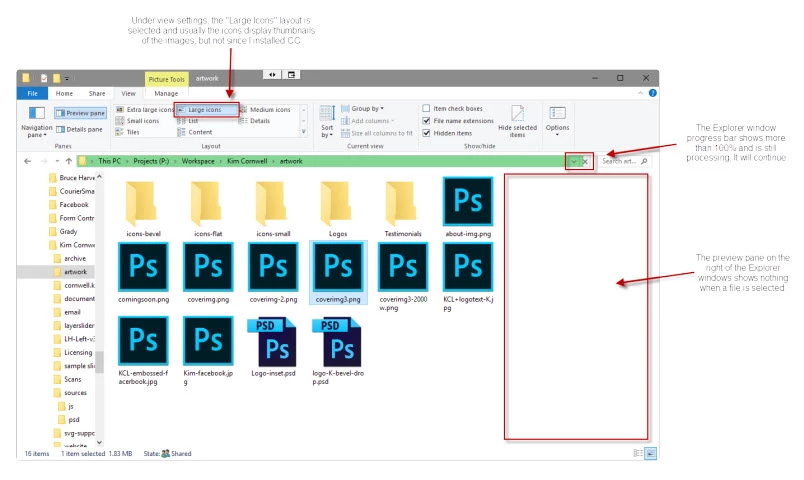
Instead, what I got was a haphazard mess of photoshop document icons and the occasional correct icon. Furthermore, the entire Windows 10 Image Preview pane no longer works for any files either created in or edited in any Abobe. CC App. This is not the case for the items I had edited/created/opened in CS6...they still look fine.
You'll notice in the attached screenshot that the green progress bar is about 105% done...It never used to do that. It could easily display the contents of any folder on my hard drive. Now, my entire computer is slowed down by something searching for files or updating the display.
And before you start with the "rebuild desktop icons" or "just wait and it will eventually update, that is not the case. I have left my PC with the same Explorer window open to a folder that had plenty of images for more than 48 hours one weekend. Nothing changed.
Do not try to claim this is Windows' problem because when I uninstalled CC, suddenly the icon preview worked great again. I can't help but feel that this is some sort of inadvertent sabotage that encourages you to use Adobe Bridge CC for the solution.
Any suggestions or anybody else experienced this problem?
 AdChoices