

woodleigh
Known Participant
April 26, 2019
Answered

Windows desktop v iMac desktop

  • April 26, 2019
  • 2 replies
  • 386 views

Hi all

I have a simple question that I can't find the answer to, but not sure if I'm searching using the right terms.

I have a 27in iMac Pro at home but at work I use a Windows system.

I really like how when you open creative cloud apps on the iMac how the menu bar fixes itself to the top of the screen.  Is it possible to Creative Cloud behave in the same way on a Windows system.

Thanks in advance.

Adam
This topic has been closed for replies.
Correct answer Nancy OShea

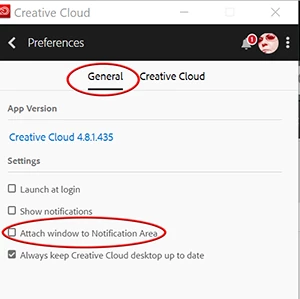
Open CC desktop app and click the 3 dots icon by your avatar.  Select Preferences > General.  See screenshot.

2 replies

woodleigh
woodleighAuthor
Known Participant
April 26, 2019

Thank you Nancy, this is great. 

I'm doing my best to create a Mac environment on my Windows machine.

Nancy OShea
Community Expert
Community Expert
April 26, 2019

  wrote

Thank you Nancy, this is great. 

I'm doing my best to create a Mac environment on my Windows machine.

You're welcome.

Good luck!

Nancy O'Shea— Product User & Community Expert
Nancy OShea
Community Expert
Nancy OSheaCommunity ExpertCorrect answer
Community Expert
April 26, 2019

Open CC desktop app and click the 3 dots icon by your avatar.  Select Preferences > General.  See screenshot.

Nancy O'Shea— Product User & Community Expert