
Participant
August 20, 2015
Answered

Work Adobe ID expired, cannot log out from Creative Cloud and use personal CS6 software.

  • August 20, 2015
  • 1 reply
  • 2113 views

To whom it may concern,

I have recently finished working for my previous employer and no longer require the Creative Cloud programs used, currently I am attempting to revert back to my personal CS6 license -Design and Web Premium- for which I hold a code/serial/license).
Having uninstalled the Creative Cloud app signing out and re-installing the CS6 license, Illustrator and InDesign open fine. However Photoshop opens to a box stating "Membership Expired" stating "You are signed in as Adobe ID: [sic. email when working at that company]". (Image attached).
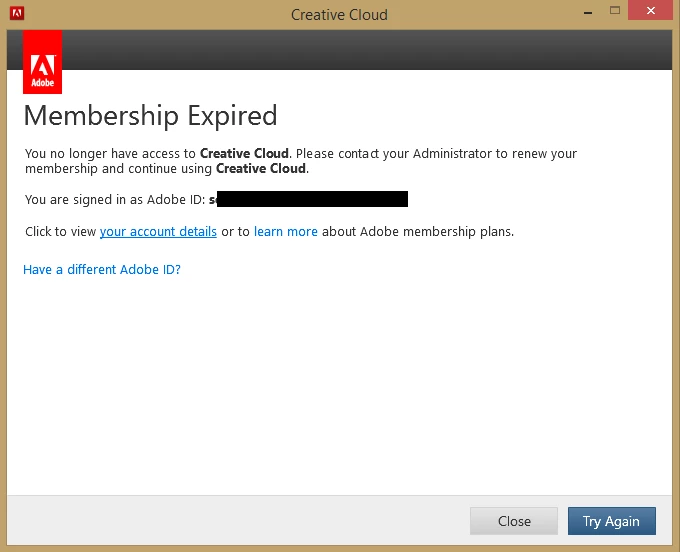
How can I sign out from the previous work Adobe ID, remove all CC items altogether and return to the CS6 version?

Thanks for your attention.
S.

This topic has been closed for replies.
Correct answer Pattie-F

Please contact our support staff from the following link: https://helpx.adobe.com/contact.html

(be sure to log in to adobe.com with your Adobe ID first)

1 reply

Pattie-F
Legend
August 20, 2015

You will need to reinstall your Creative Suite 6 after uninstalling Creative Cloud.

Pattie

SebNgLeiAuthor
Participant
August 21, 2015

Hello Pattie,

At the point of  the previous message I had already uninstalled the creative cloud items, used the creative cloud uninstaller and used the CD with CS6 to reinstall it.
Regardless, after reinstalling all Design & Web Premium software, it is only Photoshop that still displays the Creative Cloud 'membership expired' dialogue box.

Is there a way to avoid this? Any other parts of CC which need to be deactivated/uninstalled?

All the best,
S.

Pattie-F
Pattie-FCorrect answer
Legend
August 24, 2015

Please contact our support staff from the following link: https://helpx.adobe.com/contact.html

(be sure to log in to adobe.com with your Adobe ID first)