Participant
February 9, 2016
Answered

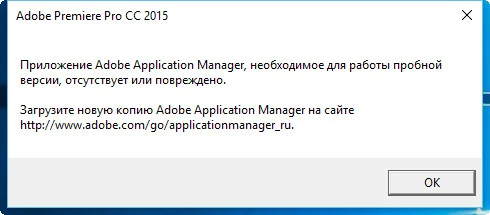
Здравствуйте, у меня при запуске Adobe Premiere Pro, а так же другие Adobe приложения из под ваших приложений, выплывает вот это сообщение, "Приложение Adobe Application Manager, необходимое для работы пробной версии, отсутствует или повреждено. Загр

  • February 9, 2016
  • 1 reply
  • 12387 views

Здравствуйте, у меня при запуске Adobe Premiere Pro, а так же другие Adobe приложения из под ваших приложений, выплывает вот это сообщение, "Приложение Adobe Application Manager, необходимое для работы пробной версии, отсутствует или повреждено. Загрузите новую копию Adobe Application Manager на сайте www.adobe.com/go/ApplicationManager_ru", но приложения порой так и не открываются, выдаёт ошибку, а при входе на сайт, меня переводит на другой http://www.adobe.com/special/errorpages/404.html, что в этом случае делать?
This topic has been closed for replies.
Correct answer AkanchhaS8194121

Hi,

Uninstall creative cloud desktop application using cleaner tool-

Creative Cloud Help | Uninstall the Creative Cloud desktop app


The error message that you are getting usually comes only when the application manager folder is damaged or corrupt. So I would recommend you to follow the mentioned steps to rebuilt the AAM folder.

Remove the OOBE and AAMUpdater folders.

Mac OS:

  1. Quit the Creative Cloud Desktop application
  2. Navigate to   \User\<UserName>\Library\Application Support\Adobe*

  And /Library/Application Support/Adobe*

          To access the hidden User Library folder, see Access hidden user             library files | Mac OS 10.7 and later.

  1. Locate and remove the AAMUpdater and OOBE folders
  1. 4. /Library/Application Support/Adobe   (rename Adobe Application Manager and Adobe desktop common)
  2. 5. Go> utilities> (Rename Adobe creative cloud and Application Manager)
  1. Re-download Creative cloud from -

  https://helpx.adobe.com/creative-cloud/help/install-apps.html

Windows:

  1. Quit the Creative Cloud Desktop application
  2. Navigate to \Users\\AppData\Local\Adobe\

  And C:\Program Files (x86)\Common Files\Adobe

C:\ProgramData\Adobe

  1. To view the hidden AppData and Program Data folder, see Show hidden files, folders, filename extensions | Windows XP, Vista, Windows 7.
  2. Locate and remove the AAMUpdate and OOBE folders
  1. 5. Re-download creative cloud from -

https://helpx.adobe.com/creative-cloud/help/install-apps.html


let us know if this will hep you.


Regards,

Akanchha


1 reply

AkanchhaS8194121
AkanchhaS8194121Correct answer
Legend
February 9, 2016

Hi,

Uninstall creative cloud desktop application using cleaner tool-

Creative Cloud Help | Uninstall the Creative Cloud desktop app


The error message that you are getting usually comes only when the application manager folder is damaged or corrupt. So I would recommend you to follow the mentioned steps to rebuilt the AAM folder.

Remove the OOBE and AAMUpdater folders.

Mac OS:

  1. Quit the Creative Cloud Desktop application
  2. Navigate to   \User\<UserName>\Library\Application Support\Adobe*

  And /Library/Application Support/Adobe*

          To access the hidden User Library folder, see Access hidden user             library files | Mac OS 10.7 and later.

  1. Locate and remove the AAMUpdater and OOBE folders
  1. 4. /Library/Application Support/Adobe   (rename Adobe Application Manager and Adobe desktop common)
  2. 5. Go> utilities> (Rename Adobe creative cloud and Application Manager)
  1. Re-download Creative cloud from -

  https://helpx.adobe.com/creative-cloud/help/install-apps.html

Windows:

  1. Quit the Creative Cloud Desktop application
  2. Navigate to \Users\\AppData\Local\Adobe\

  And C:\Program Files (x86)\Common Files\Adobe

C:\ProgramData\Adobe

  1. To view the hidden AppData and Program Data folder, see Show hidden files, folders, filename extensions | Windows XP, Vista, Windows 7.
  2. Locate and remove the AAMUpdate and OOBE folders
  1. 5. Re-download creative cloud from -

https://helpx.adobe.com/creative-cloud/help/install-apps.html


let us know if this will hep you.


Regards,

Akanchha