Participant
September 4, 2013
Answered

无法安装Application manager
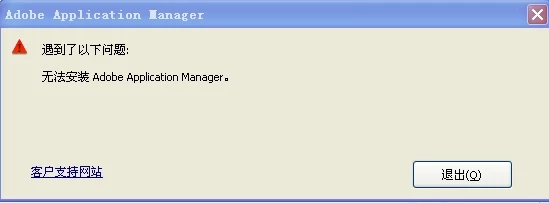
  • September 4, 2013
  • 1 reply
  • 689 views

    This topic has been closed for replies.
    Correct answer Romsinha-9KMEUt

    Hi,

    Try to perform mentioned steps:

    Win: Go to C/Program Files(X86)/Common Files/Adobe/OOBE/PDApp and rename it to PDApp.old.

    Download CC desktop from the link: https://creative.adobe.com/products/creative-cloud and try installing.

       .

    2. If you are getting this error while installation resulting in installation failure:

    (a) Try to perform mentioned steps:

    Win: Open Task Manager/Go to processes/ manual kill AAM Update Notifier. Try to install again (https://creative.adobe.com/products/creative-cloud).

    嘗試執行提到的步驟:

    贏:C / Program Files文件(X86)/公用文件/使用Adobe/ OOBE/ PDAPP的的的,它重命名為PDApp.old。

    下載鏈接:https://creative.adobe.com/products/creative-cloud CC桌面,並嘗試安裝。

       。

    2。如果你正在安裝錯誤,而導致安裝失敗:

    (一)嘗試執行提到的步驟:

    贏:打開任務管理器/進程/手動殺AAM更新通知。再次嘗試安裝(https://creative.adobe.com/products/creative-cloud)


    Regards,

    Romit Sinha

    1 reply

    Romsinha-9KMEUt
    Adobe Employee
    Romsinha-9KMEUtCorrect answer
    Adobe Employee
    September 4, 2013

    Hi,

    Try to perform mentioned steps:

    Win: Go to C/Program Files(X86)/Common Files/Adobe/OOBE/PDApp and rename it to PDApp.old.

    Download CC desktop from the link: https://creative.adobe.com/products/creative-cloud and try installing.

       .

    2. If you are getting this error while installation resulting in installation failure:

    (a) Try to perform mentioned steps:

    Win: Open Task Manager/Go to processes/ manual kill AAM Update Notifier. Try to install again (https://creative.adobe.com/products/creative-cloud).

    嘗試執行提到的步驟:

    贏:C / Program Files文件(X86)/公用文件/使用Adobe/ OOBE/ PDAPP的的的,它重命名為PDApp.old。

    下載鏈接:https://creative.adobe.com/products/creative-cloud CC桌面,並嘗試安裝。

       。

    2。如果你正在安裝錯誤,而導致安裝失敗:

    (一)嘗試執行提到的步驟:

    贏:打開任務管理器/進程/手動殺AAM更新通知。再次嘗試安裝(https://creative.adobe.com/products/creative-cloud)


    Regards,

    Romit Sinha