Known Participant
November 13, 2016
Answered

Disabling CSS in code view....Quick key?

  • November 13, 2016
  • 1 reply
  • 1089 views

Hi,

I am curious if there is a shortcut to disable CSS rules by highlighting the text (rule) from the CSS page (code view).  I know you can disable rules from the properties panel by hitting the disable button... I think it would be more intuitive to highlight a rule in code view and hit a quick key to toggle it on and off..

Thanks to anyone who helps,

Gary
This topic has been closed for replies.
Correct answer Nancy OShea

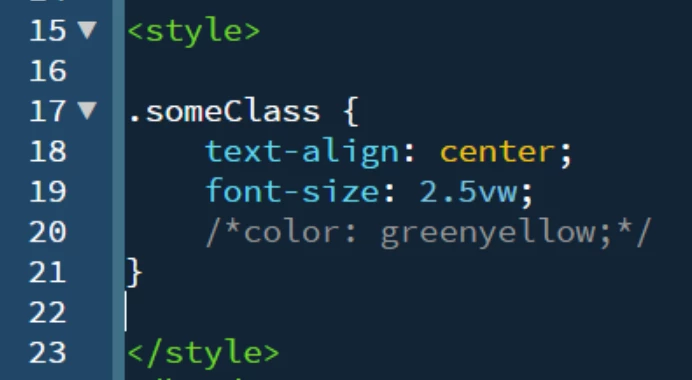
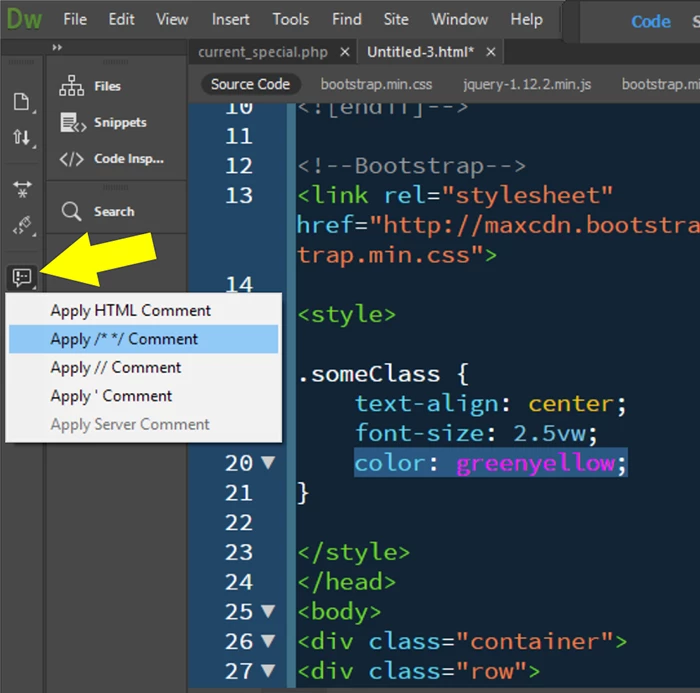
Use code comments to disable highlighted rules.

     /*this is a CSS comment*/

     <!--this is an HTML comment-->

See screenshots below from CC 2017:

BEFORE COMMENT:

AFTER COMMENT ADDED:

Does that help you?

1 reply

Nancy OShea
Community Expert
Nancy OSheaCommunity ExpertCorrect answer
Community Expert
November 14, 2016

Use code comments to disable highlighted rules.

     /*this is a CSS comment*/

     <!--this is an HTML comment-->

See screenshots below from CC 2017:

BEFORE COMMENT:

AFTER COMMENT ADDED:

Does that help you?

Nancy O'Shea— Product User & Community Expert
TaffyproAuthor
Known Participant
November 14, 2016

I wonder if there is a way to assign that to a key command,

Thanks