


Inspiring
January 29, 2020
Answered

Dreamweaver shows an error for the Null Coalescing Operator (??), a PHP 7 feature

  • January 29, 2020
  • 6 replies
  • 1468 views

I've changed my Dreamweaver settings to be PHP 7+ compliant.

Some simple code like the Null Coalescing Operator ?? throws errors and causes trouble when it it fully valid code.
Please make Dreamweaver fully PHP 7+ compliant.


// Old stupid way

$Test = isnull($_POST["PossiblyNullField"])?$_POST["PossiblyNullField"]:"";

// This is the PHP 7+ correct way to make sure that a field that may or may not exist, depending on if the user put data into it doesn't throw an error:

$text = $_POST["PossiblyNullField"]??"";
This topic has been closed for replies.
Correct answer andyd273

I finally found a solution to this issue!
I happened to stuble across it somwhere, but here's what to do:

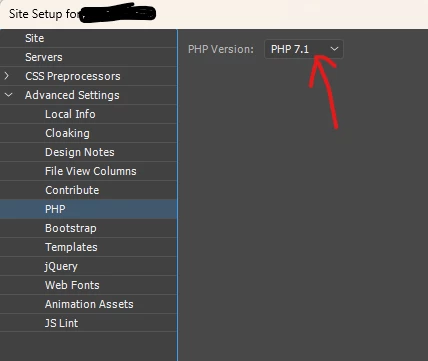
Go to Manage Sites.
Edit the site definition for your website.
Expand Advanced Settings, and then click on PHP.
Change the PHP Version to PHP 7.1 instead of PHP 5.6
Thats it!
Now the error will go away, and you can ?? to your hearts content.

6 replies

andyd273AuthorCorrect answer
Inspiring
September 18, 2024

I finally found a solution to this issue!
I happened to stuble across it somwhere, but here's what to do:

Go to Manage Sites.
Edit the site definition for your website.
Expand Advanced Settings, and then click on PHP.
Change the PHP Version to PHP 7.1 instead of PHP 5.6
Thats it!
Now the error will go away, and you can ?? to your hearts content.

Nancy OShea
Community Expert
Community Expert
September 18, 2024
quote

Change the PHP Version to PHP 7.1 instead of PHP 5.6

By @andyd273

==============

That's not a solution.  As of this writing (9/18/2024), the current stable release of PHP is version 8.2, released on November 24, 2022.


PHP 7.4 is END OF LIFE

It no longer offers more security updates and is affected by multiple vulnerabilities.  If you keep using the PHP 7.4 or lower versions, your site could be vulnerable to potential attack.


@Markus30594642ksqb,

Dreamweaver is in minimal maintenance status.  No new features are planned except essential compatibility updates. The PHP versions it supports are sorely out of date and should NOT be used for current development.  😓


See this link for more details:

https://community.adobe.com/t5/dreamweaver-discussions/bootstrap-5/m-p/14046967#M225831


Nancy O'Shea— Product User & Community Expert
Participant
September 18, 2024

I have the same problem. Why is the bug not fixed by Adobe?

andyd273Author
Inspiring
February 10, 2023

The Null Coalescing Operator was introduced in PHP7, so it's not just an 8+ thing.
I disabled the linting thing, but it doesn't seem to do anything that I can tell.
I just made a small php test page, added this code:
<?php
$t = $nt??"";

?>
The line turns red to show that it has an error, and then stays red even when I turn linting off.
Thanks for the suggestion though!

Nancy OShea
Community Expert
Community Expert
January 24, 2023

👍 to what @Ben107584 M said.  Dreamweaver has no support for PHP higher than 7.x 

You can disable code Linting from your Preferences panel.   See screenshot.


Nancy O'Shea— Product User & Community Expert
Community Expert
January 23, 2023

Unfortunately DW is in minimal maitenance mode so the odds of it staying up to date like you are asking are slim to none especially since the current version is 8.2. You may need to consider other options.

Participant
January 29, 2020

My server is running PHP 7.2.26. I'm coding in Dreamweaver CC (Ver 19.2.1). I'm using null-coalescing operator on a page, but Dreamweaver is giving me "Syntax Error, Unexpected '?'" as a line error.

My code:

($_SESSION['form_data']['smtpEmailAddress'] ?? "")

It works fine when viewing in a browser. I only get the error in Dreamweaver. Is there a way to get Dreamweaver to accept Null-coalescing Operator? Dreamweaver is currently set to use PHP 7.1. 7.2 is not an option within preferences.

I know I could just ignore the Dreamweaver error, but I do scan my code for errors using the Dreamweaver error indicators. I'd rather fix Dreamweaver than just ignore the error.

Nancy OShea
Community Expert
Community Expert
January 30, 2020

I do not know of any way to upgrade code hinting and error reporting to PHP 7.2.  I think you'll need to ignore it and wait for a DW update.   See the 2020 Roadmap below.

https://community.adobe.com/t5/dreamweaver/dreamweaver-2020-roadmap/td-p/10885179?page=1


Nancy O'Shea— Product User & Community Expert
Participant
September 18, 2024

The error has still not been corrected.