Participant
September 29, 2019
Answered

Gaps between cells when previewing in browser

  • September 29, 2019
  • 5 replies
  • 1819 views

 In dreamweaver 


Preview in browser


Hi all,

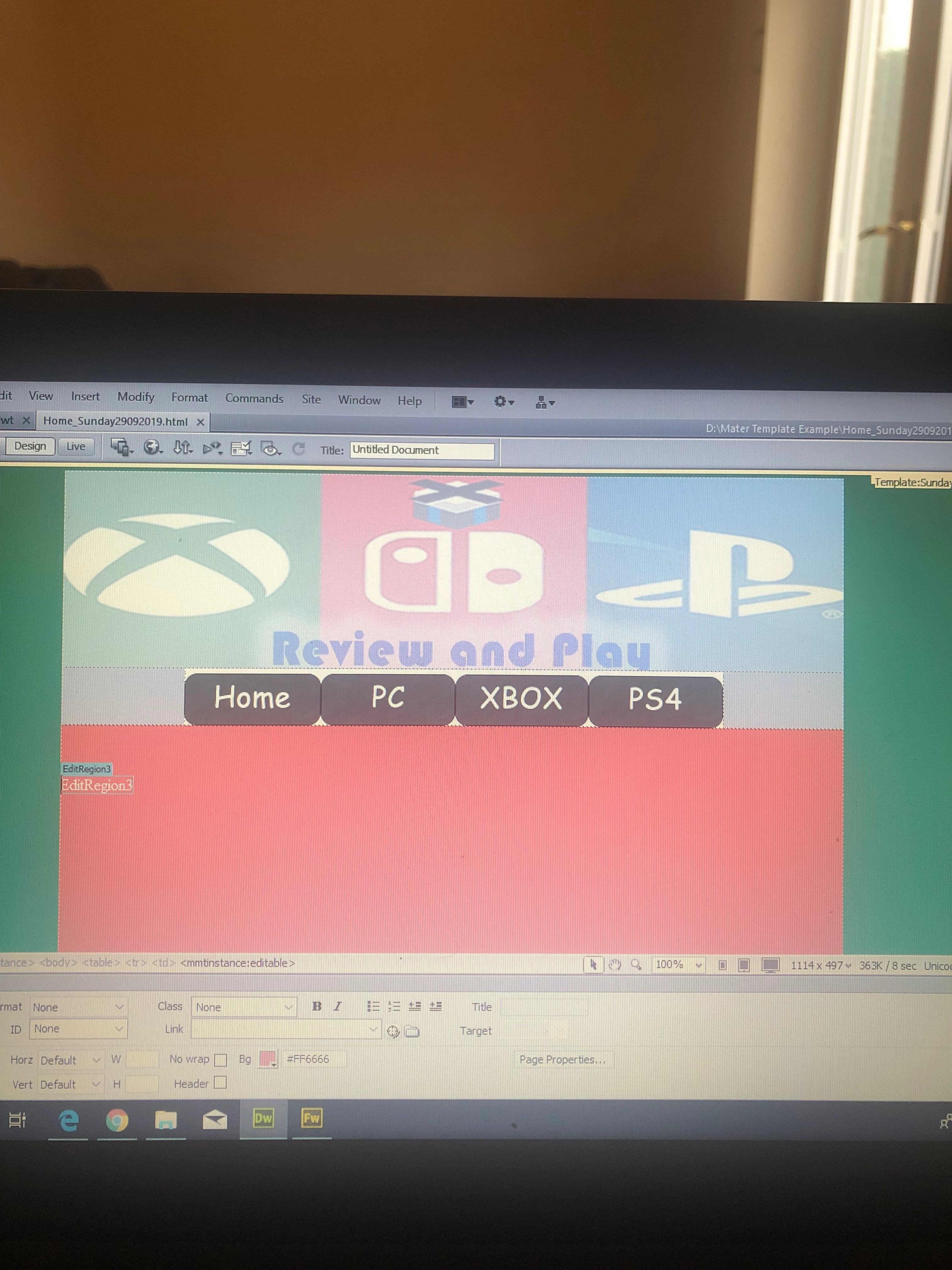
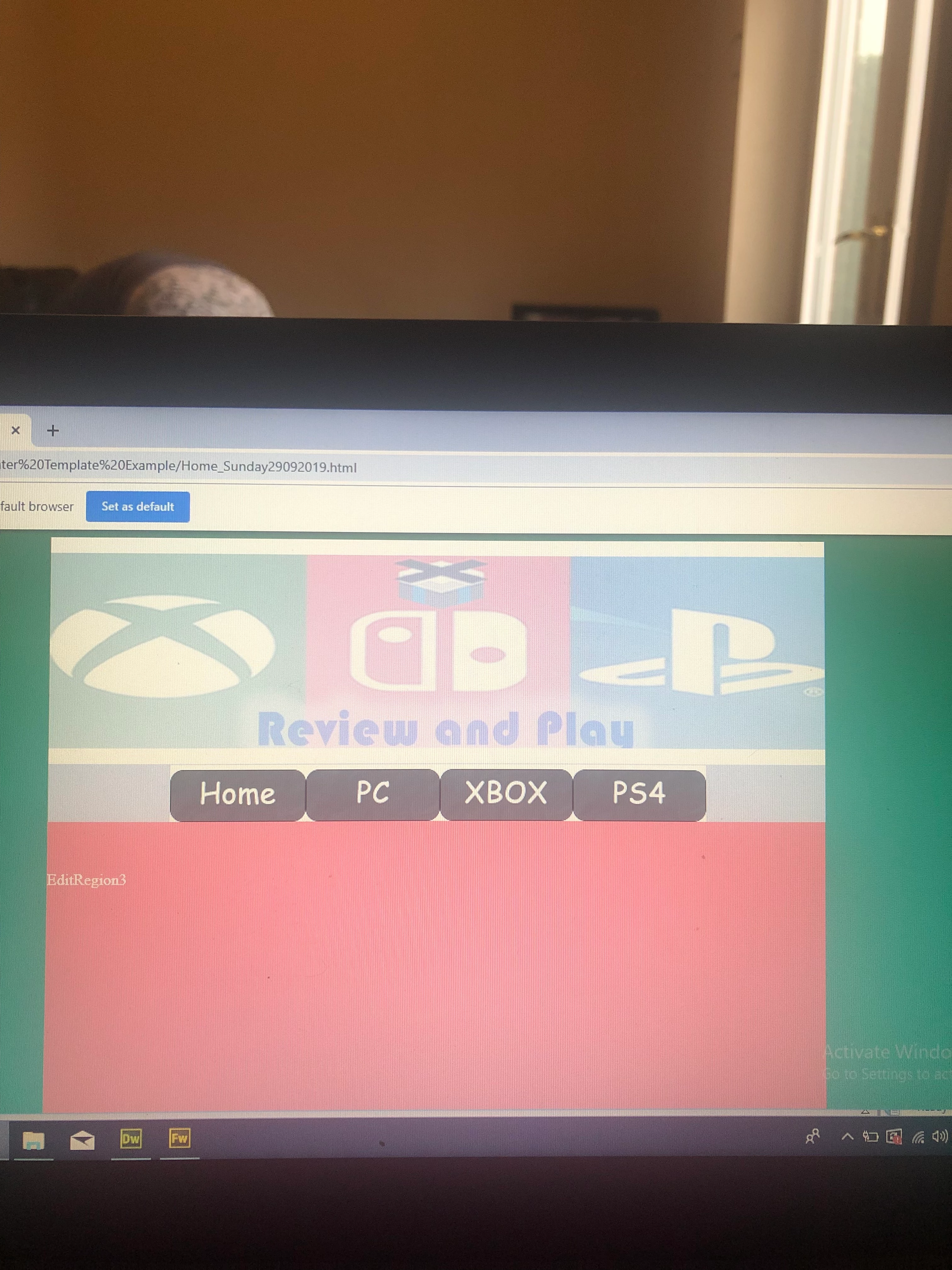
I am just messing about with dreamweaver (hence excuse the design) and I am not sure why this is happening, but on dreamweaver I have created a table (800w) with 3 rows. On the top row I have a banner, in the next a nav bar and the 3rd row is an editable region. But as you can see in dreamweaver there are no white gaps at the top of the banner or in between the banner and nav bar. However when previewing it on the browser there is a white gap at the top of the banner and nav bar. Not sure how to fix this, please help! 

Thanks in advance. 

    This topic has been closed for replies.
    Correct answer Nancy OShea

    #1 Tables for layouts went out of favor in the late 1990's when CSS was introduced.  Nowadays, we use CSS Flexbox or css Grdis to align HTML elements. 


    #2 Browsers add their own default margins and padding to all HTML elements.   One way web designers guard against browser variation is to use what's called a CSS Reset - a minified set of CSS rules that resets all styles to a consistent baseline.   See link for details.  https://cssreset.com/what-is-a-css-reset/


    A quick & dirty way to remove margins and padding from every HTML element at once is with the wildcard selector or asterisk in your CSS code like this.


    * {margin:0; padding:0}


    5 replies

    Nancy OShea
    Community Expert
    Community Expert
    October 17, 2019

    "You failed to answer him in an appropriate manner."


    I don't agree.  Using a CSS Reset is an appropriate response. But telling the OP to use an obsolete document type is not.   But the responsible & correct answer  really is "Don't use Photoshop to create HTML code."  


    Why?  Because PS is a graphics editor, not a code generator.  The code that comes out of PS is invalid, deprecated, unstable and just plain not suitable for production purposes.


    Nancy O'Shea— Product User & Community Expert
    Participant
    October 17, 2019
    Nobody told the OP to use Photoshop to create HTML code. They asked a very speific question about tables, not about effective web-layout design/coding for the 21st century. You keep interjecting your view on modern web authoring into a conversation where they asked about how tables function. Again, your response is highly inappropriate for the question being asked. The OP did not ask "Is there a better way to do what I'm doing with this table that I created?" They asked why the table was creating a gap and how to fix it (in regards to their current application). I showed them what was causing the gap and how to resolve it. .
    Nancy OShea
    Community Expert
    Community Expert
    October 17, 2019
    All this is highly moot since the OP never responded and will probably never come back.
    Nancy O'Shea— Product User & Community Expert
    Nancy OShea
    Community Expert
    Community Expert
    October 16, 2019

    Nobody should be using HTML4 anymore. 

    The current web standard is HTML5. 

    https://www.w3schools.com/html/


     <!DOCTYPE html>
    <html>
    <head>
    <title>Page Title</title>
    </head>
    <body>
    
    <h1>This is a Heading</h1>
    <p>This is a paragraph.</p>
    
    </body>
    </html> 


    Nancy O'Shea— Product User & Community Expert
    Participant
    October 17, 2019

    Joe had a question. I had an answer. You failed to answer him in an appropriate manner to his question. What concern is it if yours? It's not as if HTML 4 has stopped working. It doesn't matter what the new standard is. I provided an answer to his question.. It's not as if everybody's needs are the same. For some, HTML 2 works just fine for their needs. The same can be said for HTML 3, 4 and 5. If you have nothing positive to contribute, then why bother responding at all. Your answer did nothing to provide a solution. 

    BenPleysier
    Community Expert
    Community Expert
    October 17, 2019

    Christopher, first off, thanks for your reply, this is much appreciated. The more voices chime in, the better for the community. However, in my opinion, we should not be advocating using code that has had it's time, dating back to the early part of the previous decade. We should be advocating using the very latest. Why? Because it is by the grace of the browser that HTML 4 can still be used. But for how long? The web is progressing very rapidly and with the extra benefit that we get from using HTML5/CSS3, it would be irresponsible not to use them.


    Sams Teach Yourself HTML 4 in 24 Hours

    by D Oliver

    1999-09-17
    Wappler is the DMXzone-made Dreamweaver replacement and includes the best of their powerful extensions, as well as much more!
    Participant
    October 16, 2019

    Go to "File"

    Select "Page Properites"

    Select "Title/Encoding"

    Change "Document Type (DTD): to "HTML 4.01 Transitional"

    Select "Apply" at the bottom of the page

    Select "OK"


    That's what I did and it fixed all our problems. 

    Legend
    September 29, 2019

    In addition to what Nancy has posted. You may also have to add some css to 'tighten' the images up within their container:


    img {

    display: block;

    }


    or


    img {

    display: inline-block;

    }


    It's better if you just target the container in which the images are inserted:


    .yourContainerName img {

    display: block;

    }


    By targeting content in a specific container you then won't run the risk of the properties being attached to other content outside of the container, which might cause undesired results.


    BUT seriously you should NOT be using tables for your layout these days.

    Nancy OShea
    Community Expert
    Nancy OSheaCommunity ExpertCorrect answer
    Community Expert
    September 29, 2019

    #1 Tables for layouts went out of favor in the late 1990's when CSS was introduced.  Nowadays, we use CSS Flexbox or css Grdis to align HTML elements. 


    #2 Browsers add their own default margins and padding to all HTML elements.   One way web designers guard against browser variation is to use what's called a CSS Reset - a minified set of CSS rules that resets all styles to a consistent baseline.   See link for details.  https://cssreset.com/what-is-a-css-reset/


    A quick & dirty way to remove margins and padding from every HTML element at once is with the wildcard selector or asterisk in your CSS code like this.


    * {margin:0; padding:0}


    Nancy O'Shea— Product User & Community Expert