


Jeffery.Wright
Inspiring
October 13, 2023
Question

Load color swatches?

  • October 13, 2023
  • 2 replies
  • 414 views

So, how does a user load a color palette into DW? 
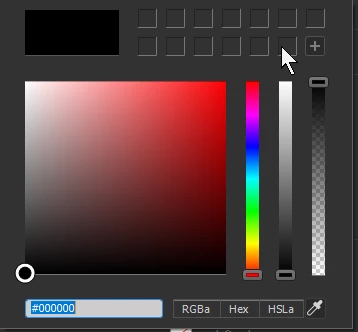


Shouldn't that be done from that window?

Why isn't it? 

 

This topic has been closed for replies.

2 replies

Nancy OShea
Community Expert
Community Expert
October 13, 2023

I'm not sure what you're doing exactly but I keep color palettes in Creative Cloud Libraries.

Go to Window > CC Libraries.

https://helpx.adobe.com/dreamweaver/using/creative-cloud-libraries-stock.html


Click on a color swatch to save hex value to Clipboard.

Paste color values into your site's stylesheet (CSS file) with Ctrl + V.  See screenshot.

Save document (Ctrl + S). 


If you wish to add paint chips to the color picker panel, move your cursor over code color value, right-click and select Quick Edit.

Paste value in the color field and hit the PLUS (+) sign.  When you're done, save document.


That said, I rarely need the color picker.  For me, working directly with code is much faster & more precise than panels.


Nancy O'Shea— Product User & Community Expert
Nancy OShea
Community Expert
Community Expert
October 13, 2023

In case you're not familiar with them, I should probably mention Adobe Color, Adobe Fonts  and saving assets to Creative Cloud Libraries.

https://color.adobe.com/create/color-wheel

https://helpx.adobe.com/fonts/using/add-fonts-website.html

https://helpx.adobe.com/creative-cloud/help/libraries.html


Nancy O'Shea— Product User & Community Expert
Jeffery.Wright
Inspiring
October 13, 2023

So, I created a new HTML page, added an image of my color palette to the page, and repeatedly clicked the eye-dropper, clicked a color from the image, then clicked the + button to add it to the palette in CSS designer, over and over again to compose a palette of our 16 brand colors... 


And of course, you simply can't to that, you have to add a class to the image, add a style source, then add a selector to the class first, all in order to even access the CSS designer to perform that mind-numbing, tedious and completely uneccesary operation to simply get a color palette in the workspace...


Once that was completed, I saved my Workspace to ensure that the color palette would be saved... only to have DW crash when editing HTML on the actual page I was previously working on and I bet you already guessed that yes, my color palette vaporized into nothingness whan I re-opened DW. Not part of the workspace?


Really?


As is often the case with using Adobe products, user experiences like these are unacceptible, and I wonder if Adobe can explain why their customers can expect to keep paying a subscription every month for this treatment?