
January 17, 2010
Answered

Mac Test Server set up issues

  • January 17, 2010
  • 1 reply
  • 2467 views

first day notes:

I've spent the last two days transitioning into Dreamweaver and setting up my test server MySQL PHP and Apache by following online help, tutorials and recommendations. I've Terminaled MAMPed, and installed more crap than I wanted to fill my hard drive with.  I've done everything I can think of just so I can see what the site I'm working on will look like in reality (using Server Side Includes) before posting as I'm still in the proposal stages of this project. 

All files are relative to the document and not root

preview using temporary file is checked

Testing Server folder is: MacintoshHD:Library:WebServer:Documents:sitename

Testing Server URL Prefix is: http://127.0.0.1/sitename.com/

FF and Safari give me:

Not Found

The requested URL /MarcJanowitz.com/TMPV8Y2WAUZU.shtml was not found on this server.

I'm used to iWeb but it clearly doesn't have the functionality I need, which is why I'm trying to graduate.  I can't use DW if I can't see what i'm creating.  I can't rely on faith when I don't have the experience with this program to have the faith.

I've been all over google and the forums since 5pm yesterday (short nap in the middle) and it looks like i'm doing everything I'm told.

I'm afraid I did something in terminal I shouldn't have or something slightly wrong in my installation/implementation of MySQL PHP and Apache. Or that i'm misunderstanding what I'm supposed to be putting in for "Testing Server URL Prefix" or something.  I need to find out asap whether this is a lost cause or fixable so I know whether to cut my losses.

--------------------------------------------------------------------------------------------------------------------------------------------------------------

the next day i tried:

apache is set to run by setting my web sharing on

i changed the line that said 127.0.0.1 in my config.inc.php. back to localhost so i could try

I'd switched because i was getting "Re: #2002 - The server is not responding (or the local MySQL server's socket is not correctly configured)" and I found these:

now that i look at those pages again, perhaps just switching 127.0.0.1 back to local host  in both places isn't enough

i've sort of lost track of the changes i've made now

I switched the line in manage sites to lowercase to match the folder

PHP and MySQL were running last night before i shut down.  How do I make sure they're running now that i've started up again?

as of now, still getting "not found"

--------------------------------------------------------------------------------------------------------------------------------------------------------------

I know there are similar topics but i'm certain i've gotten myself in a unique enough situation that it is worth a new discussion because i can't find one close enough to what i've done

thanks!
This topic has been closed for replies.
Correct answer David_Powers

1) "If you've installed additional versions of apache or mysql, uninstall them."

--don't see how to uninstall, the dmg file didn't come with an uninstall file and i can't locate what the install did since it didn't simply put an app in my Applications folder

2) stopped mysql in terminal, apache in system preferences

3)don't know where you mean when you say:

simply declare those ports in the call... i.e. localhost:8889 for mysql and to see the website localhost:8888

4) in the process of following my instructions to get MAMP going right I got through: http://www.adobe.com/devnet/dreamweaver/articles/setting_up_php_07.html

Setting up a PHP development environment for Dreamweaver

8. Click Test.

Dreamweaver attempts to connect to the database. If the connection fails, do the following:

  • Double-check the server name, user name, and password.
  • Check the settings for the folder Dreamweaver uses to process dynamic pages (see Specify a testing server for Dreamweaver).
  • Verify that the web and MySQL servers are both running.
  • Temporarily disable any firewall or security program. If the connection works, you need to configure the security program to permit communication between Dreamweaver and MySQL.

...and i'm still getting an unknown error when i click test and as far as i know i've done all the "If the connection fails, do the following:" things right


Diana Kesselschmidt wrote:

3)don't know where you mean when you say:

simply declare those ports in the call... i.e. localhost:8889 for mysql and to see the website localhost:8888

I explained this before. If you use the default MAMP ports, you need to use http://localhost:8888/ instead of http://locahost/ in the URL prefix of the Testing server definition. Also, when creating a MySQL connection, use localhost:8889 instead of localhost in the Server field.

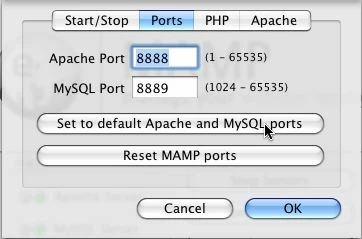
If you have stopped the preinstalled version of Apache in System Preferences, as well as stopping the version of MySQL that you installed from a dmg, you can change the ports in MAMP. See the following screenshot, which is taken from the tutorial on setting up a PHP development environment:

The screenshot shows the default MAMP ports. If you click the "Set to default Apache and MySQL ports" button, those values will change to 80 and 3306 respectively. If you do that, and you get a green light from both MySQL and Apache, you can use http://localhost/ and localhost in the testing server and MySQL connection dialog boxes.

If you still get errors when trying to test a page in Dreamweaver, please give precise details of the values you have entered in the Testing server folder and URL prefix fields of the Testing Server section of the Site Definition dialog box.

1 reply

David_Powers
Inspiring
January 18, 2010

Diana Kesselschmidt wrote:

i'm certain i've gotten myself in a unique enough situation that it is worth a new discussion because i can't find one close enough to what i've done

No, you haven't.The answer to most testing server problems is the same: undo what you have already done, and follow a decent set of instructions. http://www.adobe.com/devnet/dreamweaver/articles/setting_up_php.html.

January 18, 2010

those are one of the sets instructions I tried before i got the 2002 error

the last thing i tried was MAMP.  it didn't change anything, but i figured that that was because i might have made so many changes before that

and I have absolutely no idea how to undo what i've done

David_Powers
Inspiring
January 19, 2010

Diana Kesselschmidt wrote:

I have absolutely no idea how to undo what i've done

I'm not sure how you expect anyone else to know, either. You're the only one who knows what you have done. Uninstalling MAMP is easy. Just make sure that Apache and MySQL have been stopped in MAMP, and then drag the MAMP folder to the Trash.

Do you have a Time Machine backup? If so, revert your computer to the way it was before you started.

If not, you're going to have to explain what you did before trying MAMP. It might be a simple thing of just stopping the preinstalled version of Apache (System Preferences > Sharing, deselect Web Sharing).