Known Participant
October 19, 2023
Answered

Simple cart page

  • October 19, 2023
  • 3 replies
  • 6697 views

I am looking for help to make something for a non-profit organization

this is what i have:
an SQL database with 1 table containing the names of photos (foto1.jpg, foto2.jpg..)

what i want to do:
create a page where I show the photos, for each photo it can be thrown into a "shopping cart" - OR - selected and instead of a checkout you can print the selected photos.

The idea is to make a kind of wish list for children for Christmas, which they can then print out.

So it should be very easy to operate.

Who can and wants to help me with this?

This topic has been closed for replies.
Correct answer BenPleysier

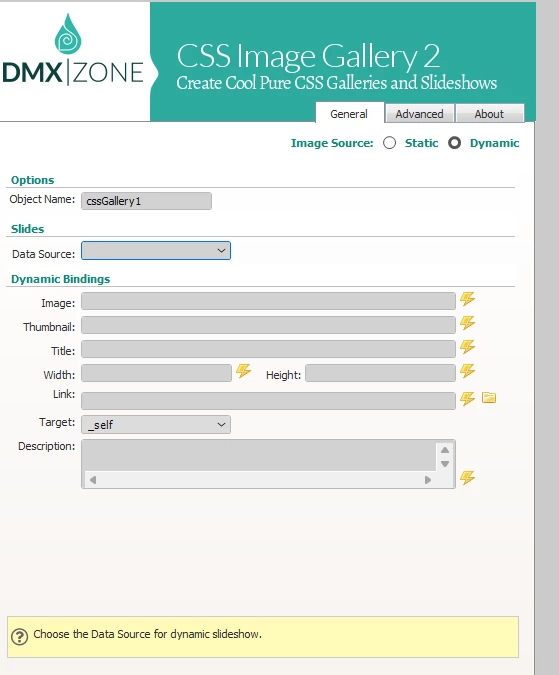
I realize that I also have dmxzone css image gallery 2. I am trying to use it for dynamic content, but it is apparently not compatible with dreamweaver 2021 or with dmxzone server connect. The field where I have to enter the data source remains empty, I cannot select anything there.
Are there other options?


I would use Bootstrap to do the hard work. The code would look like:

<!doctype html>
<html>

<head>
<base href="/">
    <meta charset="utf-8">
    <meta name="viewport" content="width=device-width, initial-scale=1, shrink-to-fit=no">
    <title>speelgoed</title>

    <link rel="stylesheet" href="https://cdn.jsdelivr.net/npm/bootstrap@5.1.3/dist/css/bootstrap.min.css" integrity="sha384-1BmE4kWBq78iYhFldvKuhfTAU6auU8tT94WrHftjDbrCEXSU1oBoqyl2QvZ6jIW3" crossorigin="anonymous" />

    <script type="text/javascript" src="dmxAppConnect/dmxAppConnect.js"></script>
</head>

<body is="dmx-app">
    <dmx-serverconnect id="serverconnect" url="dmxConnect/api/Producten/products.php" site="undefined"></dmx-serverconnect>

    <div class="container">
        <div class="row row-cols-1 row-cols-sm-2 row-cols-md-3 row-cols-lg-4 row-cols-xl-5 gy-4" is="dmx-repeat" id="repeatSpeelgoed" dmx-bind:repeat="serverconnect.data.qrySpeelgoed">
            <div class="col">
                <div class="card">
                    <img src="" alt="" height="150" dmx-bind:src="speelgoedboek/{{fotonaam}}" dmx-bind:alt="{{fotonaam}}">
                    <div class="card-body">
                        <button class="btn btn-primary">Add to cart</button>
                    </div>
                </div>
            </div>
        </div>
    </div>

    <script src="https://cdn.jsdelivr.net/npm/bootstrap@5.1.3/dist/js/bootstrap.bundle.min.js" integrity="sha384-ka7Sk0Gln4gmtz2MlQnikT1wXgYsOg+OMhuP+IlRH9sENBO0LRn5q+8nbTov4+1p" crossorigin="anonymous"></script>
</body>

</html>

3 replies

BenPleysier
Community Expert
Community Expert
October 19, 2023

I have noticed that you have used extensions from DMXZone in the past.


Did you know that this Enschede business has created a product that is similar to Dreamweaver with all of the DMXZone extensions already included? It is called Wappler.


With Wappler, you would create a page based on a Bootstrap 5 grid that holds all of your toys. This can be a static or dynamic page.


When the child clicks on one of the images, the details will be entered into a shopping cart. The contents of the shopping cart will be stored in local storage (no external database required).


Once the selections have been made, a printout page can be created using the data stored in the local storage. Hitting the browser's print button will output the desired effect.


That's how simple this will be when using Wappler.


Wappler is the DMXzone-made Dreamweaver replacement and includes the best of their powerful extensions, as well as much more!
Legend
October 20, 2023


That's how simple this will be when using Wappler.


By @BenPleysier


It's a pretty simple process when not using Wappler, assuming you know what you're doing............Wappler 'also' does have an extensive learning curve given it's myriad of options, just as learning to code does.


No need for local storage or though it's a nice added extra just incase the user returns and wants to continue where they left off...........it depends how complex the OP wants to make this.


I agree, there doesn't seem to be a requirement for a database just to store the images in this instance unless other  data is going to be stored and returned for future use

BenPleysier
Community Expert
Community Expert
October 20, 2023
quote

No need for local storage


By @osgood_


Local storage, session storage or a cookie is required so that the data can be stored when moving from one page to another.


How else would you preserve the data?

Wappler is the DMXzone-made Dreamweaver replacement and includes the best of their powerful extensions, as well as much more!
Known Participant
October 19, 2023

it should not be that extensive: it is children who create an online wish list, the lists are not saved.
The indicated images are stored in a kind of shopping cart and no data needs to be entered. Just a "print" button that prints the chosen toy

Community Expert
October 19, 2023
quote

it should not be that extensive: it is children who create an online wish list, the lists are not saved.
The indicated images are stored in a kind of shopping cart and no data needs to be entered. Just a "print" button that prints the chosen toy


By @LyaSmidtsx


I would agree with Nancy's assessment that this is beyond what DW does out of the box and you would need to find someone who does programming to do this. Your best bet, as suggested, would be to find a 3rd party solution that does this for you.


Store aside, you will still need:


- A user table to allow data to be distinguished per user

- A products table to show all the photos

- A cart table to store what each user saves

- A script to take what they save and print out the photos


Personally I would look for free cart script with wordpress or another hosted solution, set all products to a 0 value and allow them to print the list, or purchase and print so they get a fun record.

Nancy OShea
Community Expert
Community Expert
October 19, 2023

This is beyond what Dreamweaver can do.   Among other things, you'll need  server-side programming skills and advanced knowledge of complex databases and web security.


1. Users will need to create an account that stores their personal data (username & log-in password) in a server-side database.


2. To begin a "shopping" session, users will need to log-in to their account so their selected items can be collected and stored for later use in another server-side database. 


3. To move items from user's "wish list" to "shopping cart" will require another database and programming scripts.


4. To make transactions and deliver items, will require another database & more programming scripts.


5. You'll also need multi-layered security to protect data and prevent unauthorized log-ins as well as a fail-safe system to assist users with lost passwords, changed usernames, etc...


Best advice:  Find a 3rd party shopping cart that does what you want.


Nancy O'Shea— Product User & Community Expert