
Inspiring
December 13, 2021
Answered

Some Newbie issues: (1. importing web fonts (2. disabling the hyperlink psuedoclasses on buttons

  • December 13, 2021
  • 3 replies
  • 1384 views

Okay, I don't care how familiar I am with CS6. I'm a rank newbie in CC2021.

I'm currently at square 1 of rebuilding an existing website. I've got a base page, that I intend to eventually use as a template. But I'd like to nail a few things down before doing that.


Issue #1: I could just go ahead and use the default fonts that Dreamweaver used in the document that I built the page off of (one of the tutorial files), or change everything to Verdana as in the old site. But in the web design class I've been attending over the past semester, we used webfonts. I would rather like to be able to use one of the ones that I'd been using for the headlines and subheads. Just copy/pasting the font import information from the Codepen pages which we built in the class doesn't appear to bring them into Dreamweaver.

These are Google fonts, off their website of free fonts. Do I need to "repurchase" them, or what?


Issue #2: There will be a handful of external links in the site, and there will be a lot of download links, so I *do* want the hyperlink pseudoclasses.

However, I do not want them to apply to buttons or dropdown menu links. The Classroom in a Book talked about disableing the link psuedoclasses when one applies a link to a header, but I tried doing the same with the button and dropdown links and it does not appear to make a bit of difference.

If it's any help, the buttons ad dropdwn menus were copy/pasted from W3Schools 'How To' collection. They are the 'Button Group', and the 'Dropdown in Topnav' items.

Basically, I would like the psuedoclasses to only apply in regular text. I do see that the html for the button group and dropdown menus do *not* add a paragraph or header tag to the button text. Os there a way to *only* text in a <p> or <h(whatever)> tag?


I'll undoubtedly have some other newbie-level questions as I work my way through this project, but these will certainly do for starters.

Thank you all for your time and attention.
    This topic has been closed for replies.
    Correct answer Nancy OShea

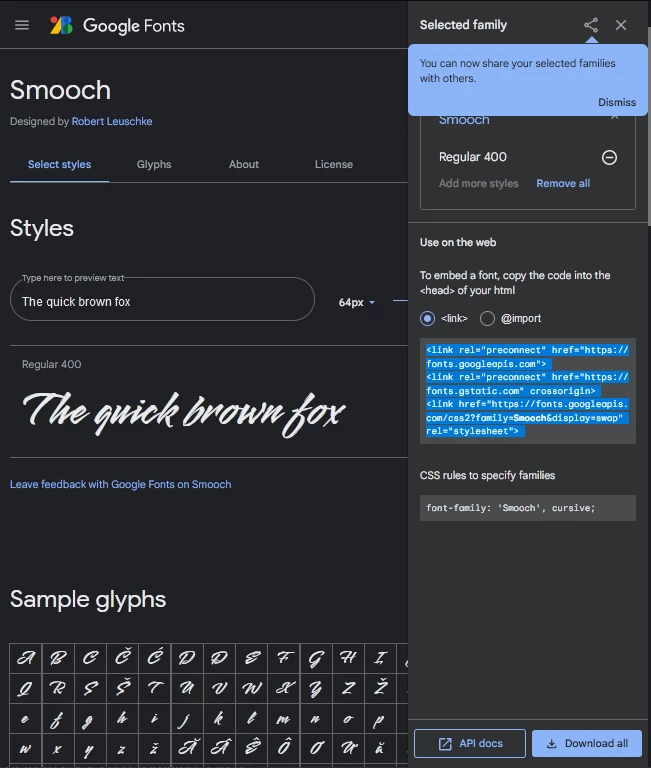
    Using Google Fonts is a 2 step process.   See screenshots.

    1.  Copy & paste Google's script into the <head> tag of your HTML document.

    2.  Apply the recommended CSS rules to your stylesheet.


    A working example:

    <!doctype html>
    <html lang="en">
    <head>
    <meta charset="utf-8">
    <title>Google Web Font Demo</title>
    <meta http-equiv="X-UA-Compatible" content="IE=edge">
    <meta name="viewport" content="width=device-width, initial-scale=1">
    
    <!--Google Script here-->
    <link rel="preconnect" href="https://fonts.googleapis.com">
    <link rel="preconnect" href="https://fonts.gstatic.com" crossorigin>
    <link href="https://fonts.googleapis.com/css2?family=Smooch&display=swap" rel="stylesheet"> 
    
    
    <style>
    body {
    font-family: "Lucida Grande", "Lucida Sans Unicode", "Lucida Sans", "DejaVu Sans", Verdana, "sans-serif";
    font-size: 1.25rem;
    }
    
    h1 {
    /**Google Web Font with fallbacks from the same family**/
    font-family: Smooch, Cursive, Fantasy, serif;
    font-size: 4rem;
    }
    </style>
    </head>
    <body>
    <!--Google Web Font-->
    <h1>Heading 1 </h1>
    
    <!--Default font family-->
    <p>Lorem ipsum dolor sit amet, consectetur adipisicing elit. Vero eaque at saepe odio ab id voluptatum enim ut assumenda, non! Exercitationem illum eaque vero doloremque adipisci quis, fugit repellat impedit?</p>
    
    </body>
    </html>


    3 replies

    Nancy OShea
    Community Expert
    Community Expert
    December 13, 2021

    PART 2:

    Are you planning to rebuild the site with Bootstrap? 

    https://www.w3schools.com/bootstrap4/


    If yes, you need not reinvent the wheel for this. Bootstrap contains a bevy of built-in classes for all sorts of things including buttons, navbars and just plain ordinary text links.  Best of all, Bootstrap reduces development time and saves you from a lot of tedious manual coding.


    Nancy O'Shea— Product User & Community Expert
    Inspiring
    December 13, 2021

    Frankly, I'd just as soon not touch Bootstrap with a 10-foot pole. Although I may end up having to wrestle with it before I'm done. I went through the Classroom in a Book, and the site built with that tutorial is heavily dependent on Bootstrap. I thoroughly disliked working with it. It appeared to insert several layers of difficulty between the program and the final viewable page. (CS6 was *so easy* to work with in comparison.)


    I do intend to put together an external stylesheet once I have things nailed down. But I'll probably keep the working page with its internal styles as a possible source page against the possibility of someday needing to build a page which does a few things differently. So having the CSS *right there* to modify without messing up the rest of the site's pages would be an advantage.


    The manual coding isn't really that much of an issue, since I'd just as soon take the opportunity to get *really* familiar with what I'm doing. I've only got the one site, so it won't hurt me to view it as a learning experience. At that, tit's basically a personal hobby site, which is absolutely not commercial, so I'm not much fussed if search engines decide to ignore it because it uses fixed-width pages and sneers at smartphones. 


    There are a lot of pages, but most of them are based on 4-5 different templates (different templates because different header graphics), but once built will mainly just require swapping out the individual text and graphic for that page. That will be a long slog of porting things over from the existing site regardless of what method is used to build the templates. There are less than a dozen opener pages, and I think I can put together that many individual pages without feeling ill-done-by. Most of them will be variants of my working page in any case.


    Right now, I have almost everything as I want it. The hypertext psuedoclass flakeyness is the last of the issues that I really need to fix. There are probably a few other things that could do with some tinkering but I could live with them if I needed to. I'm sure that other things will crop up as I work on this, however.

    I really do appreciate the help. It really did help.


    Legend
    December 15, 2021
    quote

    Frankly, I'd just as soon not touch Bootstrap with a 10-foot pole.


    By @JoyceOdell


    Only a 10ft pole?

    Nancy OShea
    Community Expert
    Nancy OSheaCommunity ExpertCorrect answer
    Community Expert
    December 13, 2021

    Using Google Fonts is a 2 step process.   See screenshots.

    1.  Copy & paste Google's script into the <head> tag of your HTML document.

    2.  Apply the recommended CSS rules to your stylesheet.


    A working example:

    <!doctype html>
    <html lang="en">
    <head>
    <meta charset="utf-8">
    <title>Google Web Font Demo</title>
    <meta http-equiv="X-UA-Compatible" content="IE=edge">
    <meta name="viewport" content="width=device-width, initial-scale=1">
    
    <!--Google Script here-->
    <link rel="preconnect" href="https://fonts.googleapis.com">
    <link rel="preconnect" href="https://fonts.gstatic.com" crossorigin>
    <link href="https://fonts.googleapis.com/css2?family=Smooch&display=swap" rel="stylesheet"> 
    
    
    <style>
    body {
    font-family: "Lucida Grande", "Lucida Sans Unicode", "Lucida Sans", "DejaVu Sans", Verdana, "sans-serif";
    font-size: 1.25rem;
    }
    
    h1 {
    /**Google Web Font with fallbacks from the same family**/
    font-family: Smooch, Cursive, Fantasy, serif;
    font-size: 4rem;
    }
    </style>
    </head>
    <body>
    <!--Google Web Font-->
    <h1>Heading 1 </h1>
    
    <!--Default font family-->
    <p>Lorem ipsum dolor sit amet, consectetur adipisicing elit. Vero eaque at saepe odio ab id voluptatum enim ut assumenda, non! Exercitationem illum eaque vero doloremque adipisci quis, fugit repellat impedit?</p>
    
    </body>
    </html>


    Nancy O'Shea— Product User & Community Expert
    Inspiring
    December 13, 2021

    Thank you! That did get the font into the file. and I'm able to apply it. Codepen used the other button for the import option.

    But now I've got some glitchy behviour after bringing it in. 

    When I pasted it in at the top of the style list it knocked out my body style. I moved the body style up to the top of the list and got it back. That was an easy fix, but I'm not sure it didn't have some unintended consequences.

    Now my hyperlink psuedostyles are wonky. 

    I built a specific rule for link text, which I'll eventually need for download links, and applied my imported font. And that worked, but it's the default hypertext blue. I've lost my basic a:link styling. Hover and active are both still functioning as I set them up, I don't know about visited, since I haven't got anything that would show that yet.

    My button text is still being messed with since it's also showing the default hyperlink blue, and the psuedoclass hover, which are neither of them what I want.

    Any idea what is going on here?

    Nancy OShea
    Community Expert
    Community Expert
    December 13, 2021
    quote

    Any idea what is going on here?


    By @JoyceOdell

    =============

    Code errors are the likely culprit.  For best results you should endeavor to use clean code denoted by a green checkmark in a circle.   A red X indicates that your code is throwing errors and needs attention.


    CodePen frequently uses SCSS code instead of CSS. The former is preprocessed code, the latter is final output.  If you're trying to paste SCSS code into Dreamweaver without a preprocessor, it won't look right and may throw validation errors. 


    Dreamweaver has onboard tools to help you.  Go to Window > Results > And check both Output & Validation.  I have them docked in my Properties Panel group.


    Nancy O'Shea— Product User & Community Expert
    Community Expert
    December 13, 2021

    1. No you don't need to repurchase anything, Google fonts are free. Can we see an example of the code you are using, preferrably on the page where they are not showing up.  This would allow us to troubleshoot this for you as it could just be a code error somewhere else on the page preventing that script from loading.


    2. This is all related to your CSS.  Again this would be easier to help explain the answer seeing your code because basically you need to make sure your classes are not overlapping and that you have unique pseudoclasses for each type of link whether a button or just text.

    Inspiring
    December 13, 2021

    The code frim the Codepen page which I copy/pasted in is:

    @1552174 url('https://fonts.googleapis.com/css2?family=Cagliostro&family=Flamenco:wght@300;400&&family=Sora:wght@500;600;700;800&display=swap');


    The Codepen page has it at the top of the HTML list inside a <style> tag. In the CSS  list there's a notation of:

    /*
    font-family: 'Cagliostro', sans-serif;
    font-family: 'Sora', sans-serif;
    font-family: 'Flamenco', cursive;
    */

    The tutorial page I'm working from now has a <style> tag up under the meta section rather than a seperate CSS file. I had been trying to work with one of the provided template files that used a seperate style sheet, but that was a wash. The program crashed and wiped out everything I'd built over the previous 2 days. I figure that I can probably create a seperate style sheet once I have things built to my satisfaction in the working file.

    In any case, I've copy/pasted the first batch of code into the <style> section.

    In the selectors list of the CSS Designer I now have a list of entries that read '@font-face' they clearly are my fonts, but they are greyed out in the  CSS Designer and I can't select them to rename them, so they have different names, or get them to apply.


    The hyperlink psuedoclasses are just:

    a:link { color: #b30000}
    a:visited { color: #850101}
    a:hover { color: #FF0000}
    a:active { color: #000000}
    And they apply to everything that's defined with an <a> tag even buttons and dropdown menu items. Yeah, sure, those are links, but I don't want the psuedoclasses on them. This didn't happen in CS6. The Spry menus were seperate from the text links and the styling of the text links didn't mess with them.
    The links inside the dropdown list code is:
    .dropdown-content a {
    float: none;
    color: #000000;
    padding: 12px 16px;
    text-decoration: none;
    display: block;
    text-align: left;
    }
    The button code is:
    .btn-group button {
    color: #000000;
    padding: 10px 24px; /* Some padding */
    cursor: pointer; /* Float the buttons side by side */
    background-image: -webkit-linear-gradient(270deg,rgba(227,227,227,1.00) 0%,rgba(169,169,169,1.00) 100%);
    background-image: -moz-linear-gradient(270deg,rgba(227,227,227,1.00) 0%,rgba(169,169,169,1.00) 100%);
    background-image: -o-linear-gradient(270deg,rgba(227,227,227,1.00) 0%,rgba(169,169,169,1.00) 100%);
    background-image: linear-gradient(180deg,rgba(227,227,227,1.00) 0%,rgba(169,169,169,1.00) 100%);
    -webkit-box-shadow: 0px 3px 6px #8C3403;
    box-shadow: 0px 3px 6px #8C3403;
    border: 1px double #a9a9a9;
    margin-top: 0px;
    }
     
    I need to be able to apply the imported fonts and I need to be able tio keep the psuedoclasses from affecting the button and dropdown menu text. Is this the code you waanted to see?
    Inspiring
    December 13, 2021

    ETA: I did figure out how to fix the dropdown menus. I moved the psuedolink rules up the styles list above the rules for the dropdowns and the buttons. That fisxed the text color of the dropdown links. But the button text is still being messed with.