
Inspiring
February 11, 2021
Question

video sizing

  • February 11, 2021
  • 2 replies
  • 653 views

Hi, I'm hoping someone in here can help with this problem.  I originally posted about this in Adobe Premier community, but supposedly this is a html question which I dont necessarily agree with but anyway.  


I'm trying to resize a video but I'm having problems.  Attached is a picture of what it looks like on-line.  I'm trying to do away with the black around the video.  
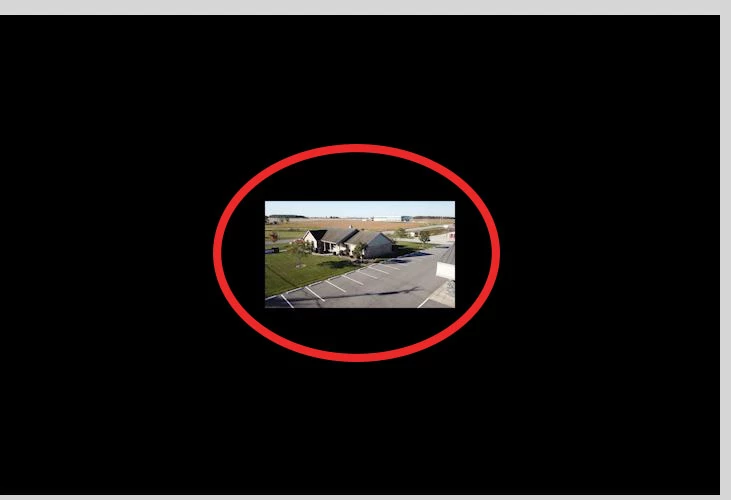
here is the html code.  

<!doctype html>
<html>
<head>
 <meta charset="utf-8">
 <title>more info</title>
 <link href="OEP.css" rel="stylesheet" type="text/css">
 <style type="text/css">
	 video {
		 position:relative;
		 height:50;
		 width:50;
	 }
 </style>
</head>

<body>
<div class="blue">
  <br />
</div>	
<div class="grey">
	<br />
</div>	
	<div id="oep">
	Ossian Enterprise Park	
</div>
<div class="grey">
	<br />
</div>
<div class="blue">
	<br />
</div>	
<nav>
	<h4><a href="homeTest.html">Home</a></h4><h4><a href="BusinessParkOptions.html">Options</a>	</h4>
	<h4><a href="Building_Site_Overview.html">Building Site Overviequ</a></h4>
</nav>	
	<h1>sample1</h1>
<video autoplay>
	<source src="assets/Sample.mp4" type="video/mp4">
	</video>
	<h1>Sample2</h1>
<video autoplay>
<source src="assets/SampleB.mp4" type="video/mp4">
</video>		
	<h1>Sample3</h1>
<video autoplay>
<source src="assets/SampleC.mp4" type="video/mp4">
</video>	
<footer style="float:none">
  building_overview building_overview
  <div id="BDH">
	<h1>Business Done Here!</h1> 
</div>	
<img src="assets/footer1.jpg" width="900" height="84" alt=""/> </footer>
</body>
</html>
    This topic has been closed for replies.

    2 replies

    Nancy OShea
    Community Expert
    Community Expert
    February 11, 2021

    Hi @mindyt743513,


    NOTE:  Autoplay won't work in most devices unless volume is muted. 


    NOTE 2: Autoplay assumes everyone wants to consume excess bandwidth which is rarely true.  For this reason many people like me have autoplay blockers enabled to stop it.  Gratuitous media should never be forced on people.  It must be their choice to view it or not.


    Try this code in a new document and see what you think:


    <!doctype html>
    <html lang="en">
    <head>
    <meta charset="utf-8">
    <title>Video Demo</title>
    <meta name="viewport" content="width=device-width, initial-scale=1">
    <meta http-equiv="X-UA-Compatible" content="IE=edge">
    <style>
    body {
    margin: 0;
    background: black;
    }
    .video-wrapper { position: relative; }
    .video-wrapper > video {
    width: 100%;
    vertical-align: middle;
    }
    .video-wrapper > video.has-media-controls-hidden::-webkit-media-controls {
    display: none;
    }
    .video-overlay-play-button {
    box-sizing: border-box;
    width: 100%;
    height: 100%;
    padding: 10px calc(50% - 50px);
    position: absolute;
    top: 0;
    left: 0;
    display: block;
    opacity: 0.95;
    cursor: pointer;
    background-image: linear-gradient(transparent, #000);
    transition: opacity 150ms;
    }
    .video-overlay-play-button:hover { opacity: 1; }
    .video-overlay-play-button.is-hidden { display: none; }
    </style>
    </head>
    <body>
    <div class="video-wrapper">
    <!--CHANGE POSTER IMAGE AND VIDEO TO YOUR OWN-->
    <video poster="path/YOUR_POSTER_IMAGE.jpg" muted="muted" autoplay="autoplay" >
    <source src="path/YOUR_VIDEO.mp4" type="video/mp4">
    </video>
    </div>
    
    
    <script>
    //Invoke the play button on load
    var videoPlayButton,
    videoWrapper = document.getElementsByClassName('video-wrapper')[0],
    video = document.getElementsByTagName('video')[0],
    videoMethods = {
    renderVideoPlayButton: function() {
    if (videoWrapper.contains(video)) {
    this.formatVideoPlayButton()
    video.classList.add('has-media-controls-hidden')
    videoPlayButton = document.getElementsByClassName('video-overlay-play-button')[0]
    videoPlayButton.addEventListener('click', this.hideVideoPlayButton)
    }
    },
    formatVideoPlayButton: function() {
    videoWrapper.insertAdjacentHTML('beforeend', '\
    <svg class="video-overlay-play-button" viewBox="0 0 200 200" alt="Play video">\
    <circle cx="100" cy="100" r="90" fill="none" stroke-width="15" stroke="#fff"/>\
    <polygon points="70, 55 70, 145 145, 100" fill="#fff"/>\
    </svg>\
    ')
    },
    hideVideoPlayButton: function() {
    video.play()
    videoPlayButton.classList.add('is-hidden')
    video.classList.remove('has-media-controls-hidden')
    video.setAttribute('controls', 'controls')
    }
    }
    videoMethods.renderVideoPlayButton()
    </script>
    </body>
    </html>


    Nancy O'Shea— Product User & Community Expert
    Inspiring
    February 13, 2021

    I finally got it to size  right!  

    Nancy OShea
    Community Expert
    Community Expert
    February 13, 2021

    I finally got it to size  right!  

    ============

    I guess we'll have to take your word for it 🙂

    Glad you got it sorted.


    Nancy O'Shea— Product User & Community Expert
    Nancy OShea
    Community Expert
    Community Expert
    February 11, 2021

    What is the native video's height and width in pixels?

    I ask because if you upscale it too much with CSS, the results will be distorted.


    Nancy O'Shea— Product User & Community Expert
    Inspiring
    February 11, 2021

    height is 720width is 1280

    I need it smaller 

    Nancy OShea
    Community Expert
    Community Expert
    February 11, 2021

    How small?


    Nancy O'Shea— Product User & Community Expert