geo_coy
Known Participant
February 16, 2020
Answered

Viewing my Developing Website on multiple devices.

  • February 16, 2020
  • 3 replies
  • 6334 views

I have a Dreamweaver website under construction at home.   Adobe Tutorial seems to be saying if I type in the web address I should be able to view my website on different devices.  The website is not on a public server, im working from home.  And I do have home ATT WiFi.  But typing the address does not pull up the site.  Do i need to do something special to my home WiFi to access this web address?
BTW who put the freaky face on my emoji?


This topic has been closed for replies.
Correct answer Nancy OShea

Isnt this the same thing Adobe Muse uses.  I seem  to recall it was using a local server?


"Isn't this the same thing Adobe Muse uses. I seem to recall it was using a local server?"

No.  If you used Muse, you probably uploaded files to Business Catalyst servers.   That's not the same thing at all.  


"http://127.0.0.1:52073/prevew/app/index.html"

That's a temporary virtual address from  Real-Time Preview.  You can't copy & reuse that address because it's not real. 


You don't NEED a local testing server to work with DW.  But it's helpful for some things. I have WAMP server installed on my computer hard drive.  And my site folder resides in the default web folder -- www.   See screenshot.
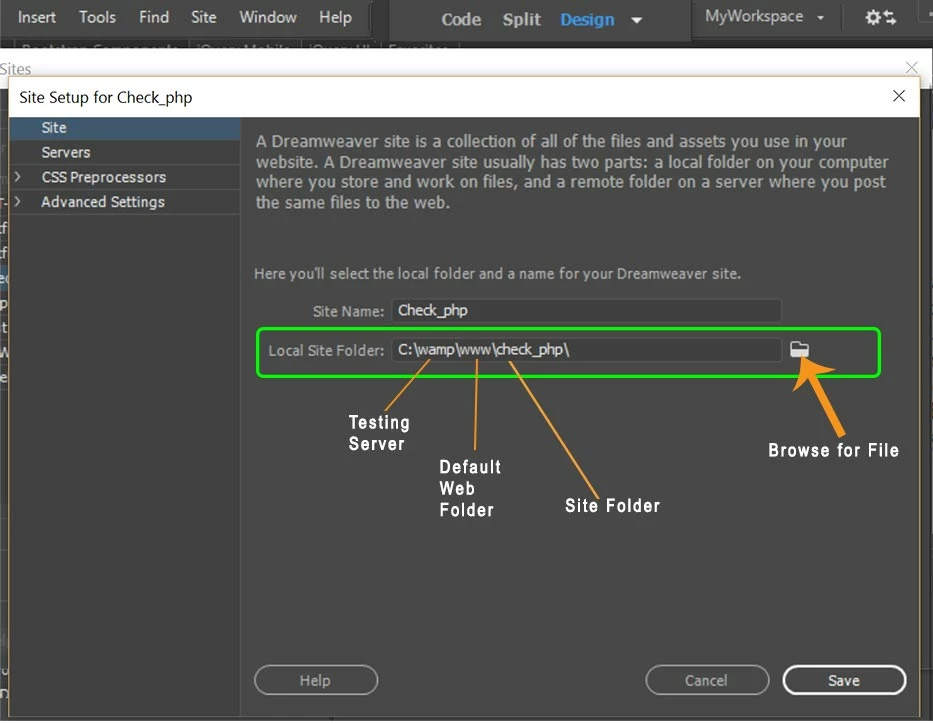
 

When I preview in browser, the address points to my local testing server on the localhost.

http://localhost/site_name/filename.php


When you start creating dynamic websites, you will need a local testing server.  In the meantime, you don't need one for static sites.  But as Jon said, having one set-up gives you an alternative to Device Preview which sometimes works and sometimes doesn't.


 

3 replies

Jon Fritz
Braniac
February 17, 2020

If you have a testing server set up, you don't have to go through Adobe to get a QR to attach to your site through their servers.

You can just use your machine's local ip, followed by the root folder of your site, and you'll be able to connect to it from any device on the same network, no scanning codes or Adobe involvement necessary.

geo_coy
geo_coyAuthor
Known Participant
February 17, 2020

Just to be clear this s what you mean

Example: "192.168.1.70\C:\Users\George\Documents\DreamWeaver for Charles\ResponsiveDesignFinished2\Complete"
This fails even when I use it on gthe same machine I am working on

geo_coy
geo_coyAuthor
Known Participant
February 17, 2020

"http://127.0.0.1:52073/prevew/app/index.html"

This is the address my computer shows when I preview it on my machine, but if I paste this into another pc it fails
 I deliberately change some characters but the formis correct

Nancy OShea
Braniac
February 16, 2020

Real-Time  &  Device Preview  are typically launched with the Real-Time Preview icon.  The  QR code is for mobile devices to read, no typing needed.   See help article below.

https://helpx.adobe.com/dreamweaver/using/device-preview.html


For troubleshooting, please refer to this other article.

https://helpx.adobe.com/dreamweaver/using/device-preview-troubleshooting.html


Nancy O'Shea— Product User, Community Expert & Moderator
BenPleysier
Braniac
February 16, 2020
Wappler is the DMXzone-made Dreamweaver replacement and includes the best of their powerful extensions, as well as much more!
geo_coy
geo_coyAuthor
Known Participant
February 16, 2020

Works Great, Thanks