

higgsyd
Inspiring
October 28, 2020
Answered

Why does Google return results to sites that no longer exist?

  • October 28, 2020
  • 3 replies
  • 637 views

Most pages on my website have a search box. If a user enters a search term here, a list of Google results is returned.


For example, go to a page on the site that has the search bar (some more recently updated pages in this site do not have the Search bar). Such a page is  https://www.higgsy.co.uk/binning_sophia_olivia.php

And enter a search. In this example I searched for "Edward". Many links are returned.
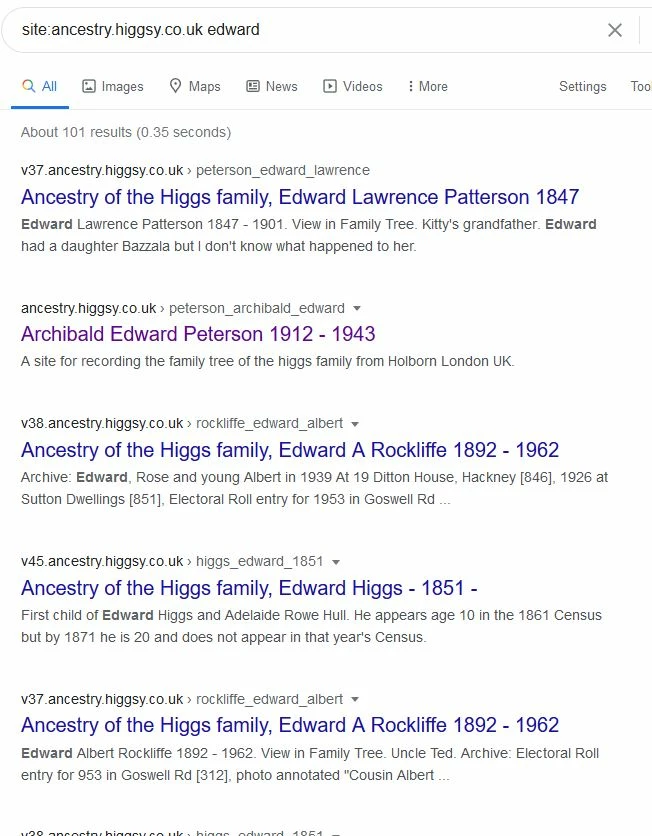
 

But all the links with a prefix of the form vnn, such as v37 and v38 and v45 go nowhere because they all point to early versions of my website that were once live and online.    My live site is v55 which is published as  https://ancestry.higgsy.co.uk


I have removed all the source files for these early sites off my hosting server.  I have also deleted those domain names.


Is there any way to suppress these results from Google? many thanks

    This topic has been closed for replies.
    Correct answer higgsyd

    Oh dear! redirect at server level, canonical URLs, site Maps, backlinks and even a database! I am frozen into inaction and worry about all these good suggestions. However I have decided to implement a course of action which none of you kind folks suggested - I will remove the search box from the site! I will come back to this question and your kind suggestions at a later date thank you all very much

    3 replies

    Legend
    October 28, 2020

    Google is a poor option for performing an internal website page search. If your names are held in a database then you should perform a search of the database NOT an external source, which as you have found out is never current and will annoy anyone on your website performing a search of it.

    I had the same situation  years ago, after taking over a website for a client, most annoying indeed for users of that website. Eventually when the website was re-designed I put all the information into a database and searched that....only current information guaranteed, is returned.


    higgsyd
    higgsydAuthorCorrect answer
    Inspiring
    October 29, 2020

    Oh dear! redirect at server level, canonical URLs, site Maps, backlinks and even a database! I am frozen into inaction and worry about all these good suggestions. However I have decided to implement a course of action which none of you kind folks suggested - I will remove the search box from the site! I will come back to this question and your kind suggestions at a later date thank you all very much

    Nancy OShea
    Community Expert
    Community Expert
    October 28, 2020

    Do you use canonical URLS and have an XML site map on your server? 


    Use Google Console to tell Google bot where your site map is located and request site re-indexing.   When Google detects a URL that's 404 not found, it will eventually drop that URL from search result pages (SERPs), although it may take 3-5 weeks to see results.  If you redirect the old URL to a new URL, Google won't know that it's 404 and should be dropped from SERPs.


    Nancy O'Shea— Product User & Community Expert
    Legend
    October 28, 2020

    'Use Google Console to tell Google bot where your site map is located and request site re-indexing'.


    In my experience Google doesnt always do a good job at re-indexing a wesbite. Some of my clients have a few dead pages still listed from years back and I cant be asked to request a removal by Google, just dont use it for internal website searches would be my advice.


    Problem with Google is it not only lists current information but also information which is no longer relative. Its a time-consuming art-form trying to sift through the crap.

    Nancy OShea
    Community Expert
    Community Expert
    October 28, 2020

    'Some of my clients have a few dead pages still listed from years back "

    Google does what Google does.  Fortunately, I don't have that problem.  But I keep my XML site maps up to date which helps alleviate that problem.


    Nancy O'Shea— Product User & Community Expert
    Jon Fritz
    Community Expert
    Community Expert
    October 28, 2020

    There's not really much you can do with Google to fix that. Nothing that would be instant, or even "reasonably quick"  anyway.

    It's best to create a redirect at the server level, to push viewers to your existing site when they type something in or click through to a page that no longer exists.

    It's not very difficult to do.

    https://support.google.com/webmasters/answer/93633?hl=en