
AAMEE CS6 and "Complete Registration" Prompt
I'm building a Mac CS6 distribution with AAMEE 3 and am encountering an issue when a suite product is first launched. While the product does run and doesn't require a serial number or registration, it presents a fleeting Growl-like prompt where it says "Complete Registration. Complete your Adobe ID profile and register your product."
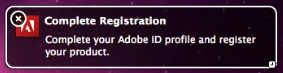
Here's the steps to reproduce:
- Build a CS6 trial package of Master Collection and InCopy with the following options set:
- <Checked> End User License Agreement
- <Checked> Adobe Product Improvement Program
- <Checked> Adobe Tutorial Content in Trial Mode
- <Unchecked> Disable all Adobe AIR installers, including Adobe Help Manager
- Conflicting processes: Abort installations
- Adobe Updater: Adobe Update Manager is disabled (IT manages update distribution)
- Installation's Location: Deploy to default application directory
- Build AAMEE CS6 serialization files for Master Collection and InCopy
- On a second computer, install the Master Collection and InCopy trial pkgs
- Install/execute the Master Collection and InCopy serialization files
- Log out of the computer which has CS6 installed and log in as a non-administrator
- Open a member of a suite (in this case there are two products--Master Collection (anything but InCopy) and InCopy)
- See the prompt to Complete Registration
Is there a way to disable this prompt?
Thanks,
- Patrick


 AdChoices