Participating Frequently
Jul 27, 2019 6:14 AM UTC
Answered

Access to cc apps as an Admin. of Team Account?

Okay.. so I had my own subscription to cc but cancelled it when I purchased a team plan for my lab at school. How do I get my machine to recognize me as the admin of the new account and allow me to use my cc apps?  Adobe ID is the same for both accounts?

This topic is closed to new replies. Start a new post to keep the conversation going.
Vikrant R
Vikrant RCorrect answer
Inspiring
Jul 29, 2019 4:07 AM UTC

By default, Admins don't have access for Products and services. You'll need to visit the https://adminconsole.adobe.com to manage your Team. Using the Admin Console, you'll need to Assign yourself a license, to the product to which you require access. You can use the Assign Users link on the Overview tab.
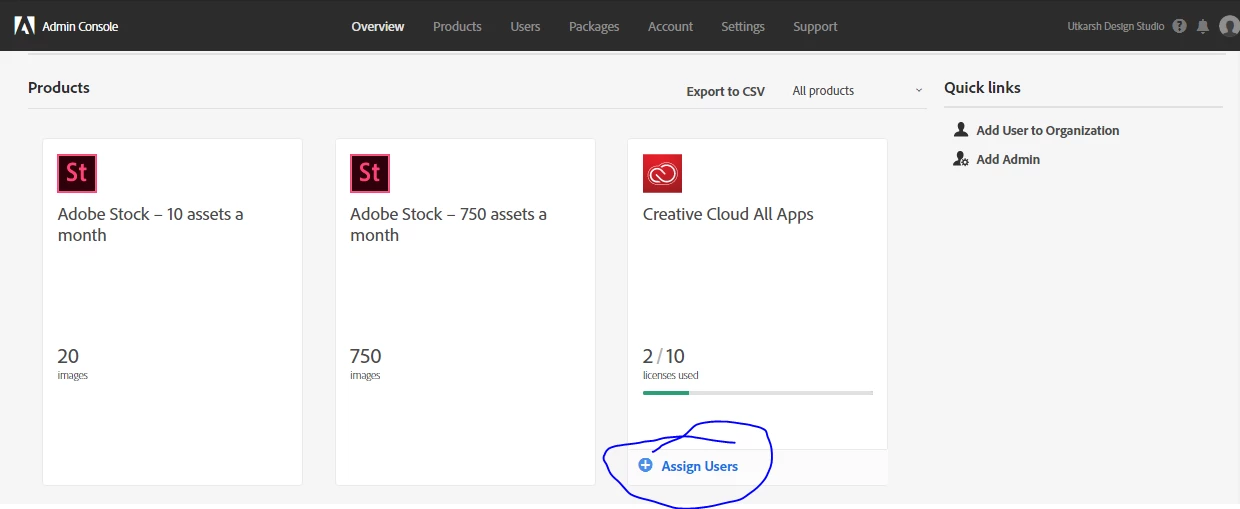
After you've provided access,if your Creative Cloud apps don't work right away, sign out and Sign in again. in any app, such as Photoshop choose Help > Sign Out.

Also, as you're new to teams, have a look at the Help articles at Teams Learn & Support.

All the best, and if you have any additional questions, let us know.

3 replies

Vikrant R
Vikrant RCorrect answer
Inspiring
Jul 29, 2019 4:07 AM UTC

By default, Admins don't have access for Products and services. You'll need to visit the https://adminconsole.adobe.com to manage your Team. Using the Admin Console, you'll need to Assign yourself a license, to the product to which you require access. You can use the Assign Users link on the Overview tab.

After you've provided access,if your Creative Cloud apps don't work right away, sign out and Sign in again. in any app, such as Photoshop choose Help > Sign Out.

Also, as you're new to teams, have a look at the Help articles at Teams Learn & Support.

All the best, and if you have any additional questions, let us know.

Translate
Participating Frequently
Jul 30, 2019 3:42 AM UTC

​There is no ​"Assign User" tab???

Translate
Chre
Inspiring
Jul 30, 2019 6:29 AM UTC

Hi all, hi christianpdupont​,

I think it is from "Users", on top of your window:

Translate