
Participating Frequently
February 28, 2018
Question

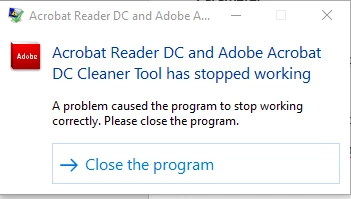
Acrobat Reader DC and Adobe Acrobat DC Cleaner Tool has stopped working...

  • February 28, 2018
  • 1 reply
  • 19864 views

I am in the process configuring an uninstaller for Adobe Reader in case we have failed installation within our company.  I found your cleaner tool, which is exactly what I needed!

However, after the tool completes the uninstall process (logs have finished being written), it crashes.  I have tested this on multiple computers.  Even if I run the tool without any adobe software installed, whenever it completes and you hit "Finish", it crashes.  If I run it silently, it crashes.

My machine is a Precision 3520 with Windows 10 1709.  However, this happened with a VM running 1709 as well.

Has anyone else experienced this?
This topic has been closed for replies.

1 reply

EnterpriseHelp
Inspiring
February 28, 2018

What are the product versions you are trying to remove?

Participating Frequently
February 28, 2018

I have been testing the tool by removing 18.011.20035.

The removal appears to be successful and the logging ends.

Like I mentioned before, even if I run the tool when NO adobe product is installed, it still crashes at the end once you click "Finish."

.

Participating Frequently
March 2, 2018

Sounds like you're ok then. I would recommend using the supported cmd line for silent uninstalls: Windows cmd line and msiexec — Enterprise Administration Guide

The tool on LABs is posted on "LABs" for a reason: While they are useful utilities, they are not the center of development focus. Note the LABs page starts with this text:

"Here you will find a summary of the Acrobat-related prerelease and experimental technologies available on Adobe Labs"


Thank you for the input!

I was just interested since it seemed like an "all in one" solution for my mass-uninstall needs.  Hopefully, someone can come back to this app and do a little extra development.  These are great for enterprise software admins!  If I find out exactly what breaks it on my configuration, I will gladly update my post.