Participant
October 18, 2017
Answered

Acrobat Reader DC SCCM Deployment - Error Code 0x673(1651)

  • October 18, 2017
  • 1 reply
  • 12206 views

I'm trying to create a deployment via SCCM of the latest version of Adobe Acrobat Reader DC for our organization, and I'm having some difficulty getting it to work properly.  Here are the steps I've taken:

  • Downloaded the executable for version 2017.012.20093 from Adobe's enterprise webpage and the patch for the latest release (2017.012.20098).
  • Extracted the executable to a new folder.
  • Opened the "AcroRead.msi" in Adobe Customization Wizard DC, customized the installer to my desired settings, and generated a transforms file named "AcroRead.mst" to the extracted folder.
  • Removed the "AcroRdrDCUpd1701220093.msp" from the extracted folder and replaced it with "AcroRdrDCUpd1701220098.msp".
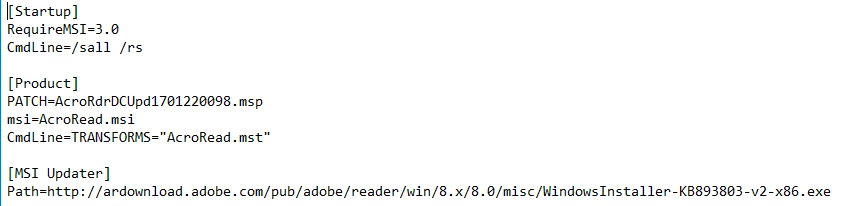
  • Modified "setup.ini" as follows:
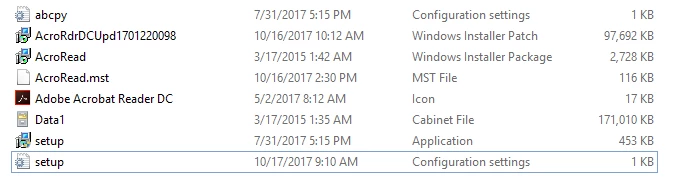
  • Copied the files to my SCCM application deployment share, which contains the following files:
  • Created a device collection and application in SCCM, distributed the content to my distribution points and deployed it.
  • The command line is as follows:
    • msiexec /i "AcroRead.msi" TRANSFORMS="AcroRead.mst" PATCH="\\<Deployment Share File Path>\AcroRdrDCUpd1701220098.msp" /q
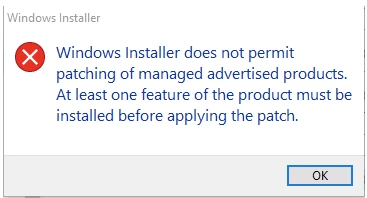
  • Installation via SCCM is successful, but only on workstations that have a previously installed version of Adobe Acrobat Reader DC.  Deployments to workstations that do not currently have an Adobe Reader program installed fail with the following error message:
  • Which translates to:
  • This tells me that my application is only installing the patch (AcroRdrDCUpd1701220098.msp) instead of the .msi followed by the .msp.  As such, the installed application does not include the custom settings which I configured for it in the AcroRead.mst.
  • I also tried running "setup.exe" from an administrative command prompt on my local machine, but it produced this error message:
I'd really appreciate any help or advice.

This topic has been closed for replies.
Correct answer danielr90421805

The issue ended up being some underlying corruption on two of the machines that I was testing this on which consistently produced this error message when run (if I removed the silent switch from the configuration file):

This would happen running "setup.exe" or calling the .msi, transform and patch file within the command line itself.  So my setup.ini file was configured correctly and my original SCCM application/deployment was as well.  It was just simply failing on two particular workstations I was testing it on initially.  For all other workstations I was able to successfully deploy this application (manually and via SCCM) using the following command:

setup.exe 

1 reply

Participant
October 19, 2017

I just rebuilt everything from scratch and I can get it to install the .msi followed by the .msp by running the following command from an elevated command prompt on multiple local machines:

Text

msiexec /i "AcroRead.msi" /q PATCH="\\<Share Path>\AcroRdrDCUpd1701220098.msp" TRANSFORMS="AcroRead.mst" 

This is the exact same command line switch that I am using in the SCCM application deployment, but it is fails on every machine I test deploying it that way with error message 0x673(1651).

danielr90421805AuthorCorrect answer
Participant
October 24, 2017

The issue ended up being some underlying corruption on two of the machines that I was testing this on which consistently produced this error message when run (if I removed the silent switch from the configuration file):

This would happen running "setup.exe" or calling the .msi, transform and patch file within the command line itself.  So my setup.ini file was configured correctly and my original SCCM application/deployment was as well.  It was just simply failing on two particular workstations I was testing it on initially.  For all other workstations I was able to successfully deploy this application (manually and via SCCM) using the following command:

setup.exe