LoriBelleDeFurio
Adobe Employee
Adobe Employee
March 13, 2012
Answered

acrotray.exe is hogging resources. help!

  • March 13, 2012
  • 1 reply
  • 23966 views

acrotray.exe is using TSR resources in Windows 7. What are my options?

This topic is closed to new replies. Start a new post to keep the conversation going.
Correct answer LoriBelleDeFurio

To disable acrotray.exe  from startup simply do the following:

  1. Go to Start>RUN
  2. Type “msconfig”
  3. Hit the Enter/Return key
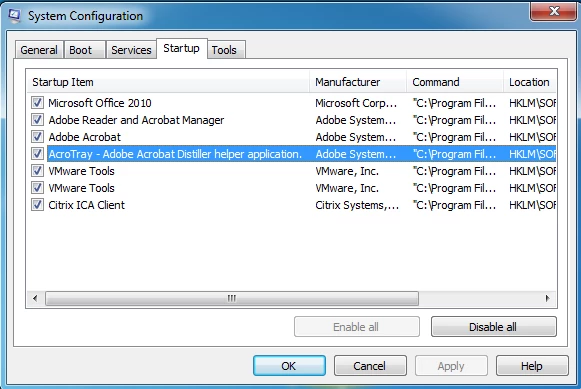
  4. In the “System Configuration” window, select “Starup”
  5. Go down to the item on the list labeled “AcroTray – Adobe Acrobat Distiller helper application.”

6.  Deselect the check box
7.  Click the OK button
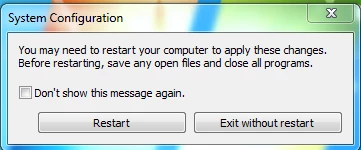
8.  In the “System Configuration” dialog box select “Restart” 


1 reply

LoriBelleDeFurio
Adobe Employee
LoriBelleDeFurioAuthorCorrect answer
Adobe Employee
March 13, 2012

To disable acrotray.exe  from startup simply do the following:

  1. Go to Start>RUN
  2. Type “msconfig”
  3. Hit the Enter/Return key
  4. In the “System Configuration” window, select “Starup”
  5. Go down to the item on the list labeled “AcroTray – Adobe Acrobat Distiller helper application.”

6.  Deselect the check box
7.  Click the OK button
8.  In the “System Configuration” dialog box select “Restart”