Participant
July 29, 2019
Answered

Add Computer to a SDL Profile by AD OU

  • July 29, 2019
  • 1 reply
  • 822 views

Hello!

I am trying to configure profiles for SDLs that should add PCs by their AD OU, but can't get it to work.

Basically I copy the value of the distinguishedName AD-attribute (CN=pc001,OU=clients,DC=contoso,DC=com) and paste it into the profile-permissions (added "" make no difference). I also tried without the CN, still getting the PC assigned to the default profile.

If I create the report from the default profile, the OU is in there, the exact same way.

Another weird thing I noticed is that the formatting of the AD-OU-string gets messed up and formatted like this:

CN=pc001

OU=clients

DC=contoso

DC=com

Was anybody successful using the Associated Machnies by AD OUs?

Thanks in advance!

This topic has been closed for replies.
Correct answer peppe_adobe

Hi! Try adding just the names of the leaf OUs, one per line.

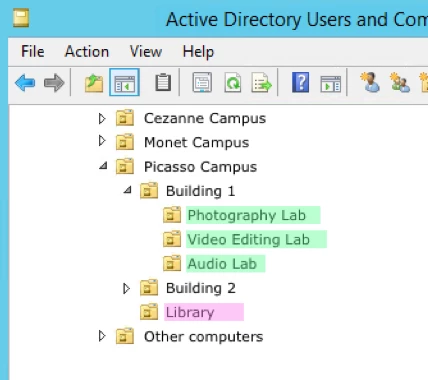
For example, if you want to create an SDL profile for the 3 labs in Building 1:

... then you would enter the following in the SDL profile permissions (one per line, without any quotes):

Photography Lab

Video Editing Lab

Audio Lab

Let us know if that works for you. Thanks!

1 reply

peppe_adobe
Adobe Employee
peppe_adobeCorrect answer
Adobe Employee
July 29, 2019

Hi! Try adding just the names of the leaf OUs, one per line.

For example, if you want to create an SDL profile for the 3 labs in Building 1:

... then you would enter the following in the SDL profile permissions (one per line, without any quotes):

Photography Lab

Video Editing Lab

Audio Lab

Let us know if that works for you. Thanks!