


Adobe Acrobat 9, 10, 11 Pro Uninstall issues
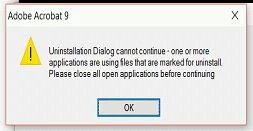
I am trying to uninstall Adobe Acrobat 9, 10, 11 Pro for one of my client through silent Batch file but the product is not getting uninstalled. I tried to uninstall manually on one of client PC and got the prompt "Uninstallation Dialog cannot continue. One or more applications are using files that are marked for uninstall. Please close all open applications before continuing." Please let me know the forceful process to uninstall the application.
Please find the batch file content that I am using -
@4628292 off
MsiExec.exe /X {AC76BA86-1033-0000-BA7E-100000000002} /qn REBOOT=Suppress
MsiExec.exe /X {AC76BA86-1033-0000-BA7E-000000000003} /qn REBOOT=Suppress
MsiExec.exe /X {AC76BA86-1033-0000-7760-000000000003} /qn REBOOT=Suppress
MsiExec.exe /X {AC76BA86-1033-0000-BA7E-000000000004} /qn REBOOT=Suppress
MsiExec.exe /X {AC76BA86-1033-F400-7760-000000000004} /qn REBOOT=Suppress
MsiExec.exe /X {AC76BA86-1033-F400-7761-000000000004} /qn REBOOT=Suppress
MsiExec.exe /X {AC76BA86-1033-F400-7760-000000000005} /qn REBOOT=Suppress
MsiExec.exe /X {AC76BA86-1040-7D70-7760-000000000005} /qn REBOOT=Suppress
MsiExec.exe /X {AC76BA86-1033-FFFF-7760-000000000006} /qn REBOOT=Suppress
MsiExec.exe /X {AC76BA86-1033-FFFF-BA7E-000000000006} /qn REBOOT=Suppress
MsiExec.exe /X {AC76BA86-1033-0000-0064-0003D0000004} /qn REBOOT=Suppress
MsiExec.exe /X {AC76BA86-7AD7-1033-7B44-A80000000002} /qn REBOOT=Suppress
# Please revert ASAP.
 AdChoices