


Participant
Oct 27, 2026 6:49 PM UTC
Question

Adobe Acrobat Classic 2024 LTSC 24.001.30429 crashing after installing Windows Server 2025 October update (KB5126646) (26100.33650)

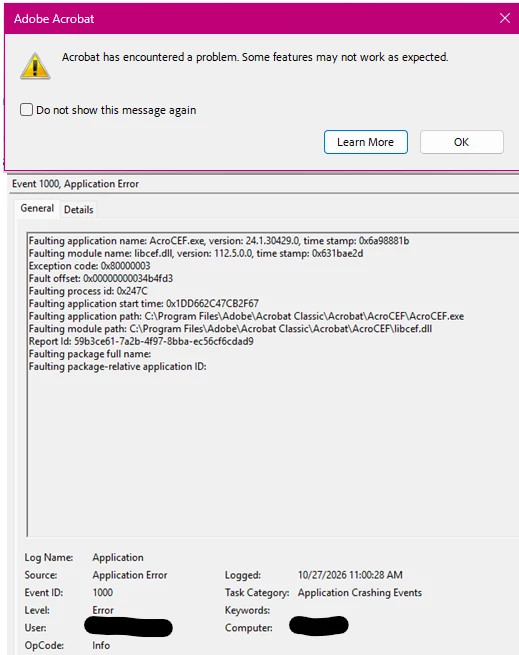
After installing October Updates, Acrobat crashes shortly after opening a PDF. It displays the message “Acrobat has encountered a problem. Some features may not work as expected.” it also logs event 1000 for AcroCEF.exe listing libcef.dll as the faulting application. This happens for all users on the RDS server. It seems to be similar behaviour to the known issue introduced in a Windows Server 2022 update (KB5034129), but the remediation for that issue does not seem to work this time around. 


    16 replies

    Community Manager
    Nov 5, 2026 9:16 AM UTC

    Hi all, 

    We would like to provide an update: a bug has been reported regarding this issue.
    The product engineering team is currently assessing the situation internally. In the meantime, we would appreciate your assistance in providing the following logs, as they will help expedite the triaging process:

    Diagnostic logs: Use diagnostic tool to collect logs, and share the log ID with us. For more information on downlading and using the tool, please visit here: https://www.adobe.com/devnet-docs/acrobatetk/tools/Labs/acromonitor.html

    Crash logs: Also, kindly share the crash logs with us, for information on how to collect logs, please visit here: https://helpx.adobe.com/acrobat/kb/collect-logs-crash-freeze.html
     

    We will keep this discussion updated as soon as we have more details to share.


    Thanks,
    Tariq

    Translate
    Participant
    Nov 2, 2026 3:34 PM UTC

    Having the same issue here with Server 2025 RDS and both Adobe Acrobat reader (32 bit)  and Adobe Acrobat 64 bit in ReducedModeEnforced feature lockdown mode.

    WinDbg analysis confirms the Adobe crash occurs in libcef.dll 
    Server: Windows Server 2025
    Adobe: 26.002.22031 x64
    Process: AcroCEF.exe --slMode
    CEF: libcef.dll 112.7.0.0
    Exception: 0xC000001D ILLEGAL_INSTRUCTION
    Instruction: UD2
    Fault offset: 0x34b4e34

    Translate
    Community Manager
    Nov 2, 2026 6:16 PM UTC

    Hi ​@Lucien36052086r9zn,

    Thanks for posting your WinDbg findings, and we’re really sorry you’re hitting this on your RDS server too. The libcef.dll version and fault offset are useful to have.

    We’ll check this with the team on our side and update the thread if we have anything to share.


    Please use diagnostic tool to collect logs, and share the log ID with us. For more information on downlading and using the tool, please visit here: https://www.adobe.com/devnet-docs/acrobatetk/tools/Labs/acromonitor.html

    Also, kindly share the crash logs with us, for information on how to collect logs, please visit here: https://helpx.adobe.com/acrobat/kb/collect-logs-crash-freeze.html

    Please let us know how it goes, we’re happy to assist further.


    Thanks,
    ^AV

    Translate
    Participant
    Nov 1, 2026 6:20 AM UTC

    I have the same exact problem with KB5126646 on Server 2025, same fault with AcroCEF.exe.

    Translate
    Community Manager
    Nov 2, 2026 6:18 PM UTC

    Hi ​@laszlon73966722,

    Thanks for letting us know, and we’re really sorry you’re seeing the same crash after KB5126646.


    Before discussing this with product engineering, please help us with the following logs:

    Use diagnostic tool to collect logs, and share the log ID with us. For more information on downlading and using the tool, please visit here: https://www.adobe.com/devnet-docs/acrobatetk/tools/Labs/acromonitor.html

    Also, kindly share the crash logs with us, for information on how to collect logs, please visit here: https://helpx.adobe.com/acrobat/kb/collect-logs-crash-freeze.html

    Please let us know how it goes, we’re happy to assist further.


    Thanks,
    ^AV

    Translate
    Participant
    Nov 2, 2026 6:26 PM UTC

    Was using latest 2024 LTSC - sorry, can’t tell you the precise version as I uninstalled it and now users have to rely on Reader until this is fixed.

    Translate
    Community Manager
    Oct 27, 2026 6:59 PM UTC

    Hi ​@Jovial_Serendipity0141,

    Thank you for reaching out, and we’re really sorry about the crashes. Having Acrobat fall over for every user on the RDS server right after a Windows update is a tough spot to be in.

    So we’re on the same page: since KB5126646 went onto your Windows Server 2025 machine (OS Build 26100.33650), Acrobat Classic 2024 (24.001.30429) crashes shortly after a PDF is opened. Event 1000 shows AcroCEF.exe with libcef.dll as the faulting module, and the remediation from the Windows Server 2022 issue isn’t helping this time.

    Two pointers from our end. The technical requirements for Acrobat Pro 2024 list Windows Server 2016, 2019 and 2022 (64-bit) as the server versions: https://helpx.adobe.com/acrobat/desktop/get-started/learn-the-basics/tech-requirements-acrobat-pro-2024.html

    We also have an article on AcroCEF and RdrCEF process errors. It covers ending the AcroCEF processes, checking folder permissions, adding Acrobat as an exception in your security software, and Help > Repair installation, plus a clean reinstall with the Adobe Cleaner Tool. Please follow the steps in order: https://helpx.adobe.com/acrobat/desktop/troubleshoot/performance-issues/app-process-errors.html

    Have you already been through those steps, and if so, did anything change in how Acrobat behaves?

    Please let us know how it goes, we’re happy to assist further.

    Thanks,
    ^AV

    Translate
    Participant
    Oct 27, 2026 7:52 PM UTC

    Thank you, AV

    Hopefully Windows Server 2025 not being on the supported OS list is an oversight on Adobe’s part since we have been using it for almost a year. Since they list Windows 11, which is the base OS for Server 2025 as a supported OS, I do not suspect this is the issue. We reviewed the help link you provided before posting to the forum, but the AcroCEF and RdrCEF processes are crashing and closing rather than hanging. Also, we have reviewed the permissions for the folders listed in the article and compared them to our working Server 2025 instance that does not have the October updates and they are identical. 

    The errors we are receiving seem to point ot libcef.dll interaction with the changes made to the OS being the issue. We have ran a repair of Acrobat on the server experiencing the issue but it did not have any effect. 

    How do you recommend we open a ticket with Adobe?

    Translate
    Community Manager
    Oct 27, 2026 8:18 PM UTC

    Hi ​@Jovial_Serendipity0141,

    Thank you for the detailed follow-up, and we’re really sorry this is still holding up your RDS users. You’ve already covered what that article asks, with the repair, the permissions comparison against your working Server 2025 instance and the earlier remediation, so we won’t send you back through it. Thanks as well for flagging the OS list.

    Since the crash points to libcef.dll after the October update, it needs a closer look at your environment. Because your organization is on a Teams plan, you can open a case from Admin Console > Support. If someone else manages the Admin Console for you, they can open it on your behalf. It would help to include the Event 1000 details you shared here, the steps you’ve already tried, the comparison with your working Server 2025 instance, and a link to this thread.

    We’ll also check this with the team on our side, and we’ll update this thread if there’s anything useful to share.

    Please let us know how it goes, we’re happy to assist further.

    Thanks,
    ^AV

    Translate