


Participant
Dec 27, 2023 9:46 AM UTC
Answered

Adobe Acrobat Version identifiy

We have a lot installations of Adobe Acrobat - Reader / Standard and Pro.

With the renaming in the appziw.cpl we can't directly identifiy which Version / Typ is now installed / in use


We install Adobe Acrobat Reader over Chocolatey.org

Chocolatey Software | Adobe Acrobat Reader DC 2023.6.20380
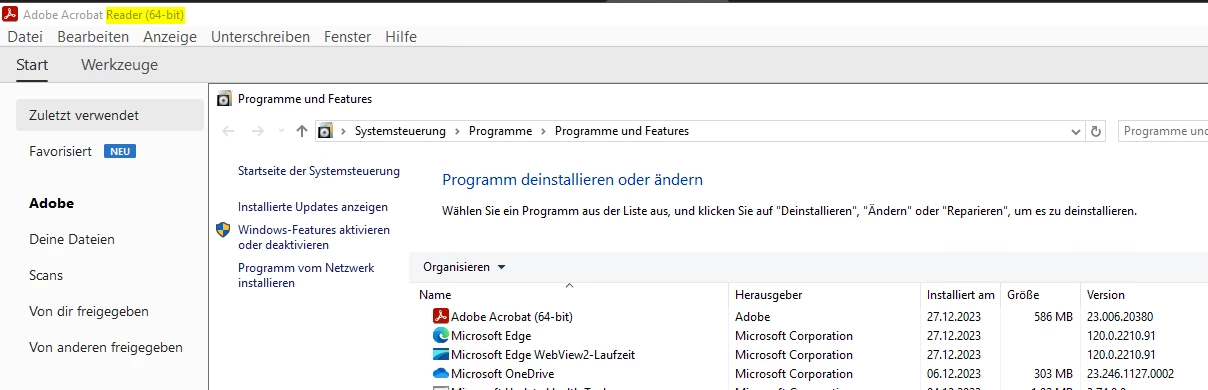
 

the other Adobe Acrobat Standard and Pro over the Adminconsole.adobe.com --> Package

 

So now, how can i find out which Version / Typ is in use?


Appendix A: Identifying Installs — Deployment Planning and Configuration (adobe.com)

This topic is closed to new replies. Start a new post to keep the conversation going.

4 replies

Participant
Jan 23, 2024 7:12 AM UTC

... but this is not my question. where can i see if it adobe acrobat (reader) odr the adobe acrobat DC Standard

Translate
Kevin Stohlmeyer
Community Expert
Community Expert
Dec 28, 2023 8:58 PM UTC

@defaultwawqbmtetakr This is not a supported method to install Adobe software. If you are an enterprise customer, you can create install packages and track versioning via the Admin Console.

Translate
Participant
Jan 3, 2024 6:39 AM UTC

what is not a supported method? Chocolatey? but this is nothing more then a normal Setup from the adobe Setup.exe ;

https://ardownload2.adobe.com/pub/adobe/acrobat/win/AcrobatDC/2300120093/AcroRdrDCx642300120093_MUI.exe


We have over 50 Customer Admin Console... i wish to know how can i see the difference on the device himself. i will tracker the Software / Version over our Computermanagement Solution


Translate
Kevin Stohlmeyer
Community Expert
Kevin StohlmeyerCommunity ExpertCorrect answer
Community Expert
Jan 3, 2024 1:46 PM UTC