Participant
April 21, 2025
Question

Adobe add in not working in MS word

  • April 21, 2025
  • 1 reply
  • 1626 views

Adobe add-in is not working for MS word.

It works fine with outlook and excel.

Both office and adobe is updated to last version.

Tried to re-install both but the issue still happens.


1 reply

Community Manager
April 21, 2025

Hi @Ji31013023s9c1,


Thank you for reaching out.

Based on your query, the Adobe add-in is not working in Microsoft Word, although it functions correctly in Outlook and Excel. Please confirm if this is the issue you need assistance with.

Here are a few steps you can try to resolve the issue:

  1. Check if the add-in is disabled in Word
    Open Microsoft Word.
    Go to File > Options > Add-ins.
    Look for Adobe PDFMaker Office COM Add-in.
    At the bottom of the window, ensure "Manage: COM Add-ins" is selected and click Go.
    In the list:

  • If Adobe PDFMaker is unchecked, check it and click OK.

  • If it is listed under Inactive or Disabled Add-ins, enable it.

  1. Repair Office installation
    Open Control Panel > Programs > Programs and Features.
    Select Microsoft Office and click Change.
    Choose Quick Repair. If the issue persists, try Online Repair (this requires an internet connection).

  2. Run Acrobat repair tool
    Open Adobe Acrobat.
    Go to Help > Repair Installation.
    Restart your computer after the repair completes.

  3. Re-enable the add-in manually via registry
    Press Windows + R, type regedit, and press Enter.
    Navigate to:
    HKEY_CURRENT_USER\Software\Microsoft\Office\Word\Addins\PDFMaker.OfficeAddin
    Find the LoadBehavior key and ensure it is set to 3. If not, right-click > Modify > enter 3.
    Restart Microsoft Word.

If none of the above solutions resolve the issue:

  • Ensure Adobe Acrobat is set as the default PDF handler.

  • Try launching Word as Administrator once and check if the add-in loads correctly.

Additionally, if you are using Microsoft 365, please try to enable the add-in by following the steps in this document:
https://adobe.ly/4jsgzRW

As per the account details, you are listed as an admin on the enterprise contract. Could you please confirm how many users are affected by this issue? If multiple users are impacted, we recommend checking the product profile assigned to them. It's possible that PDF services are disabled for that profile. You can refer to the following documentation for guidance:
https://adobe.ly/3Y8AlJo

Let us know if the issue persists after these steps. We're here to help.

Regards,
^AN

Participant
April 21, 2025

Hello,


Yes, it works fine, in other apps. It's just Word having this issue.

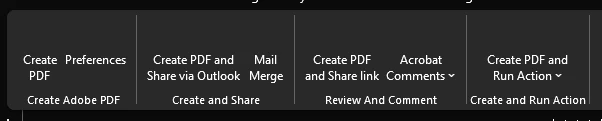
Issue still happens when i open word as admin. I can see the text but no icons.

Unforunately, i already tried all these steps and issue is still happening.

Currently, it is happening to about 30 people but most of them uses PDF daily for work.

Community Manager
April 21, 2025

Hi @Ji31013023s9c1,


Thank you for the update and confirmation.

Since the issue is affecting approximately 30 users and continues to occur in Word despite previous troubleshooting steps such as running the application as administrator, repairing installations, and applying registry modifications, this may indicate a broader compatibility issue or an enterprise-level configuration conflict.

Please review the product profile assigned to the affected users and verify whether any services are disabled for them. You may refer to the documentation shared in the previous message for guidance.

If all relevant services are enabled in the assigned product profile, consider enabling the add-in via the registry for a few users to test if this resolves the issue. Additionally, check if there are any Group Policies or administrative settings that could be disabling add-ins or restricting their functionality in Microsoft Word.

It is also important to confirm the visibility of the add-in in the Word ribbon. At times, ribbon customizations or rendering issues within Office may cause the Adobe Acrobat tab to be hidden even if the add-in is properly loaded.

To verify:

  • Open Microsoft Word

  • Navigate to File > Options > Customize Ribbon

  • Check if the Adobe Acrobat tab is selected under Main Tabs

If the tab is already enabled but still not visible, try creating a new local Windows user profile to determine if the issue is specific to the current Windows profile.

Please let us know the results of these checks so we can further assist.

Regards,
^AN
