Inspiring
January 21, 2017
Answered

Adobe CC 2017 Updates grayed out.

  • January 21, 2017
  • 12 replies
  • 7356 views

Hello,

I have problem updating CC2017 apps on PC (windows 10 64bit)

Creative cloud app reports that all installed apps are up to date even I know there are new updates. Example: I have AE 14.0.1 and there is 14.1 update available.

Tried to manually update Creative cloud app to last version and now it reports that only AE and ME are installed, PS,AI,AU,BR disappeared from installed list even they are installed and start normally.

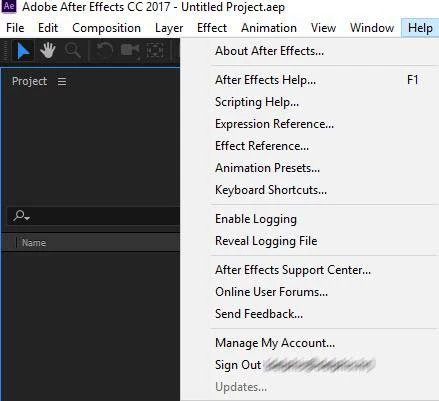
Also in every installed app, help/updates option is greyed out.
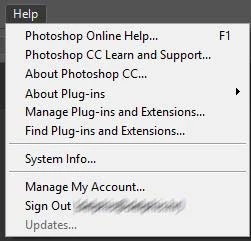
Bridge updates... reports this message:

User account is administrator type, and I also tried to start apps as administrator but no difference.

Any solution for this update problem ?

Thank you.

Delphis

    This topic has been closed for replies.
    Correct answer grgart72

    Jeff, in 2-3 months I plan to buy new PC and need to reinstall everything then anyway but I just checked you links and had idea with CCP and that was a nice solution:

    Backup-ed my system.

    Installed Creative Cloud Packager and made offline install package for 5 apps I use selecting updates only (4GB)

    Installed package and all installed apps are updated and funny thing, updates option is not ghosted anymore

    Only bad thing is that updates resets apps settings in AppData\Roaming\Adobe\ folder.

    Luckily I had backup-ed system and restored that folder, and had all my setting, file history, and all the rest as before update.

    So, I would recommend for everybody updating to backup that folder.

    I see that ccp made cache files in c:\Users\GrgArt\AppData\Local\Adobe\CCP\AdobeCCPCache\ of apps from package and it's 4GB. Can I delete that cache folder since I got everything updated and have that update package as separate files?

    Thank you again for the guides.

    Best regards,

    Z

    12 replies

    grgart72Author
    Inspiring
    January 25, 2017

    Jeff, I manage computer myself (freelancer).

    Uh, reinstall process would take a while with my internet connection and can't do it while projects are in production.

    Is there a way to download new updates manually and install them over installed apps?

    Thank you.

    Jeffrey_A_Wright
    Legend
    January 25, 2017

    Considering that updates are not currently enabled I would not encourage it Grgart72.  You can review your installation logs to see if there are any specific errors which may be preventing the updates from applying.  Details on how to review the installation logs was offered in message #6 of this discussion.

    You also indicated that you are the only individual managing your computer.  I would still encourage you to review Disable auto-updates in Adobe Creative Cloud and Adobe Creative Suite 6 apps as the steps listed could also be causing the updates to be disabled.

    Finally, if you are in the middle of a critical project then I would wait to apply the updates.  You are welcome to bookmark and update this discussion, when it is convenient, and you are not in the middle of time critical projects.

    grgart72AuthorCorrect answer
    Inspiring
    January 26, 2017

    Jeff, in 2-3 months I plan to buy new PC and need to reinstall everything then anyway but I just checked you links and had idea with CCP and that was a nice solution:

    Backup-ed my system.

    Installed Creative Cloud Packager and made offline install package for 5 apps I use selecting updates only (4GB)

    Installed package and all installed apps are updated and funny thing, updates option is not ghosted anymore

    Only bad thing is that updates resets apps settings in AppData\Roaming\Adobe\ folder.

    Luckily I had backup-ed system and restored that folder, and had all my setting, file history, and all the rest as before update.

    So, I would recommend for everybody updating to backup that folder.

    I see that ccp made cache files in c:\Users\GrgArt\AppData\Local\Adobe\CCP\AdobeCCPCache\ of apps from package and it's 4GB. Can I delete that cache folder since I got everything updated and have that update package as separate files?

    Thank you again for the guides.

    Best regards,

    Z

    jbm007
    Community Expert
    Community Expert
    January 21, 2017

    Close ACC , reboot your machine and try again.

    grgart72Author
    Inspiring
    January 21, 2017

    Tried that, does not work.

    Installed apps reapired on installed list, but still no updates possible.

    Also tried to delete AppData\Local\Adobe\OOBE\opm.db, noes not work.

    Jeffrey_A_Wright
    Legend
    January 23, 2017

    Grgart72 I am sorry you are facing difficulties updating the installed Adobe Applications.  What happened on your Windows 10 computer prior to loosing the ability to update the applications?  Did you run a system restore, system optimization software, or recover from a malicious software infection?

    If you create a new local administrator account are you still unable to update any of the installed applications?  Does the Adobe Creative Cloud desktop application list the installed applications properly?  You can find details on how to create a new local administrator account at https://helpx.adobe.com/x-productkb/global/create-local-administrator-account-windows.html.