


Adobe CC Desktop App Not Working
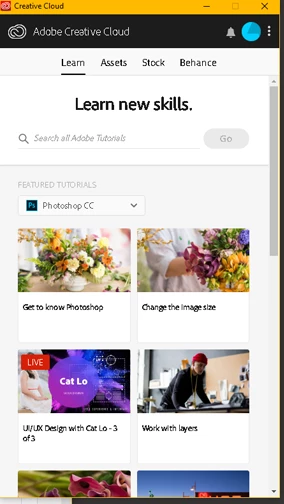
Hello, great and powerful Adobe Community Forums. I work for a government agency where we've just been supplied with new workstations as replacements for ailing machines. The Adobe CC Desktop App launches automatically on startup, but it looks different on the new installation and appears stripped of it's functionality. The image on the left (below) shows how it looks on our old machines, the image on the right is what we get now. As you can see, we're no longer able to install or update any Adobe software. We updated the Desktop App to version 4.7.0.400 after noticing the version that came installed was a 2017 release, but the problem persists.
When I click on "manage account" under my user I.D., my browser opens to an Adobe web page ("Adobe Account, Overview"). Clicking "Download Apps" brings me to what looks like an online version of the desktop app. All the Adobe CC apps are listed on the page with an "Install" button, even though several of these programs are already installed on my machine. However, when I try to install a listed program, I'm given a message that says, "You may need to request permission from your IT administrator to use this app or service." I also see that there are several different "plans" under our account, all of which appear to be various software bundles. Oddly, none of them match the load-out on my workstation.
Obviously, we need to be able to download and regularly update Creative Cloud apps. I'm trying to track down my IT Administrator, but I'm not sure exactly what I need to ask him for. I keep reading about "packages" and "elevated privileges", but I don't really understand what that means. I have admin rights to my machine. If anyone recognizes this problem and can tell me what I need to tell the folks in ITS, I'd really appreciate it.
Thanks!

 AdChoices