Participant
December 7, 2017
Answered

Adobe CC Serialization and Change install folder

  • December 7, 2017
  • 4 replies
  • 1162 views

Hi,

[Question 1]

We have a Adobe CC Education Enterprise Agreement.

I've created a install package with Creative Cloud Packager and deploy these apps (for example illustrator and photoshop.)

Is it necessary to run AdobeSerialization.exe on every computers we've deployed with Adobe apps?

[Question 2]

And is it possible to change install folder names?

I know i can change it by using the option: --ADOBEINSTALLDIR="C:\Program Files\MyPath"

Default path is "C:\Program Files\Adobe\Adobe Illustrator CC 2017", but would like to change the last folder for example "C:\Program Files\Adobe\Adobe Illustrator CC"

Is that possible?

    This topic has been closed for replies.
    Correct answer alisterblack

    Hi,

    If you are using educational device licenses then you can either bundle the license with the applications or you can roll out the license seperately. See Create packages with Adobe Creative Cloud for education device licenses

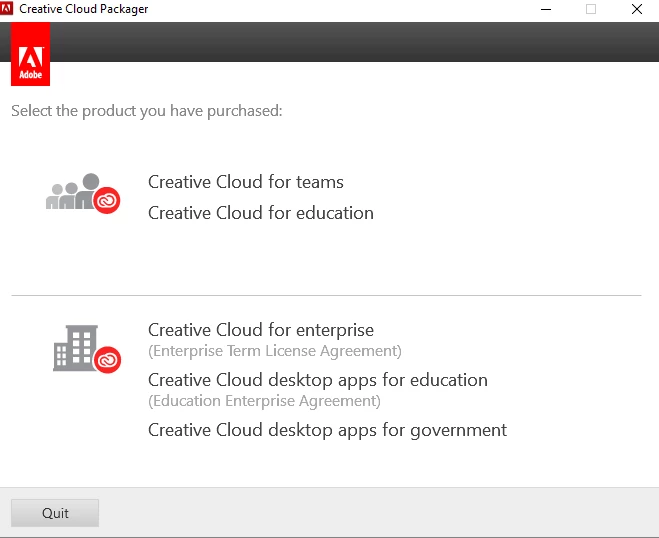
    If you are using a serial number then the same is true, although when logging in to the Creative Cloud Packager you should choose the Enterprise option rather than the education option (see below)

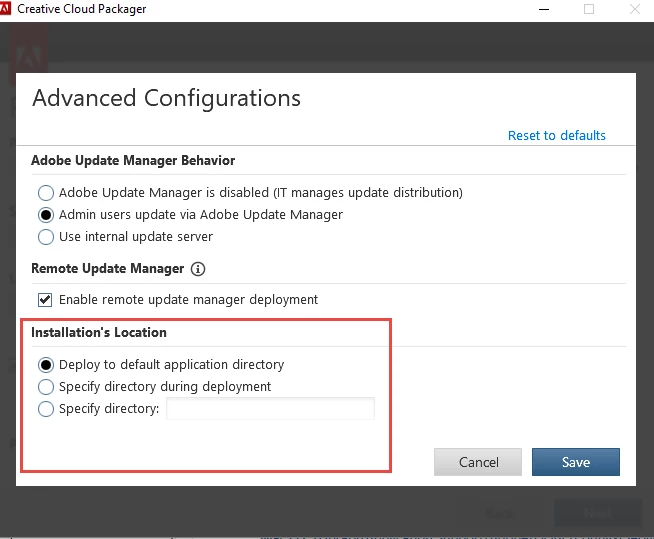
    Under the Advanced Configurations option you can choose the default installation directory.

    For further information see Packaging User Guide

    4 replies

    alisterblack
    alisterblackCorrect answer
    Inspiring
    December 8, 2017

    Hi,

    If you are using educational device licenses then you can either bundle the license with the applications or you can roll out the license seperately. See Create packages with Adobe Creative Cloud for education device licenses

    If you are using a serial number then the same is true, although when logging in to the Creative Cloud Packager you should choose the Enterprise option rather than the education option (see below)

    Under the Advanced Configurations option you can choose the default installation directory.

    For further information see Packaging User Guide

    arjanv78Author
    Participant
    December 8, 2017

    But this would change only the main install folder? and not the app folder names?

    I want to get rid of the year naming in the apps folder, when updating we must also copy/make new shortcuts for users every time.

    Like to see it like this:

    C:\Program Files\Adobe\Adobe Illustrator CC

    C:\Program Files\Adobe\Adobe Photoshop CC

    alisterblack
    Inspiring
    December 8, 2017

    There is no functionality within our packaging tools to change the name of the files or folders installed. I would not recommend doing so as it may cause issues when updating.

    kglad
    Community Expert
    Community Expert
    December 7, 2017