Answered
Adobe creative cloud Mas apps
Why are the CC apps in all with the same icon and starting name. This is at best confusing. Plesase fix this.
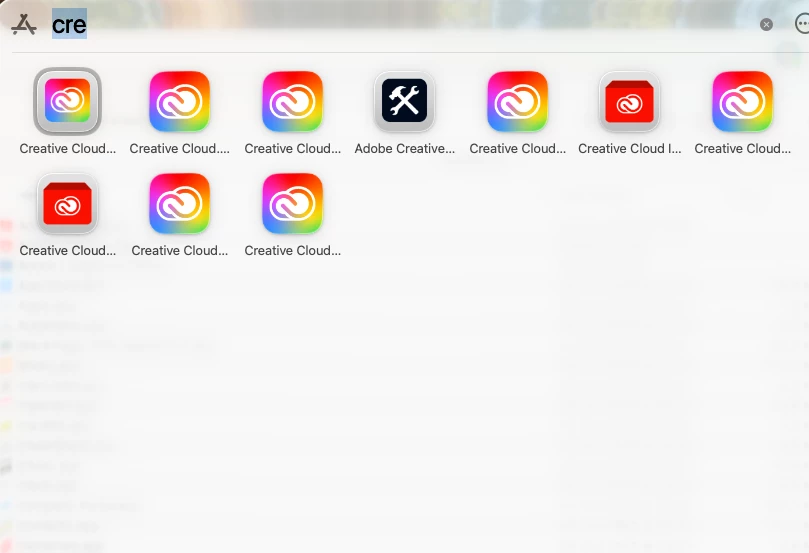

Why are the CC apps in all with the same icon and starting name. This is at best confusing. Plesase fix this.
Hi @claus_6491,
Thank you for sharing the screenshot and your feedback.
What you’re seeing is expected behavior with the current Creative Cloud Desktop experience. Adobe uses a unified Creative Cloud icon and naming convention for Creative Cloud–related apps and components. This includes the main Creative Cloud Desktop app, background services, and supporting utilities. As a result, multiple entries can appear with similar icons and starting names, which can understandably feel confusing.
At the moment, these components are intentionally grouped under the Creative Cloud branding, as they are part of the same ecosystem and work together to manage application installation, updates, licensing, and related services.
Adobe installs multiple components for Creative Cloud, such as Creative Cloud Desktop, Creative Cloud Libraries, Creative Cloud Installer, and Creative Cloud Helper. On macOS, these components often share the same base icon and naming prefix, and Launchpad may truncate longer names, making them appear identical.
To view the full application names, you can hover over an icon in Launchpad or click and hold it. Alternatively, you can open the Applications folder in Finder, where the complete application names are displayed (for example, Creative Cloud, Creative Cloud Libraries, Creative Cloud Installer, and Creative Cloud Uninstaller).
That said, your feedback regarding usability and clarity is valid, and I will be sure to share it with our product team for consideration in future improvements.
Thank you for taking the time to report this. Please let us know if you have any other questions or concerns.
Regards,
^AN
Already have an account? Login
Enter your E-mail address. We'll send you an e-mail with instructions to reset your password.


 AdChoices