


Adobe Creative Cloud Packager, macOS, Installation Error A12E1
Trying to setup Adobe Creative Cloud Packager for macOS on two different clean systems with a fresh macOS 10.12.6 install. Run the CCPLauncher.app from the /Applications folder, downloads the files from Adobe, begins to extract them, then gets to the point where admin credentials are required. I provide proper admin credentials and immediately receive the following error message:
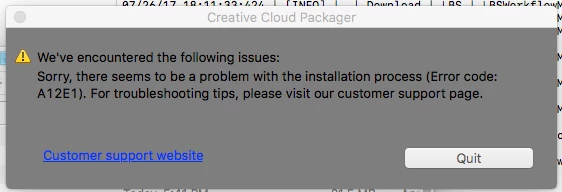
Have repeatedly received this message on two different systems with clean OS installs. No other Adobe applications are installed. Here's the output of various logs:
PDApp.log:
07/26/17 18:11:33:068 | [INFO] | | ASU | OPM | OPM | | | 27297 | Build Version - 7.0.0.271
07/26/17 18:11:33:068 | [INFO] | | ASU | OPM | OPM | | | 27297 | Logging Level verbosity Set to 4
07/26/17 18:11:33:146 | [INFO] | | ASU | OPM | OPM | | | 27297 | Successfully opened opm session, db location:/Users/babbage/Library/Application Support/Adobe/OOBE/opm.db in opm_createLibRef
07/26/17 18:11:33:230 | [INFO] | | ASU | OPM | OPM | | | 27297 | No Record found for the input fields in opm_getValueForKey
07/26/17 18:11:33:230 | [INFO] | | ASU | OPM | OPM | | | 27297 | Released OPM refrence successfully in opm_freeLibRef
CCP_LBS.log:
07/26/17 18:11:28:143 | [INFO] | | Download | LBS | LBSApplicationFacade | | | 27240 | ****************Starting CCP_LBS workflow*******************
07/26/17 18:11:33:022 | [INFO] | | Download | LBS | LBSWorkflowManager | | | 27297 | initializing screen
07/26/17 18:11:33:400 | [INFO] | | Download | LBS | ProductInfo | | | 27297 | Product Sap Code not specified in the product information file
07/26/17 18:11:33:400 | [INFO] | | Download | LBS | ProductInfo | | | 27297 | Product locale not specified in the product information file
07/26/17 18:11:33:400 | [INFO] | | Download | LBS | ProductInfo | | | 27297 | Product name not specified in the product information file
07/26/17 18:11:33:400 | [INFO] | | Download | LBS | LBSWorkflowManager | | | 27297 | Bootstraping Passed
07/26/17 18:11:33:411 | [INFO] | | Download | LBS | LBSWorkflowManager | | | 27297 | CCP_LBS lock acquired
07/26/17 18:11:33:424 | [INFO] | | Download | LBS | SystemCheck | | | 27297 | System OS Version - major = 10, minor = 12, bugFix = 6
07/26/17 18:11:33:424 | [INFO] | | Download | LBS | LBSWorkflowManager | | | 27297 | System requirements check passed
07/26/17 18:11:33:935 | [INFO] | | Download | LBS | LBSWorkflowManager | | | 27297 | deployment lock check passed
07/26/17 18:11:33:948 | [INFO] | | Download | LBS | LBSWorkflowManager | | | 27297 | CCP not present so downloading is initiatied
07/26/17 18:11:33:960 | [INFO] | | Download | LBS | LBSWorkflowManager | | | 27297 | Downloading Creative Cloud Packager Enterprise Edition
07/26/17 18:12:02:207 | [INFO] | | Download | LBS | LBSWorkflowManager | | | 27297 | post download deployment lock check passed
07/26/17 18:12:02:208 | [INFO] | | Download | LBS | LBSWorkflowManager | | | 27297 | Extracting and installing Creative Cloud Packager
07/26/17 18:12:12:653 | [WARN] | | Download | LBS | AamInstallAction | | | 27297 | AAM installation setup launch failed with error code 1.
07/26/17 18:12:12:653 | [FATAL] | | Download | LBS | LBSWorkflowManager | | | 27297 | Failed to extract or install Creative Cloud Packager. Error Code - 115667340
07/26/17 18:18:11:974 | [INFO] | | Download | LBS | LBSApplicationFacade | | | 27240 | ****************Closing CCP_LBS workflow*******************
DLM.log:
07/26/17 18:11:34:106 | [INFO] | | | | | | | 27297 | GDE Version is 7.0.0.97 (BuildVersion: 6.0; BuildDate: Fri Mar 01 2013 09:49:41 )
DLM_Native.log:
07/26/17 18:12:12:629 | [ERROR] | | | | | | | 27734 | AAM Helper: Process certificate didnt match to Adobe certificate!
07/26/17 18:12:12:642 | [ERROR] | | | | | | | 27734 | AAM Helper: Executable signature validation failed!
My untrained eyes are showing some type of issue with a certificate that is included in the files that the Adobe Creative Cloud Packager is attempting to download and install from Adobe.
Again, just to emphasize this - this is occurring on two, recently formatted systems with only macOS installed, being configured specifically to build Adobe packages only.
Please advise on next troubleshooting steps. Thank you.
 AdChoices