



__Kyuubi__
Participant
May 14, 2015
Question

Adobe Customization Wizard Error code 14

  • May 14, 2015
  • 1 reply
  • 5417 views

I'm trying to build an Adobe Acrobat package following the instructions from http://tv.adobe.com/watch/acrobat-it-tips-tricks-tutorials/customization-wizard-xi-for-mac-os-x/.  When I try to create the final package the Wizard errors out showing a code 14.  I looked that up and got this: The APTEE tool called from within returned an error. See /tmp/oobelib.log for details. I'm attaching the logs because I cannot figure out why the package is not being created. I can't figure out why the serial number is not being validated.
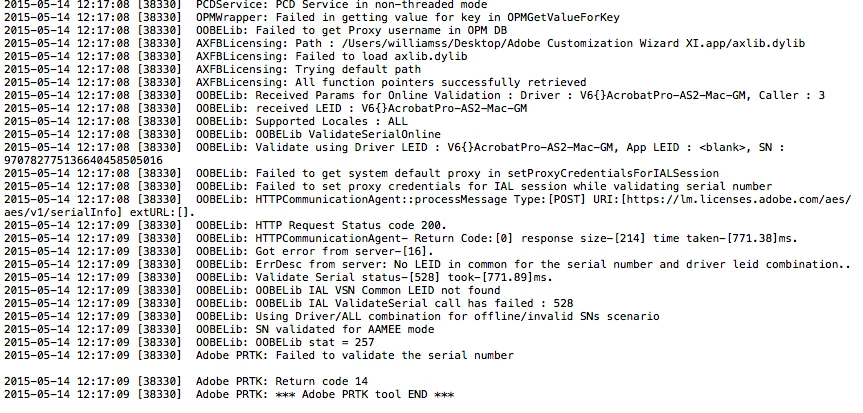
Any help would be appreciated.

Thanks,

This topic has been closed for replies.

1 reply

Adobe Employee
May 14, 2015

The third line from the end of the log.

"2015-05-14  12:17:09  [3830]  Adobe PRTK:  Failed to validate the serial number"

markc53927069
Participant
December 9, 2015

Steve,

Pointing out the line that says "Failed to validate the serial number" does not help the customer with his problem.  We know the validation failed; that goes with code 14.  What the customer needs is help finding WHY it failed.  Also, I need the same.

In my own case, I have checked network connectivity and can reach adobe servers. 

I'm using a serial number retrieved from a redemption code for Acrobat DC (12).  I have entered the serial number with no spaces, with spaces, and with hyphens instead of spaces.  Now, pay attention to this:

I HAVE HAD A CO-WORKER CHECK MY TYPING TO ENSURE THAT I ENTERED THE SERIAL CODE CORRECTLY.

Also, we are working from a printout of the serial code as provided by Adobe, NOT manually copied from the screen.

Several lines above the "Failed" line, the error log (running on a separate machine or I'd copy/paste it) says that this is an "OOBELib Bad Serial Number."  Given that this serial is a printout from Adobe and HAS BEEN TYPED CORRECTLY, then that's IMPOSSIBLE.

What is going on??

Adobe Employee
December 10, 2015

Check a couple of things:

Is the URL used by the Adobe Customization Wizard being blocked by a firewall, proxy, security software, etc...

Does the PRTK tool work on it's own to validate the serial number?  In other words, are you able to serialize a default installation using the Adobe Provisioning Tool?