Known Participant
November 7, 2017
Answered

Adobe Reader Classic 2015 Displays Wrong Version

  • November 7, 2017
  • 5 replies
  • 884 views

I created an administrative installation point and patched it to version 15.6.3055 and deployed it successfully.

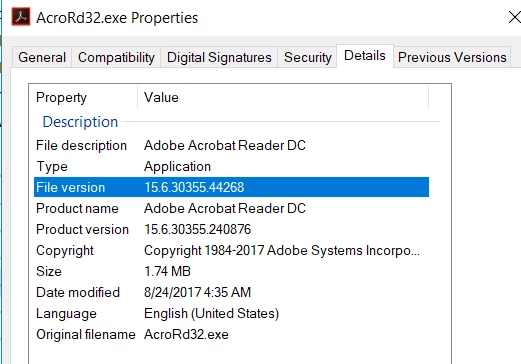
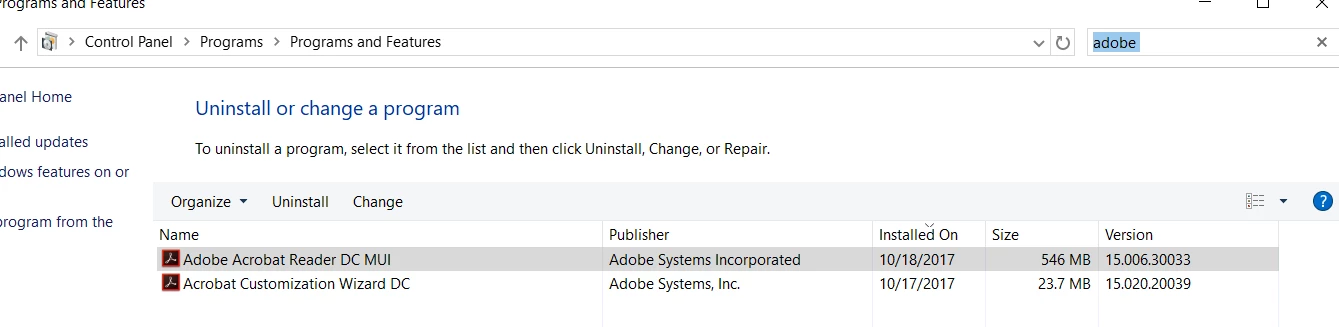
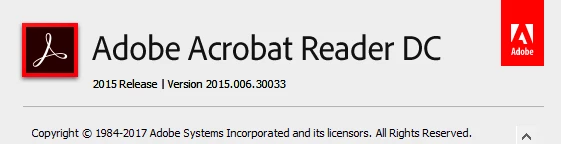
When I go to C:\Program Files (x86)\Adobe\Acrobat Reader 2015\Reader\AcroRd32.exe and look at Properties\Details\File Version shows 15.6.3055.240876 which is expected, but when I open Adobe Reader and go to Help\About Adobe Reader, it displays Version 2015.006.30033.  It also displays 15.006.30033 in Programs and Features.

Adobe Reader Plug-Ins display Version 15.6.30352.237999.

This is causing confusion. How can this be fixed?
This topic has been closed for replies.
Correct answer Tariq Dar

Hi Web1c,

There seems a problem with the last command line you provided:

Command line you used:

msiexec /a D:\AR2015CL\EXT\AcroRead.msi /p D:\AR2015CL\Patch\AcroRdr2015Upd1500630355_MUI.msp

When this command line msiexec /a D:\AR2015CL\EXT\AcroRead.msi is executed, the installer would ask for a location to save the package. You must change it to another location(where you want to save the AIP), For an example , let's assume you entered “D:\AR2015CL\AIP”. Then the last command line should be

msiexec /a D:\AR2015CL\AIP\AcroRead.msi /p D:\AR2015CL\Patch\AcroRdr2015Upd1500630355_MUI.msp

Try packing the installer again and it should resolve your problem. Let us know if that helps.

For information about AIP: Administrative Installation Points — Enterprise Administration Guide

-Tariq Dar

5 replies

Legend
November 7, 2017

Hi Web1c,

Sorry for the inconvenience caused to you.

In order to reproduce this issue in-house, we need the package and all the command lines you used to create the package and deploy the package.

You may use Adobe Send to share the package with us: How to share a document If you want to share it privately you may send us Adobe Send link via Private message. How Do I Send Private Message

Will be waiting for your response.

-Tariq Dar

web1cAuthor
Known Participant
November 8, 2017

These are the commands I used to apply the patch.

D:\AR2015CL\AcroRdr20151500630033_MUI.exe -nos_ne -nos_o"D:\AR2015CL\EXT"

msiexec /a D:\AR2015CL\EXT\AcroRead.msi

msiexec /a D:\AR2015CL\EXT\AcroRead.msi /p D:\AR2015CL\Patch\AcroRdr2015Upd1500630355_MUI.msp

I will upload the files.

Tariq DarCorrect answer
Legend
November 10, 2017

Hi Web1c,

There seems a problem with the last command line you provided:

Command line you used:

msiexec /a D:\AR2015CL\EXT\AcroRead.msi /p D:\AR2015CL\Patch\AcroRdr2015Upd1500630355_MUI.msp

When this command line msiexec /a D:\AR2015CL\EXT\AcroRead.msi is executed, the installer would ask for a location to save the package. You must change it to another location(where you want to save the AIP), For an example , let's assume you entered “D:\AR2015CL\AIP”. Then the last command line should be

msiexec /a D:\AR2015CL\AIP\AcroRead.msi /p D:\AR2015CL\Patch\AcroRdr2015Upd1500630355_MUI.msp

Try packing the installer again and it should resolve your problem. Let us know if that helps.

For information about AIP: Administrative Installation Points — Enterprise Administration Guide

-Tariq Dar