


Adobe Update Server IIS Error 125
I'm not sure how to get around this problem. I've set up Adobe Update Server on IIS following this guide: Use the Adobe Update Server Setup Tool (AUSST)
When my client PC runs the Create Cloud app and I try to install an application (like Media Encoder), it fails, generating an Error 125. The details of the error are as follows:
Exit Code: 125
-------------------------------------- Summary --------------------------------------
- 2 fatal error(s), 0 error(s), 0 warnings(s)
FATAL: Fatal Error '125' occurred while download
FATAL: Error occurred in install product workflow with error code 125 error message {http://myupdateserver//updates/ACC/services/ffc/packages//AME/13.1/win64/Application.json?name=AME&version=13.1&platform=win64&build=13.1.0.173,P:-4,PS:404,G:-4}
-------------------------------------------------------------------------------------
The update server works fine, I have the IIS server set to allow browsing so I can navigate in the folder, but when I click on the Application.json it generates a 404 error both to the screen and into the IIS logs.
There is only 1 website on the server, this one, so I've set the handler mappings per the documentation as follows:
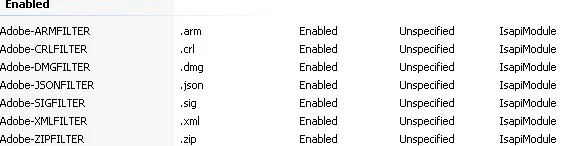
All are set to the executable path of C:\Windows\Microsoft.NET\Framework\v2.0.50727\aspnet_isapi.dll
The web.config at C:\Windows\Microsoft.NET\Framework\v4.0.30319\Config
includes the handlers per the documentation:
<add path="*.xml" verb="*" type="System.Web.StaticFileHandler" />
<add path="*.crl" verb="*" type="System.Web.StaticFileHandler" />
<add path="*.zip" verb="*" type="System.Web.StaticFileHandler" />
<add path="*.dmg" verb="*" type="System.Web.StaticFileHandler" />
<add path="*.json" verb="*" type="System.Web.StaticFileHandler" />
<add path="*.sig" verb="*" type="System.Web.StaticFileHandler" />
<add path="*.arm" verb="*" type="System.Web.StaticFileHandler" />
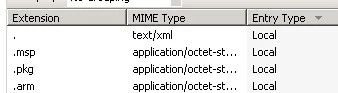
The \ACC\services\ffc\validation folder contains the MIME Types per the documentation:
The DefaultAppPool is set to a v4.0 Framework and has the Managed Pipeline Mode set to Classic.
I've updated the web.configs per the documentation in the ffc\icons and ffc\validation folders so they look like this:
<?xml version="1.0" encoding="UTF-8"?>
<configuration>
<system.webServer>
<staticContent>
<mimeMap fileExtension="." mimeType="text/xml" />
</staticContent>
</system.webServer>
</configuration>
Note my ACC updates are on a separate drive than C: but otherwise added as a virtual directory under the default web site. Local users have read/execute so I think that's not the issue, especially since I can directory browse per above.
I've got to be missing something very simple---Any insight would be appreciated!
-S

 AdChoices