
Participant
January 29, 2025
Answered

Adobe Xd access to create links

  • January 29, 2025
  • 1 reply
  • 225 views

Hello Adobe Support team, I hope you are doing well.


Adobe XD has a feature that allows you to generate a link to share the design of a prototype application. In other words, it enables you to create an interactive design and generate a link for others to try it out.

The problem is that these links cannot be generated in the following two cases:

  1. When connected to the company network, the application shows a message indicating that I am offline.
  2. When connected to the VPN, the same message appears.


The message is as follows:
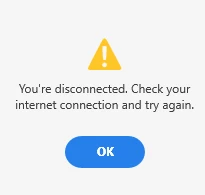
 

It should be noted that this does NOT happen if I am connected to my home network and the VPN is not activated.

Could you suggest a solution or indicate which ports need to be open to allow us to generate the links within the company network?

Correct answer Anshul_Nautiyal

Hi @Ulises31848843tcam,


Thank you for reaching out. The issue you’re experiencing is likely due to network restrictions preventing Adobe XD from connecting to the required services. To resolve this, your IT team may need to allow access to specific Adobe services and open the necessary ports.


Please ensure the following are accessible on your company network and VPN:
Allowed Domains:
Ensure that the necessary Adobe domains are accessible by referring to this official guide.


Required Ports:

Port 443 (HTTPS) – Used for secure communication with Adobe services.
Port 80 (HTTP) – Occasionally required for initial connections.


Additional Troubleshooting Steps:
Network Testing: Since the issue does not occur on your home network, try using a different network within your company to determine if the problem is specific to a particular network configuration.
Connectivity Troubleshooting: You may also refer to this guide for resolving common network connectivity issues: Adobe Connectivity Issues


I hope this helps! Let me know if you need further assistance.


^AN

1 reply

Anshul_NautiyalCommunity ManagerCorrect answer
Community Manager
January 30, 2025

Hi @Ulises31848843tcam,


Thank you for reaching out. The issue you’re experiencing is likely due to network restrictions preventing Adobe XD from connecting to the required services. To resolve this, your IT team may need to allow access to specific Adobe services and open the necessary ports.


Please ensure the following are accessible on your company network and VPN:
Allowed Domains:
Ensure that the necessary Adobe domains are accessible by referring to this official guide.


Required Ports:

Port 443 (HTTPS) – Used for secure communication with Adobe services.
Port 80 (HTTP) – Occasionally required for initial connections.


Additional Troubleshooting Steps:
Network Testing: Since the issue does not occur on your home network, try using a different network within your company to determine if the problem is specific to a particular network configuration.
Connectivity Troubleshooting: You may also refer to this guide for resolving common network connectivity issues: Adobe Connectivity Issues


I hope this helps! Let me know if you need further assistance.


^AN