This topic is closed to new replies. Start a new post to keep the conversation going.
Anshul_NautiyalCorrect answer
Legend
Nov 5, 2024 4:38 PM UTC

Hi @Angelworks42,

Thank you for reaching out.

Could you please share the link and documentation where you obtained this application? Since Creative Cloud applications rely heavily on shared resources and the Adobe CC framework, conflicts can sometimes arise that affect the installation and uninstallation processes across apps. Ensuring we have the correct source and documentation will help us address any issues more effectively.

As Kevin recommended, please try using the Adobe Cleaner Tool to remove all Creative Cloud applications from your machine.


Regards,

^AN

5 replies

Kevin Stohlmeyer
Community Expert
Community Expert
Nov 1, 2024 9:45 PM UTC

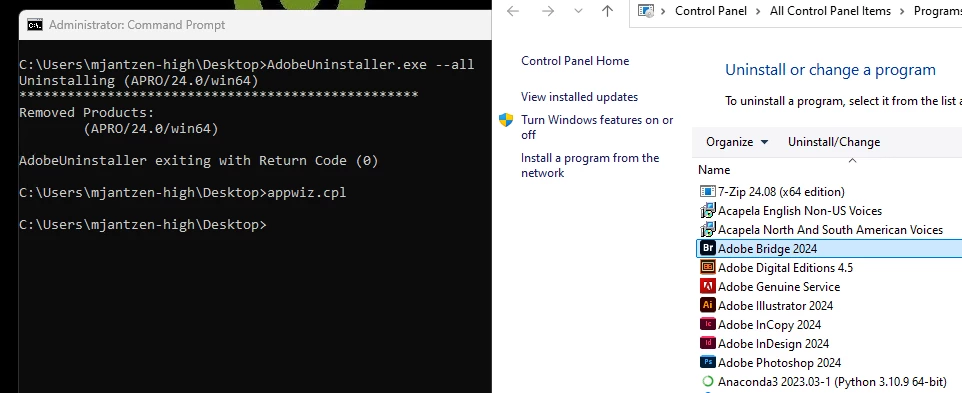
If you are trying to remove the entire Adobe Install, that would be done using the Creative Cloud Cleaner tool not the individual Adobe Uninstaller.

https://helpx.adobe.com/creative-cloud/kb/cc-cleaner-tool-installation-problems.html


Translate
Angelworks42
Participant
Nov 5, 2024 4:14 PM UTC

Fair enough - why does the adobeuninstaller.exe have a -all option and documentation suggests it will uninstall everything?

Funnily enough - Acrobat is like the only Adobe product that you can reliably install/uninstall.

Translate
Kevin Stohlmeyer
Community Expert
Community Expert
Nov 5, 2024 4:32 PM UTC

Personally I've never used this adobe Uninstaller and the command line interface.

https://helpx.adobe.com/enterprise/using/uninstall-creative-cloud-products.html

I've found the Cleaner Tool to be an easier/user friendly option instead.


Translate