


aart12
Known Participant
October 10, 2014
Question

After updating CC this morning, I keep getting message that Adobe Application Manager is missing or Damaged

  • October 10, 2014
  • 2 replies
  • 652 views

After updating CC this morning, I keep getting messages that "Adobe Application Manager, required to verify your license, is missing or Damaged. It tells me to download the program.

I have done that. Uninstalled CC, rebooted, and re-stalled and re-booted, but keep getting the error.

The CC app seems to be working. It had me update my installed apps, and indicated that I was logged into my CC account. But when I run a CC app (Acrobat, Photoshop, etc.,) I continue to get the error.
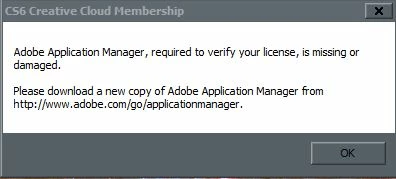
(...and why does it say CS6 Creative Cloud? I don't have any CS6 programs installed. Only CC2014x)

    This topic has been closed for replies.

    2 replies

    williamj82804644
    Participant
    August 12, 2017

    I have a similar problem with the same message with Windows 10 but with Acrobat XI Pro,  This is the message

    "Adobe Application Manager, required to verify your license, is missing or damaged.

    "Please download a new copy of Adobe Application Manager from Http://www.adobe.com/go/applicationmanager."

    When I go to the referenced URLI see no way to download an Adobe Application Manager for Acrobat XI Pro

    I click OK and can proceed but each time I use Acrobat Pro I keep seeing this message.  Frustrating!!!!!

    rpandita
    Inspiring
    August 14, 2017
    Participant
    October 13, 2014

    I have the same problem. Windows 7 64Bit, Acrobat Standard XI

    The error occurs again and again, after reinstall and Serial I can work. But sometimes I have to do it several times a day!!!!