
Participant
August 2, 2022
Answered

Billing Issue. Plan Expired. Not able to pay and renew.

  • August 2, 2022
  • 2 replies
  • 775 views

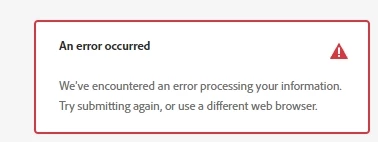
I was traveling, so missed a payment, as there has been a slight change in my bank account and services and the auto-debit didn't go through this time. Now, When I try to renew my account, I get errors that "there has been an error in processing my information. Try submitting again or use a different browser." I tried that too about 17 times, but the issue still persists. 


There is no issue with my bank, my network, or my system.

Yet, the Adobe website is acting up like a scorned girlfriend. Now, since the account is canceled, I can neither access the apps nor work on my projects. My entire work is halted.


Please guide me on how to resolve this. Adobe India doesn't have, a dedicated customercare : I called them and heard outdated music for about 52 minutes after choosing relevant options, but no response. Unable to find a mail id, where I could report this issue. Most mails are bouncing back because the web postmaster says, that the mail inboxes are full.  I tried searching for a solution here on community, but couldn't find a thread, which has got the resolution for this kind of issue.

This has become such a conundrum. 
This topic has been closed for replies.
Correct answer abhisek0D4C

Hello everyone,


I have a student subscription. Am still studying. I used a different bank account and the payment went through. The bank authorities as well as I are unable to figure out this issue, as earlier payments used to go through with the same previous bank. Now, Adobe has suddenly stopped taking payments from that account. I don't know what the issue was but I tried a different account and the account is renewed. Now. I just have to figure out a plan only for PS/LR/Acrobat. I don't require any other software. 


Thanks a lot to all the members who took out time to help me out. Hope this post also helps a fellow member. 

2 replies

Participant
August 3, 2022

I tried the options of chat, but I get the following errors : 

The virtual assistant asks me to contact an administrator. 

When I try to log in to the admin console, it says, I have to contact a system administrator. 

In no way, am I able to open the chat option. 


Please advise. 


kglad
Community Expert
Community Expert
August 4, 2022

do you have an enterprise or team subscription?


if so, are you the enterprise/team administrator?

abhisek0D4CAuthorCorrect answer
Participant
August 9, 2022

Hello everyone,


I have a student subscription. Am still studying. I used a different bank account and the payment went through. The bank authorities as well as I are unable to figure out this issue, as earlier payments used to go through with the same previous bank. Now, Adobe has suddenly stopped taking payments from that account. I don't know what the issue was but I tried a different account and the account is renewed. Now. I just have to figure out a plan only for PS/LR/Acrobat. I don't require any other software. 


Thanks a lot to all the members who took out time to help me out. Hope this post also helps a fellow member. 

kglad
Community Expert
Community Expert
August 3, 2022

using a browser that allows popups and cookies, contact adobe support by clicking here, https://helpx.adobe.com/contact.html?rghtup=autoOpen
in the chat field (lower right), type AGENT
be patient, it can take quite a while to reach a human

p.s. if you're contacted by anyone (via email or private message), it's much more likely to be a scammer than an adobe representative. ie, double check for an employee badge if contacted in the forums and look for an adobe.com domain in the email address if you click reply to an email. then check again and be very suspicious. any other method of contacting (or offering to contact you) is almost certainly a scam.

p.p.s you can also use phone (but chat is usually quicker), https://helpx.adobe.com/contact/phone.html
