


Participant
March 5, 2021
Answered

Block or allow domains that can be shared through Creative Cloud / Creative Cloud Desktop

  • March 5, 2021
  • 6 replies
  • 911 views

Hello
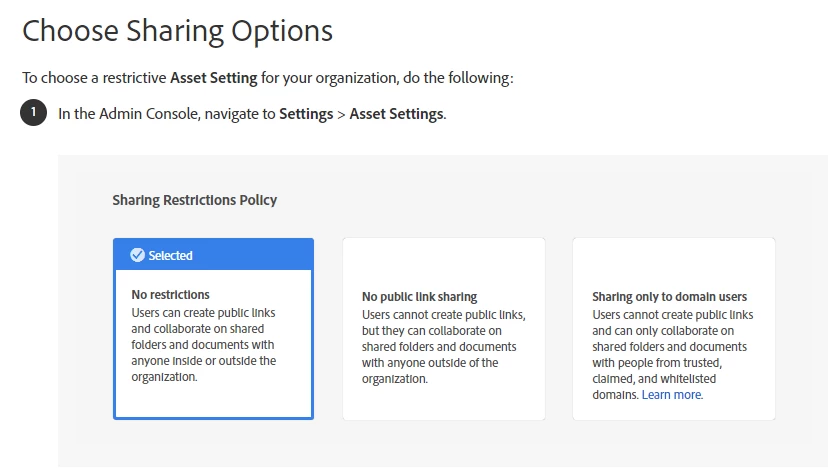
I need to manage the way in which the information of my users can be shared in Creative Cloud, in the company we have an Information Security Management System together with Data Loss Prevention Policies and I need to block domains in order to authorize the use of this tool.
Regards.
This topic has been closed for replies.
Correct answer SuJoshi

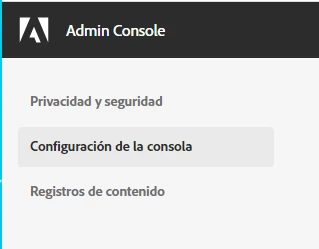
yes, but ... my console does not show the configuration ... what do I do?


I found the exact menu where I have to do it, but it is not in my console

please help.


The feature is available with the Enterprise contract/licenses and it seems that you have a Team contract which is the reason the options are not available.

6 replies

Community Manager
March 5, 2021

Hello,

I hope this article might answer your query: https://www.adobe.com/privacy/desktop-app-usage-info-faq.html


Participant
March 6, 2021

Thanks, but this information did not help me, let me explain.


What I need is to block users so they cannot share information with third parties, I need to block domains like @ hotmail.com or @ gmail.com to avoid loss of confidential information.


I hope it is possible, otherwise I will have to ban the use of this tool.


Thank you all.

Participant
March 9, 2021

Well, after a chat session in English, because there was no support in my language, the agent told me the following: you can set the Assets settings in the adobe admin console to restrict file sharing with another domain . You can check this link to configure sharing restriction policies: "https://helpx.adobe.com/in/enterprise/admin-guide.html/in/enterprise/using/welcome.ug.html"


I'm checking the documentation to see if it works.
Regards.